 ·
10 minute read
·
10 minute read
The Invisible Database Territory
In standard enterprise IT governance, systems operations managers and platform architects rely on machine-readable maps. In relational database administration (RBA), database engines natively generate comprehensive, real-time catalogs of their own internals. An architect can query system views like SQL Server's sys.foreign_keys or PostgreSQL's pg_constraint catalog and information_schema to trace every constraint, dependency, and stored procedure.
In a no-code ecosystem, however, the map does not match the territory. Relational models are built visually by citizen developers, who deploy base connections, sync pipelines, and automation scripts on the fly. Because these changes bypass central IT review, they accumulate technical debt that is invisible to traditional security scanners and monitoring tools.
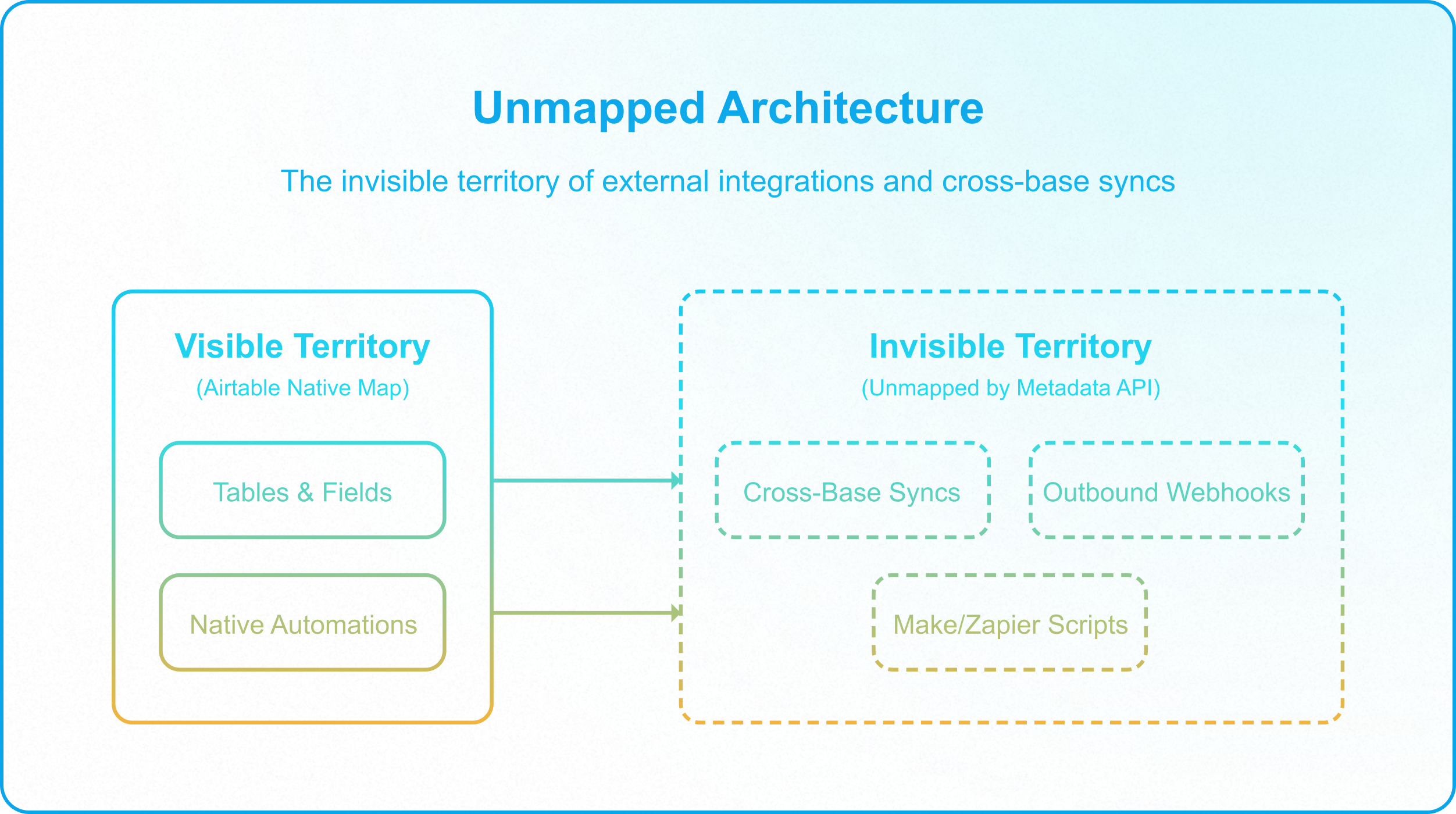
This structural obscurity is not just an organizational problem; it is a native platform limitation. Unlike traditional databases, Airtable's native Airtable Metadata API Reference is programmatically blind to cross-base and external connections. It does not expose where a synced table originates, which downstream bases subscribe to its data, or what external middleware integrations (e.g., Zapier, Make, custom scripts) are reading and writing to its fields.
For the enterprise application manager, this blind spot creates a critical vulnerability: Unmapped Architecture. When the underlying data topology is a black box, a simple change to a field type in a single base can trigger a silent cascade of failures across downstream operations, halting business processes without throwing a single database compiler error.
The Dangers of the Unmapped Sync Cascade
An unmapped architecture behaves unpredictably under operational scaling. When teams treat Airtable as a local productivity tool rather than a sovereign enterprise database layer, they build dependencies that violate basic database design standards, such as the Zachman Framework for Enterprise Architecture and TOGAF Standards.
In an unmapped environment, these dependencies manifest as three major operational failures:
1. The Multi-Hop Sync Cascade (Shattered Schema Lineage)
When a business department needs access to data owned by another team, they configure an Airtable Sync Integration Overview. Over time, organic growth leads to multi-hop sync networks: Base A (Source of Truth) syncs a table to Base B (Regional Hub), which filters and syncs a subset of that data to Base C (Operational Field View).
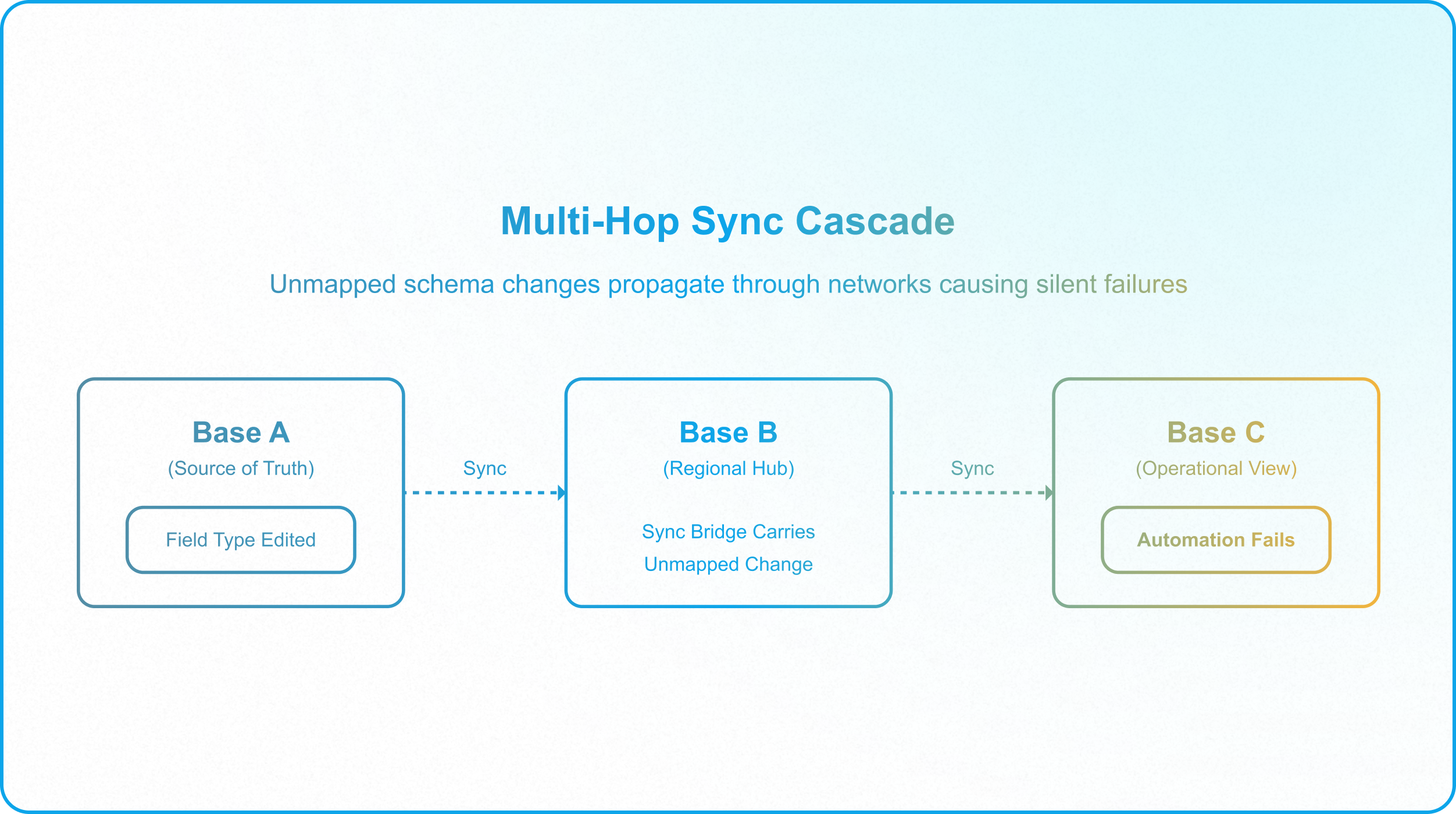
Because the Metadata API cannot trace downstream destinations, an administrator modifying a field type in Base A has no visibility into the fact that they are breaking a mission-critical automation in Base C. The change compiles internally, but the sync bridge silently drops values or crashes when it reaches Base C. This structural fragility is the exact opposite of the robust architectures designed in The Dangers of Circular Syncs in Airtable and Enforcing Data Contracts in Airtable.
2. The Silent Webhook Breakage
When citizen developers connect external automation platforms, they create webhooks that listen for record updates or status flips. Because Airtable has no central webhook registry that associates callers with specific schemas, these endpoints remain completely unmapped.
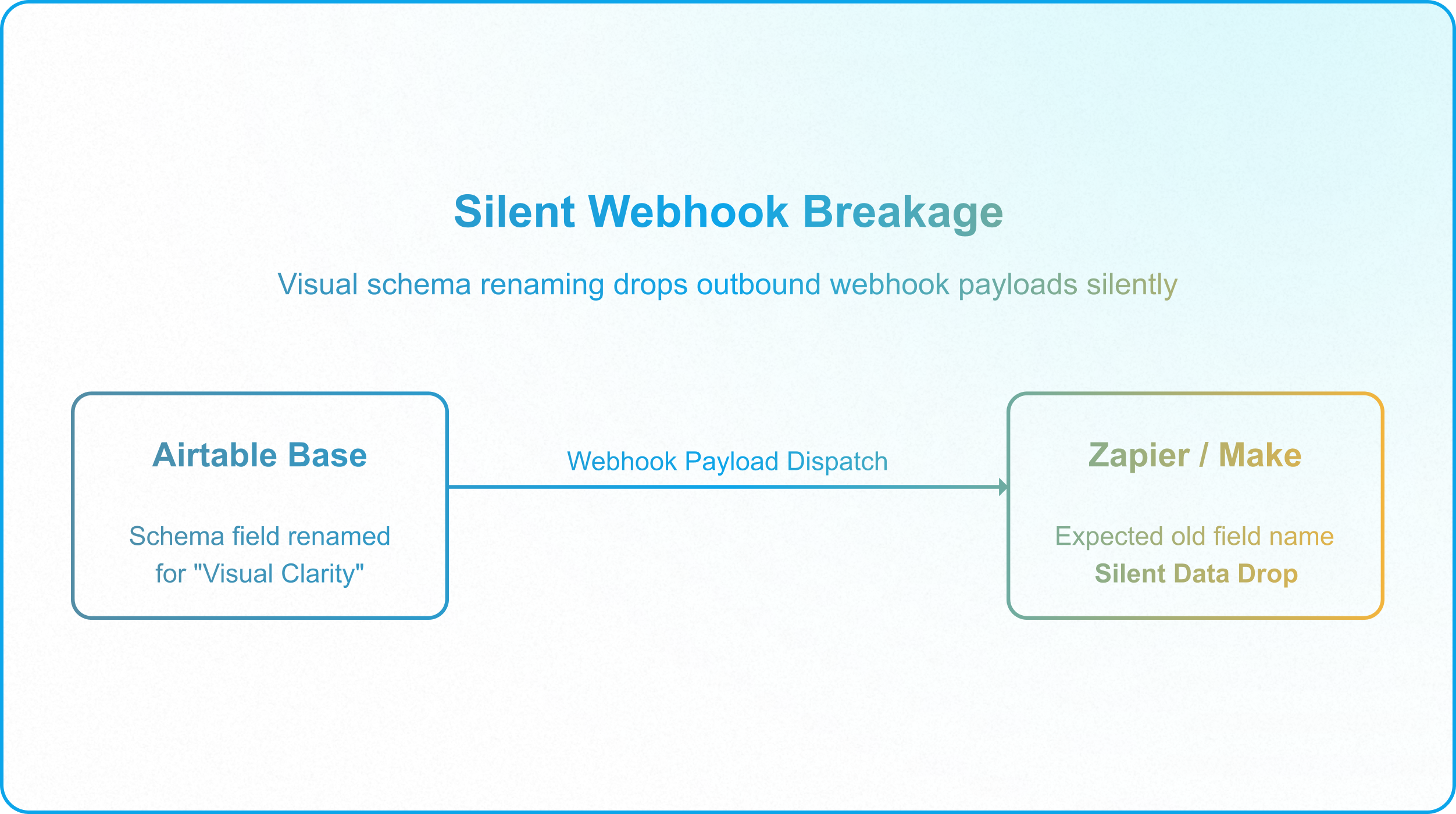
If a creator renames a field for visual clarity, the base updates its internal formulas and interfaces automatically. However, external webhook integrations immediately break, dropping payload updates without alerting the creator. This silent failure mode bypasses standard error handlers, poisoning downstream systems, as analyzed in Preventing Silent Failure Chains in Airtable Automations.
3. Documentation Latency and the "Living Map" Fallacy
Airtable provides a built-in "Base Schema Extension" to visualize relationships. However, this visual representation is a localized map; it only displays relationships within the boundaries of a single base. It remains blind to the cross-base links, sync contracts, and external scripts that define the actual enterprise database footprint.
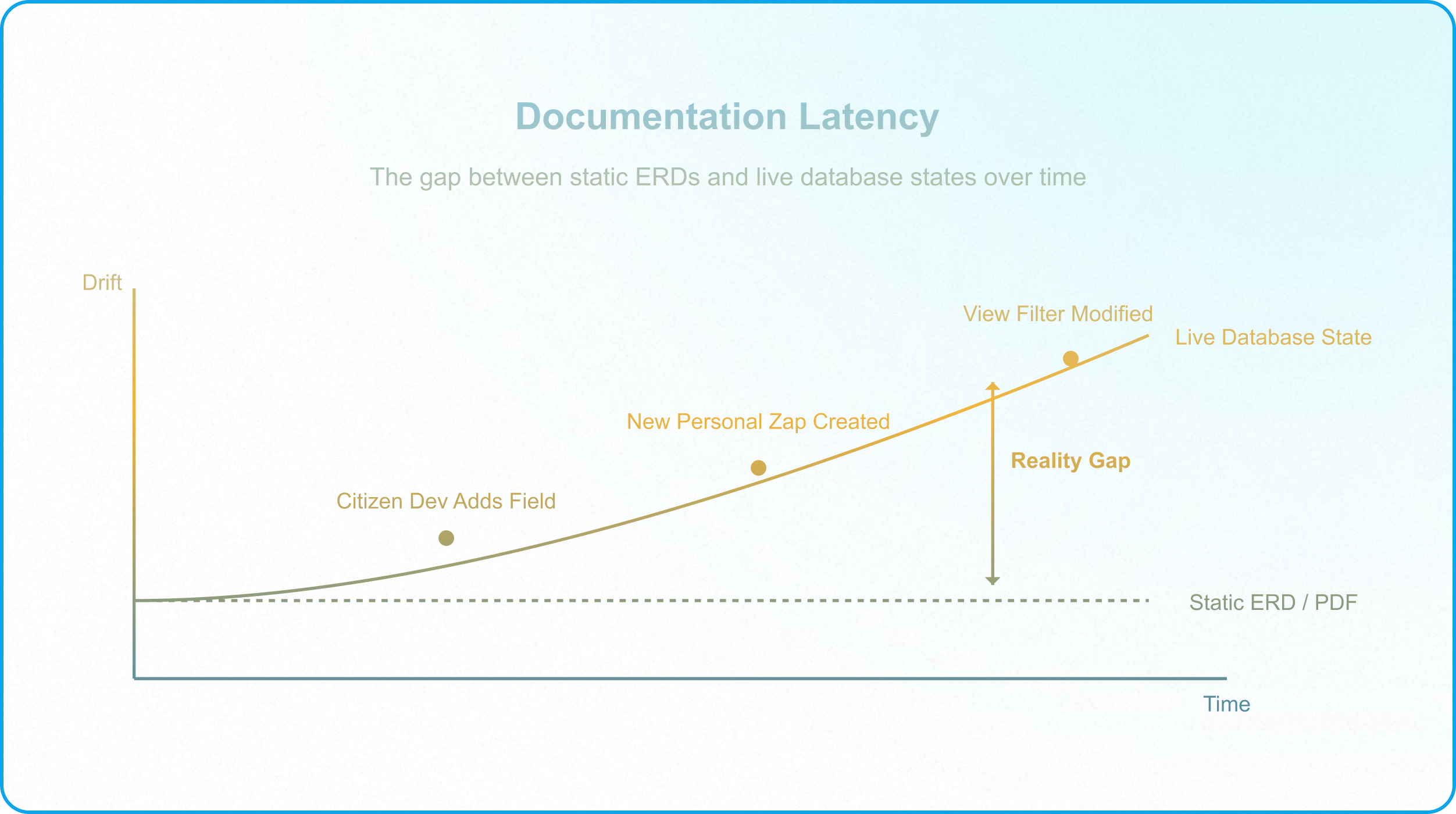
When architects attempt to resolve this by drawing static architecture diagrams (such as ERDs or PDF flowcharts), they introduce "documentation latency." In a fast-moving enterprise, a static diagram is obsolete the moment it is documented. Citizen developers will modify single-select values, build personal Zapier zaps, or add new table views, creating a dangerous gap between the documented model and operational reality.
[!WARNING] Relying on manual, point-in-time drawings for change management guarantees system downtime. When the schema drifts without validation, structural changes inevitably result in data corruption at the ingestion boundary, violating basic OWASP API Security Top 10: The Complete 2026 Guide..
The Playbook for Forensic Reconstruction
When inheriting an unmapped, undocumented Airtable ecosystem, enterprise application managers cannot afford to make assumptions. To stabilize the system, you must conduct a forensic reconstruction of the data topology.
Because you cannot retrieve this topology programmatically from the platform, you must execute a four-step diagnostic protocol:
Step 1: Trace API Signatures and Token Owners
Do not modify any tables until you identify who is querying the database. You must trace the active API traffic.
- Map all Airtable Personal Access Tokens (PATs) Guide and enterprise service accounts querying the workspace.
- Analyze the user-agent headers and IP addresses of incoming requests.
- Match token owners to specific business departments. This is a critical security step outlined in Shadow IT and Data Exfiltration to prevent unauthorized data exfiltration.
Step 2: Audit Webhook and Automation Receivers
Locate every outbound data path.
- Open the Developer Hub for each base and inspect the configured Airtable Webhooks API Guide endpoints.
- Review all native Airtable automations that utilize the "Send Webhook" action.
- Catalog the destination URLs. Note if webhooks are pointing to staging servers or production middleware (such as Make or Zapier), ensure alignment with OWASP Webhooks Security Best Practices.
Step 3: Map the Sync Lineage
Trace the parent-child relationships across the workspace.
- Inspect the configuration of every synced table.
- Document the Source Base ID, Table ID, and View ID for each sync bridge.
- Identify if the sync contract enforces a Minimum Viable Sync (pulling only primary keys and status fields) or if it pulls unnecessary operational fields, violating NIST SP 800-53 Access Control Guidelines. This data isolation standard is analyzed in Airtable Access Matrix and How to Build Controlled Interface Pathways in Airtable.
Step 4: Search Middleware and Code Repositories
Conduct a search across your organization's external automation pipelines.
- Search Make scenarios, Zapier workspaces, and corporate GitHub repositories for references to your Airtable Base IDs (appxxxxxxxxxxxxxx) and Table IDs (tblxxxxxxxxxxxxxx).
- Identify legacy scripts that execute database writes directly to the base grid. This is a critical failure vector, as direct grid updates bypass interface-level validation and cause concurrency collisions, as documented in Why Operators Should Never Touch the Raw Database.
Active Governance: The Centralized Schema Registry
Once you have forensically reconstructed the unmapped architecture, you must establish an active governance system. To comply with Rule 9 of the Airtable Interface & Layout Rules, the database topology must be manually cataloged and audited in a centralized registry.
The solution is to build a "Registry Base" (often referred to as the Base of Bases). This specialized base functions as the sovereign metadata directory for the entire enterprise workspace, mapping the relationships that Airtable’s native API conceals.
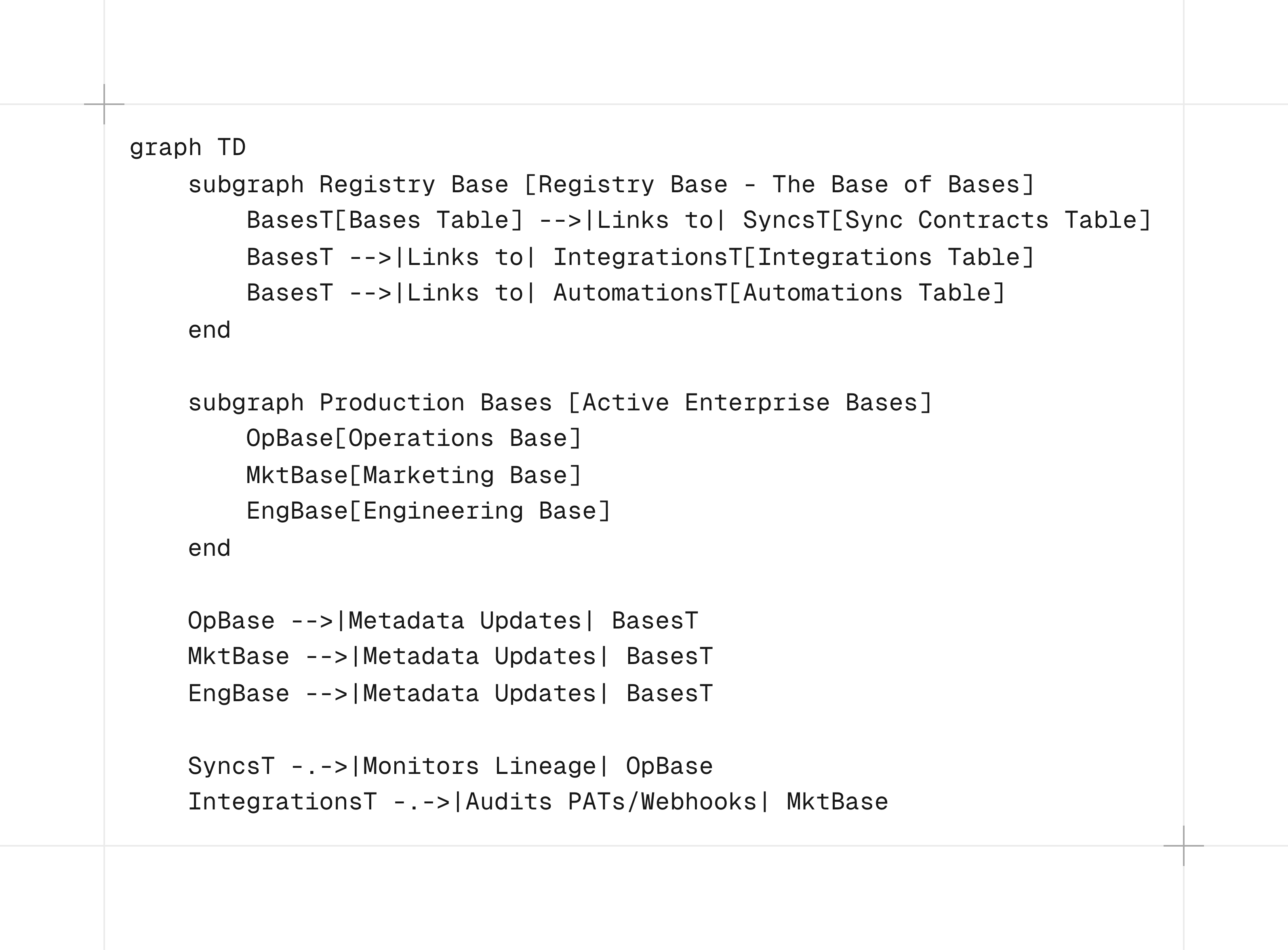
The Structure of the Registry Base
To transition from undocumented dependencies to active governance, you must configure a dedicated Airtable base—the Registry Base—using a highly structured, relational schema. Rather than generic spreadsheets, this schema serves as a machine-readable directory.
The Registry Base is composed of four primary tables, designed to track metadata, lineage, external integrations, and internal processing scripts:
1. Table: Bases & Owners (tblBasesOwners)
This table catalogs every active database instance within the enterprise tenant, establishing clear administrative and data ownership.
|
Field Name |
Airtable Field Type |
Configuration / Validation Rules |
Purpose & Operational Context |
|---|---|---|---|
|
Base Name |
Single line text |
Primary Key |
User-facing identifier of the database. |
|
Base ID |
Single line text |
Validation Regex: ^app[a-zA-Z0-9]{14}$ |
Unique API identifier of the Airtable base. |
|
Production Status |
Single-select |
Options: Production, Staging, Development, Deprecated |
Defines lifecycle state; alerts CAB if changes are proposed to Production. |
|
Technical Owner |
User |
Restrict to: IT / System Architects |
Person responsible for managing schema changes and API tokens. |
|
Business Owner |
User |
Restrict to: Department Operational Leads |
Person responsible for data quality, approval states, and compliance. |
|
Department |
Single-select |
Options: Product Ops, Marketing, Finance, Engineering, Legal |
Department that funds and utilizes the base. |
|
Data Responsibility Link |
URL |
Must resolve to active Interface or documentation |
Direct link to the base's field-level stewardship matrix: Data Responsibility Map. |
|
Linked Syncs (Source) |
Link to other record |
Link to: tblSyncContracts (One-to-Many) |
Outgoing sync connections where this base acts as parent. |
|
Linked Syncs (Consumer) |
Link to other record |
Link to: tblSyncContracts (One-to-Many) |
Incoming sync connections where this base acts as consumer. |
|
Linked Integrations |
Link to other record |
Link to: tblIntegrationsWebhooks (One-to-Many) |
API tokens, webhooks, and middleware scripts hitting this base. |
|
Linked Automations |
Link to other record |
Link to: tblAutomationCatalog (One-to-Many) |
Native automations running within this base. |
|
Last Audited Date |
Date |
Formatting: YYYY-MM-DD |
Timestamp of the last forensic API / schema review. |
|
Audit Status |
Formula |
IF(DATETIME_DIFF(TODAY(), {Last Audited Date}, 'days') > 90, "⚠️ Audit Overdue", "✅ Governed") |
Automated visual indicator enforcing quarterly forensic reviews. |
2. Table: Sync Contracts (tblSyncContracts)
This table maps every cross-base Airtable Sync connection, tracing data lineage and enforcing minimum viable sync boundaries.
|
Field Name |
Airtable Field Type |
Configuration / Validation Rules |
Purpose & Operational Context |
|---|---|---|---|
|
Contract Key |
Formula |
Primary Key: `CONCATENATE({Source Base Name}, " ➔ ", {Consumer Base Name}, " | View: ", {Source View Name})` |
Unique contract identifier mapping the schema lineage. |
|
Source Base |
Link to other record |
Link to: tblBasesOwners |
The parent base supplying the authoritative data. |
|
Source Base ID |
Lookup |
Pulls Base ID from Source Base |
Used for programmatic audits and API matching. |
|
Source Table Name |
Single line text |
Literal string match to target base table |
Name of the table hosting the original records. |
|
Source Table ID |
Single line text |
Validation Regex: ^tbl[a-zA-Z0-9]{14}$ |
Unique identifier of the source table. |
|
Source View Name |
Single line text |
Literal string match to target view |
Name of the view defining the sync filter. |
|
Source View ID |
Single line text |
Validation Regex: ^viw[a-zA-Z0-9]{14}$ |
Unique identifier of the sync source view. |
|
Consumer Base |
Link to other record |
Link to: tblBasesOwners |
The child base subscribing to the synced data. |
|
Consumer Base ID |
Lookup |
Pulls Base ID from Consumer Base |
Used for programmatic tracking. |
|
Consumer Table Name |
Single line text |
Literal string match to target table |
Table name in the receiving base. |
|
Consumer Table ID |
Single line text |
Validation Regex: ^tbl[a-zA-Z0-9]{14}$ |
Unique identifier of the consumer table. |
|
Sync Frequency |
Single-select |
Options: Automatic (Real-Time), Hourly, Daily, Manual |
Identifies synchronization latency class. |
|
Sync Scope / Filters |
Long text |
Plain text documentation |
Detailed description of the view filter criteria (e.g., Status = 'Approved'). |
|
Synced Fields List |
Long text |
Plain text markdown list |
Documentation of the specific fields included in the sync to monitor schema drift. |
|
Data Sensitivity |
Single-select |
Options: Private Data (PII/Financial), Restricted Operational, Public Domain |
Classifies security requirements of synced elements. |
|
Sync Status |
Single-select |
Options: Active, Deprecated, Broken / Schema Mismatch, Under Review |
Monitored by systems architects to identify inactive sync loops. |
3. Table: Integrations & Webhooks (tblIntegrationsWebhooks)
This table catalogs every external API consumer, middleware connection, and webhook receiver to prevent shadow IT and silent automation breakage.
|
Field Name |
Airtable Field Type |
Configuration / Validation Rules |
Purpose & Operational Context |
|---|---|---|---|
|
Integration Key |
Formula |
Primary Key: `CONCATENATE({Integration Name}, " | Base: ", {Connected Base Name})` |
Unique identifier for API connections. |
|
Integration Name |
Single line text |
Plain text description |
Descriptive identifier (e.g., Make.com ERP Writeback). |
|
Connected Base |
Link to other record |
Link to: tblBasesOwners |
The base targeted by this integration. |
|
Connected Base Name |
Lookup |
Pulls Base Name from Connected Base |
Used in the primary formula key. |
|
Integration Type |
Single-select |
Options: Make.com, Zapier, Custom API (Node.js/Python), BI Tool (PowerBI/Tableau), Internal App Scripting |
Classifies the integration engine. |
|
Integration Purpose |
Long text |
Plain text documentation |
Technical description of write/read operations. |
|
Token Owner |
User or Email |
Owner of the Personal Access Token (PAT) |
The identity token owner responsible for transactions. |
|
OAuth Scopes |
Multiple-select |
Options: data.records:read, data.records:write, schema.bases:read, schema.bases:write |
The active security permissions assigned to the token. |
|
Webhook URL |
URL |
Valid HTTPS endpoint URL |
Outbound webhook receiver address. |
|
Webhook ID |
Single line text |
Validation Regex: ^whk[a-zA-Z0-9]{14}$ |
Airtable native webhook registration identifier. |
|
Integration Status |
Single-select |
Options: Active, Failing, Deprecated, Deactivated |
Operational status of the integration. |
|
Error Log Channel |
Single line text / URL |
Webhook URL or Slack channel string |
Target for routing silent automation errors. |
4. Table: Automation Catalog (tblAutomationCatalog)
This table catalogs all internal Airtable automations, preventing thread congestion and execution-limit exhaustion.
|
Field Name |
Airtable Field Type |
Configuration / Validation Rules |
Purpose & Operational Context |
|---|---|---|---|
|
Automation Key |
Formula |
Primary Key: `CONCATENATE({Automation Name}, " | Base: ", {Parent Base Name})` |
Unique identifier for internal base automations. |
|
Automation Name |
Single line text |
Literal match to base automation name |
Name of the rule in the native Airtable panel. |
|
Parent Base |
Link to other record |
Link to: tblBasesOwners |
The base containing the automation. |
|
Parent Base Name |
Lookup |
Pulls Base Name from Parent Base |
Used in primary formula key. |
|
Trigger Type |
Single-select |
Options: Record Enters View, Record Matches Conditions, Form Submitted, Webhook Received, Scheduled Time |
Defines the event listener. |
|
Trigger Configuration |
Long text |
Plain text statement of logic |
The trigger criteria (e.g., Status = 'Completed' AND Approved = TRUE). |
|
Action Steps |
Long text |
Sequential numbered list |
Ordered actions (e.g., 1. Run Script, 2. Update Record). |
|
Contains Custom Script |
Checkbox |
True / False |
Checked if the automation relies on custom JavaScript code. |
|
Script Source URL |
URL |
Link to corporate Git repository |
Version control URL tracking script changes. |
|
Execution Priority |
Single-select |
Options: Tier 1 (Mission-Critical), Tier 2 (Operational), Tier 3 (Ad-Hoc) |
Classifies business criticality. |
|
Failure Notification |
Single-select |
Options: Base Creator, Ops Slack Channel, Admin Email, PagerDuty |
Notification target when execution crashes. |
Enforcing the Change Advisory Board (CAB)
With the Registry Base locked as the single source of truth for your architecture, you must institute a strict change management workflow:
- Staging Isolation: All schema modifications (renaming options, adding fields, or editing scripts) must be tested and validated first in a staging environment, as detailed in Creating Operational Resilience in Airtable.
- Registry Log: Before a change is mirrored in production, the creator must register the proposed change in the Registry Base. The Registry automatically alerts any downstream base owners who rely on synced tables from the target base.
- Script Consolidation: Instead of allowing citizen developers to build chaotic visual automations that deplete your run quotas, you must consolidate automation logic into clean, microservice-style JavaScript blocks, as outlined in The God Automation and Single Responsibility and Microservice Thinking.
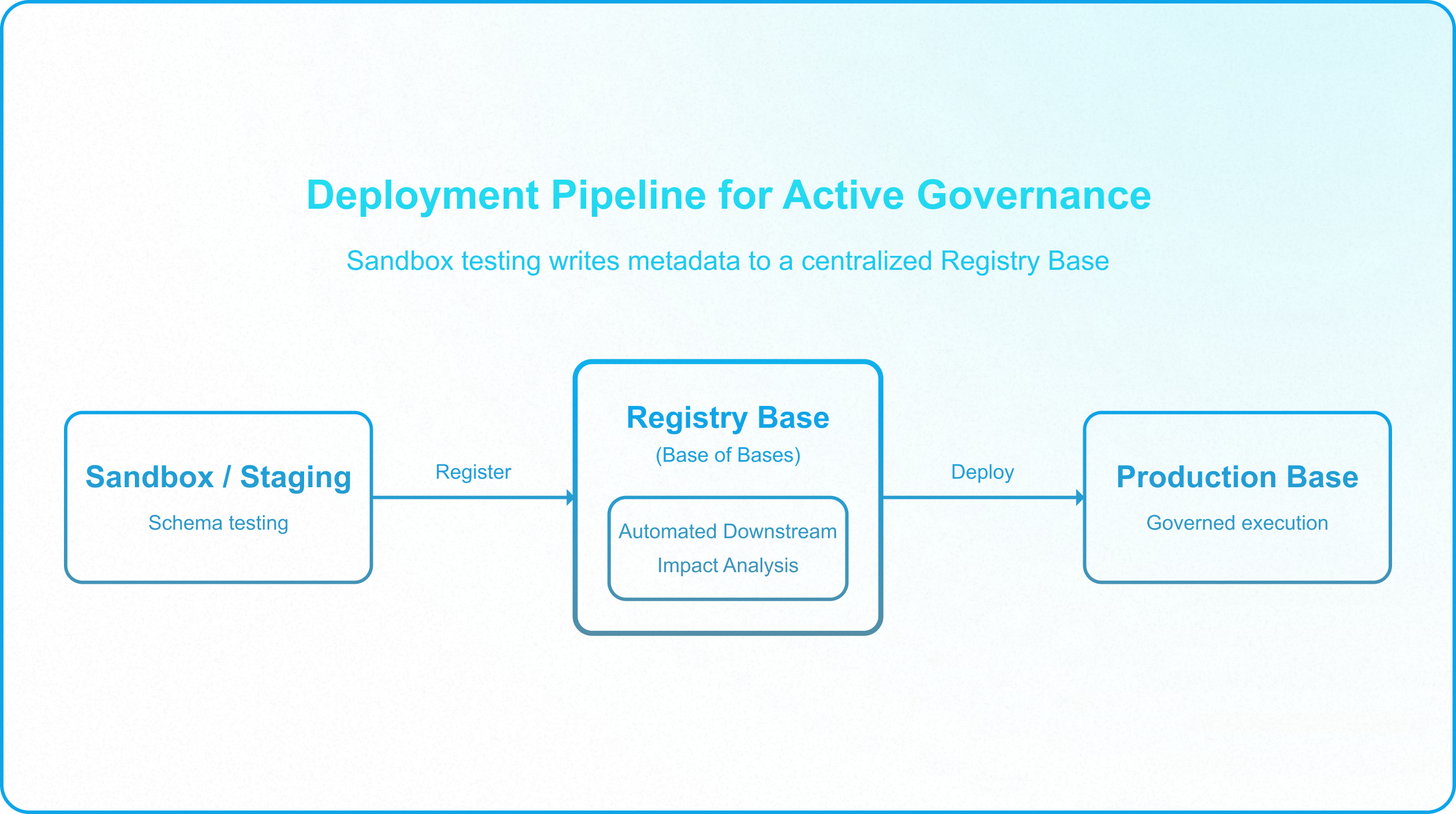
Figure 5: The deployment pipeline for active governance, showing how staging validation and sandbox testing write metadata changes directly to the centralized Registry Base before production deployment.
Architectural Comparison: Unmapped vs. Governed Registries
To guide systems administrators in transitioning away from unmapped architectures, the following matrix contrasts the operational traits of unmapped bases with actively registered ecosystems:
|
Operational Dimension |
Unmapped No-Code Architecture |
Governed Registered Ecosystem |
|---|---|---|
|
Dependency Tracing |
Invisible; cross-base syncs and webhooks are tracked only in individual builders' heads. |
Centralized; every sync bridge, API token, and webhook target is logged in the Registry Base. |
|
Change Management |
High-risk; fields are modified in production, causing silent failures in downstream bases. |
Low-risk; mandatory staging validation, automated impact analysis via registry logs, aligning with ITIL Change Management Principles. |
|
Security Auditing |
Ungoverned; untracked PATs and webhooks bypass IT control, exposing sensitive fields. |
Controlled; all external connections mapped to specific department owners and security scopes. |
|
Performance Protection |
Low; cascading lookups and redundant syncs overload Airtable's main processing thread. |
High; offloaded calculations protect database performance, as analyzed in Offloading Resource-Intensive Workloads.md. |
|
Failure Resolution |
Reactive; failures are discovered only when downstream users report empty or corrupted records. |
Proactive; asynchronous error logging and retry queues isolate errors, as detailed in Preventing Silent Failure Chains in Airtable Automations.md. |
Silence of the Black Box
The structural decay of an unmapped architecture does not announce itself with a warning banner or a compilation error. It waits. It waits for the worst possible moment—a high-volume quarter-end financial reconciliation, a holiday sales surge, or a critical system migration.
The tipping point almost always arrives on a quiet Friday afternoon. A well-meaning department lead, acting as a citizen developer, renames a single text column to make an interface page look cleaner. Because Airtable auto-updates internal formulas, the change looks successful on their screen. They log off for the weekend, unaware that they have cut the power to their own downstream operations.
Outside the base boundaries, the unmapped webhooks silently shatter. Downstream ingestion scripts drop payloads, regional sync bridges write empty records, and integration middleware begins throwing undocumented authorization errors. By Monday morning, your engineering team is running forensic grep queries across raw server logs, trying to reconstruct a broken data topology they didn't know existed, while the business loses thousands of records in transit and tens of thousands of dollars in operational downtime.
This is the price of visual convenience operating in the dark. If you treat Airtable as a visual playground where schemas are untracked, permissions are unscoped, and integrations are uncataloged, you are not running an enterprise database. You are running a collection of disconnected spreadsheets connected by invisible, fragile threads that will eventually snap under pressure.
The turning point occurs when you accept a fundamental architectural truth: You cannot govern what you cannot trace.
Arresting the chronological decay analyzed in What Breaks First at Enterprise Scale requires moving past local schema views. It requires executing a forensic audit of your active API tokens, enforcing a centralized metadata directory inside a Registry Base, and subjecting every base to strict, data-driven access control.
This Registry Base is not an isolated solution; it is the final structural keystone of a fully mapped ecosystem. It only works because it sits inside a system where every layer — data, logic, integration, and presentation —was designed to talk to the others on purpose. Only when these layers are fully aligned can you transition Airtable from a fragile black box of shadow IT into a visible, resilient, and governed operational control plane that scales reliably alongside the enterprise.