
 ·
4 minute read
·
4 minute read
Scaling an enterprise database requires establishing strict operational boundaries. In typical spreadsheet environments, teams operate under a flat permission structure where every user can edit every row, column, and formula cell. When organizations import these collaborative habits into relational database tools, the results are predictable: accidental record deletions, compromised fields, and severed automation triggers.
As established in the Enterprise Airtable Architecture Foundations, maintaining system integrity requires treating your database not as a shared spreadsheet, but as a governed operational engine.
To achieve this, operations leaders rely on an Airtable Access Matrix: a structured grid that explicitly defines which user roles can read, edit, or create records across specific tables and views. This article provides a practical, step-by-step framework to map, design, and implement an Access Matrix in your organization to secure your database core.
The Operational Vulnerability of Flat Permissions
Airtable’s accessible visual interface makes it highly popular among operations teams. However, because it is so easy to build new tables and fields, database administration frequently lags behind user growth. Without a formal permissions model, organizations fall into the trap of granting broad "Editor" or "Creator" permissions to entire bases.
As discussed in Why Base-Level Permissions Create Enterprise Vulnerability, broad base-level access introduces severe operational risk. When day-to-day operators have direct access to raw grids:
- They can bypass interface layout validation rules, writing incomplete or unvalidated data.
- They can create ad-hoc views, filters, and sort options that degrade client-side performance, leading to rendering lag.
- They can accidentally delete critical relational links or field schemas, causing downstream API sync errors.
To prevent these issues, organizations must implement a formal access control model, mapping access levels strictly to operational roles. This aligns database security with established frameworks such as the CIS Critical Security Controls (specifically Control 6: Access Control Management) and the NIST Role-Based Access Control (RBAC) Project.
Anatomy of an Airtable Access Matrix
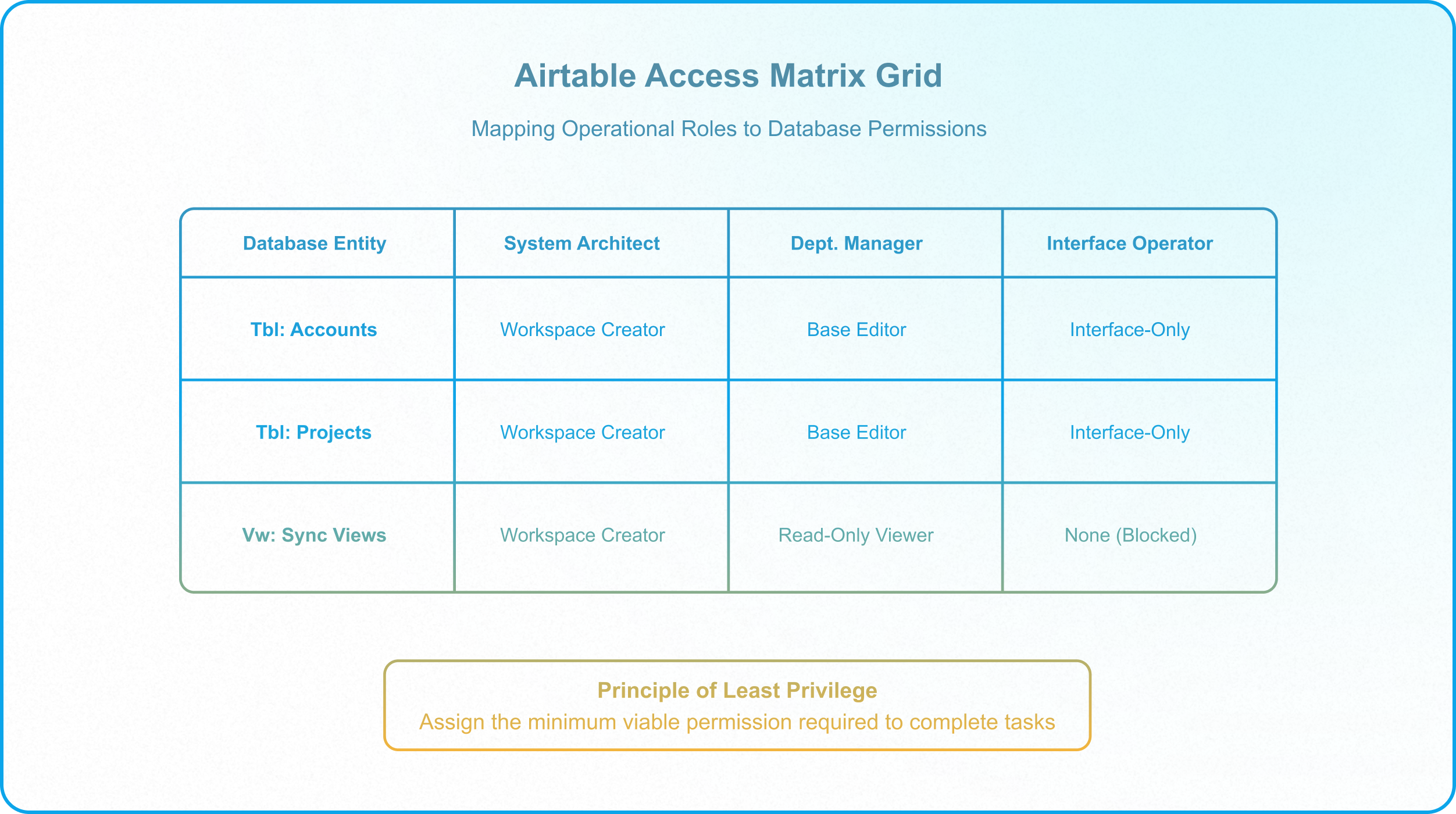
An Airtable Access Matrix is a two-dimensional grid used by RevOps and systems architects to define data permissions. It acts as the blueprint for database sharing settings, translating organizational structure into technical permission states.
The matrix is structured around three key elements:
- User Roles (Columns): Operational categories based on data ownership and workflow requirements rather than corporate job titles. Examples include:
- System Architect / RevOps: Full schema control and database design authority.
- Department Lead / Manager: Scoped authority to manage operational records within their department, build automations, and view reports.
- Interface Operator (Field Staff): Day-to-day users who enter data and execute tasks through UI gates.
- Viewer (Stakeholders / Clients): Read-only actors who monitor metrics and project status without edit rights (see configuration methods under Permission Levels).
- API / Service Accounts: Centrally managed system integrations (e.g., Make, Zapier, custom scripts) executing programmatic edits.
- Database Entities (Rows): The specific tables, fields, views, or bases within the workspace ecosystem (e.g., Accounts, Projects, Invoices, Sync Views).
- Permission Levels (Intersecting Cells): The specific CRUD (Create, Read, Update, Delete) privileges assigned to each role for each entity. These correspond to Airtable's sharing tiers:
- Workspace Creator: Can modify base structures, schemas, scripts, and add integrations.
- Base Editor: Can add, modify, and delete records directly in the grid.
- Interface-Only Editor: Can only edit records through restricted Interface layouts.
- Read-Only Viewer: Can view records without edit privileges. Viewer permissions can be configured in one of three ways:
- View-Only Link or Sync Consumers: Users with access to a view-only link to a view or an interface, or a read-only sync. Technically, they are not registered base users, but the same read-only logic applies.
- Interface-Only Read-Only or Commenter: Granting read-only or commenter permissions strictly to a specific interface (rather than specific page layouts, as permissions cannot be set at the page level), keeping users out of the backend.
- Base-Level Read-Only or Commenter: Granting view access to the entire base (including automation configurations, technical fields, and users). This option is rarely used in governed enterprise architectures.
- None (No Access): Structurally blocked from accessing the base or table.
Visual Mapping Exercise: Step-by-Step
Designing your Access Matrix is an architecture exercise that must happen before inviting users to the workspace. Because native base sharing cannot restrict access to individual tables, this matrix serves as an architecture spec rather than a direct sharing screen.
Step 1: Inventory the Database Schema & Base Boundaries
List every table in your database. Group them by structural relationship (e.g., parent tables vs. child tables). Note which tables feed into external base syncs.
[!IMPORTANT] The Base-Wide Constraint: In Airtable, native collaborator permissions (Creator, Editor, Read-Only) are assigned base-wide. If a user is added as an Editor to a base, they possess write access to every table in that base. If you need to guarantee that a user or integration is an Editor on Table A but strictly Read-Only on Table B, those tables must live in separate bases (using synced tables to mirror data). For more on structuring these relationships, consult Parent-Child Ownership Models.
Step 2: Define Scoped Roles
Map your team members to standard roles. Do not create a role for every individual; instead, group them by their relational data requirements. For example, if a team member only updates task statuses, they are an Interface Operator restricted to specific layouts where interface settings lock or hide other tables, not a Base Editor.
Step 3: Define Permissions in the Matrix Grid
Complete the matrix grid by assigning the minimum viable permission level required for each role to complete their tasks. This follows the Principle of Least Privilege, as detailed in the NIST Attribute-Based Access Control Guide (SP 800-162). If a role only needs to view historical data, assign them Read-Only or None rather than Base Editor.
The Interface Enforcement Layer
Once the Access Matrix is finalized, it must be enforced. If you map a user as "Interface-Only Editor" in your matrix but leave their base-level permissions as "Editor" in the sharing settings, the database remains vulnerable.
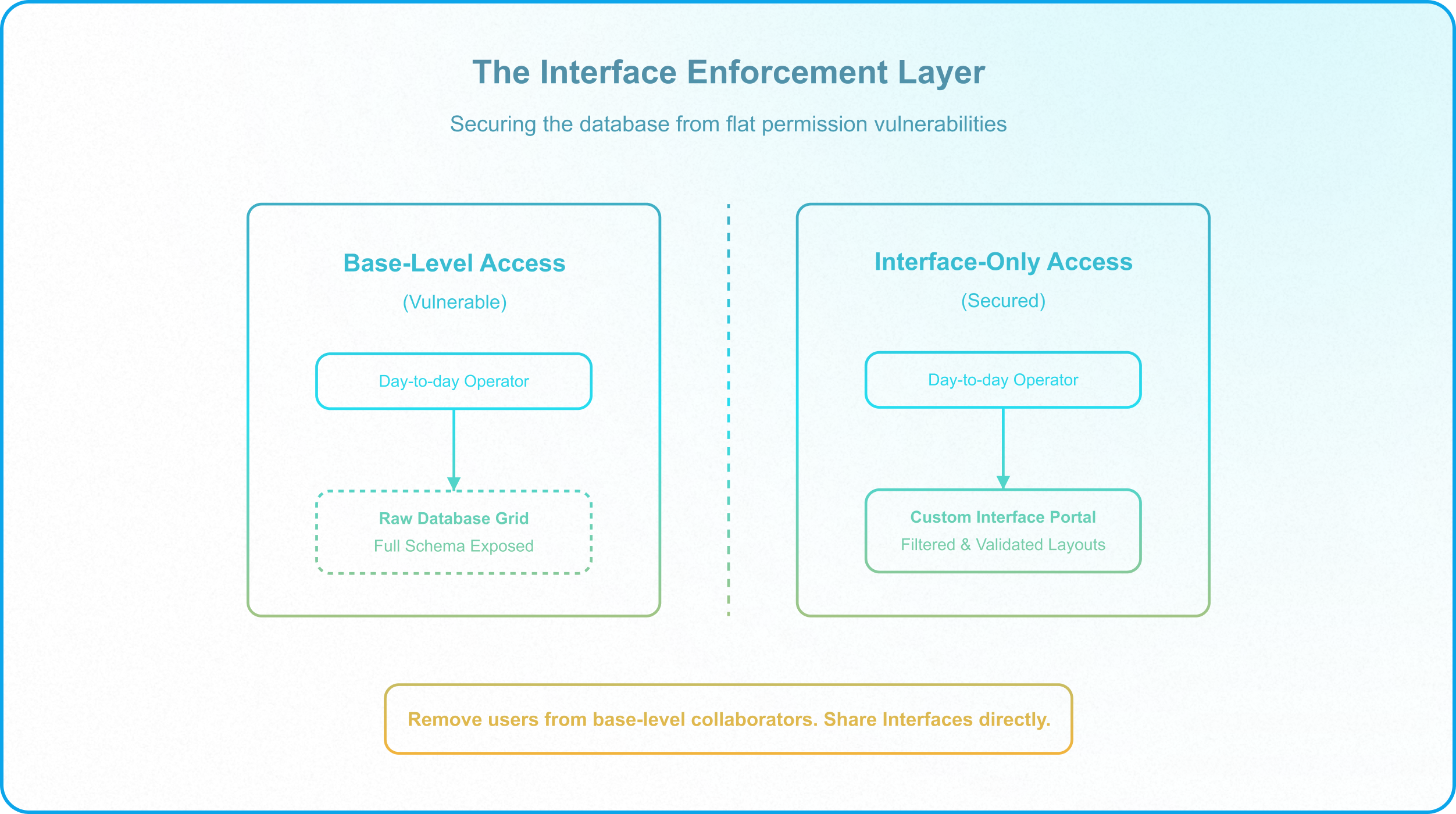
To secure the environment, operations managers must remove users from base-level collaborator lists and share the Custom Interface directly as Interface-Only collaborators. According to the Airtable Base Permissions Documentation, restricting users to interfaces ensures:
- They cannot access the raw grid or view the underlying table structures and formulas.
- They can only input data through configured intake forms and validation gates.
- Relational fields can be filtered to prevent users from linking incorrect records.
Implementation: Programmatic Validation Gates
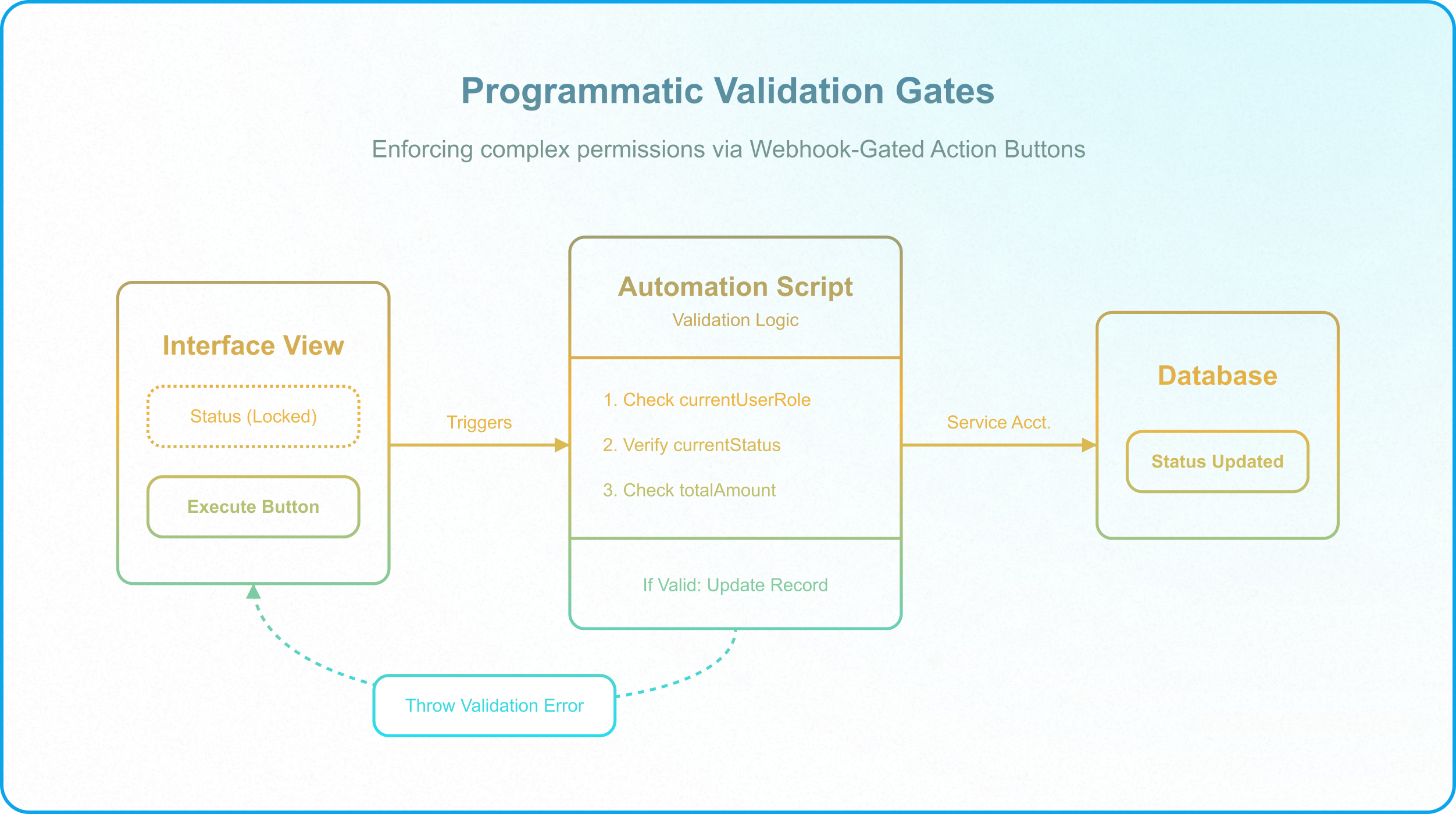
For complex permissions that cannot be enforced via native interface settings (such as restricting edits once a record is marked "Approved"), architects should deploy Webhook-Gated Action Buttons. Instead of making a status field editable, replace it with a button that runs a custom validation script.
.png?width=3680&height=3340&name=ray-so-export%20(6).png)
By establishing this matrix, you create a clear standard for your database ecosystem. When a team lead requests elevated permissions, the system architect relies on the established matrix to evaluate the request, ensuring that the database remains secure and structured as the enterprise scales.
Maintaining Governance Over Time
An Access Matrix is not a static document; it must evolve alongside your business processes. As new tables are built or integrations added, the matrix must be updated and reviewed by your data owners.
To maintain compliance and manage changes safely without disrupting downstream operations, team leads should establish governance policies similar to the Salesforce Center of Excellence Framework. This ensures that every permission change is validated against the data model before it is implemented in production.
If your team is managing a scaling Airtable ecosystem and needs to establish robust permission controls, Schedule a Discovery Call with InAir. We audit active workspaces and implement governed architectures that secure your operational databases.