
 ·
4 minute read
·
4 minute read
Traditional Airtable bases are built on a dangerous assumption: that the same visual spreadsheet view used to query data should also serve as the input surface to modify it. When builders combine read and write paths into a single backend base, they create immediate security and operational vulnerabilities. Standard operators are granted broad edit permissions simply to update a status, exposing the entire database schema to accidental modifications.
Traditional Airtable configurations are built on a dangerous assumption: that the same single view or interface layout used to query data should also serve as the input surface to modify it. When builders combine read and write paths into a single view or interface layout, they create immediate security and operational vulnerabilities. Standard operators are granted broad edit permissions simply to update a status, exposing the entire database schema to accidental modifications.
To secure enterprise systems at scale, platform architects must apply a proven software design pattern to the user interface: Command Query Responsibility Segregation (CQRS). As established in the Enterprise Airtable Architecture Foundations, scaling database ecosystems requires separating backend base structures from user interaction.
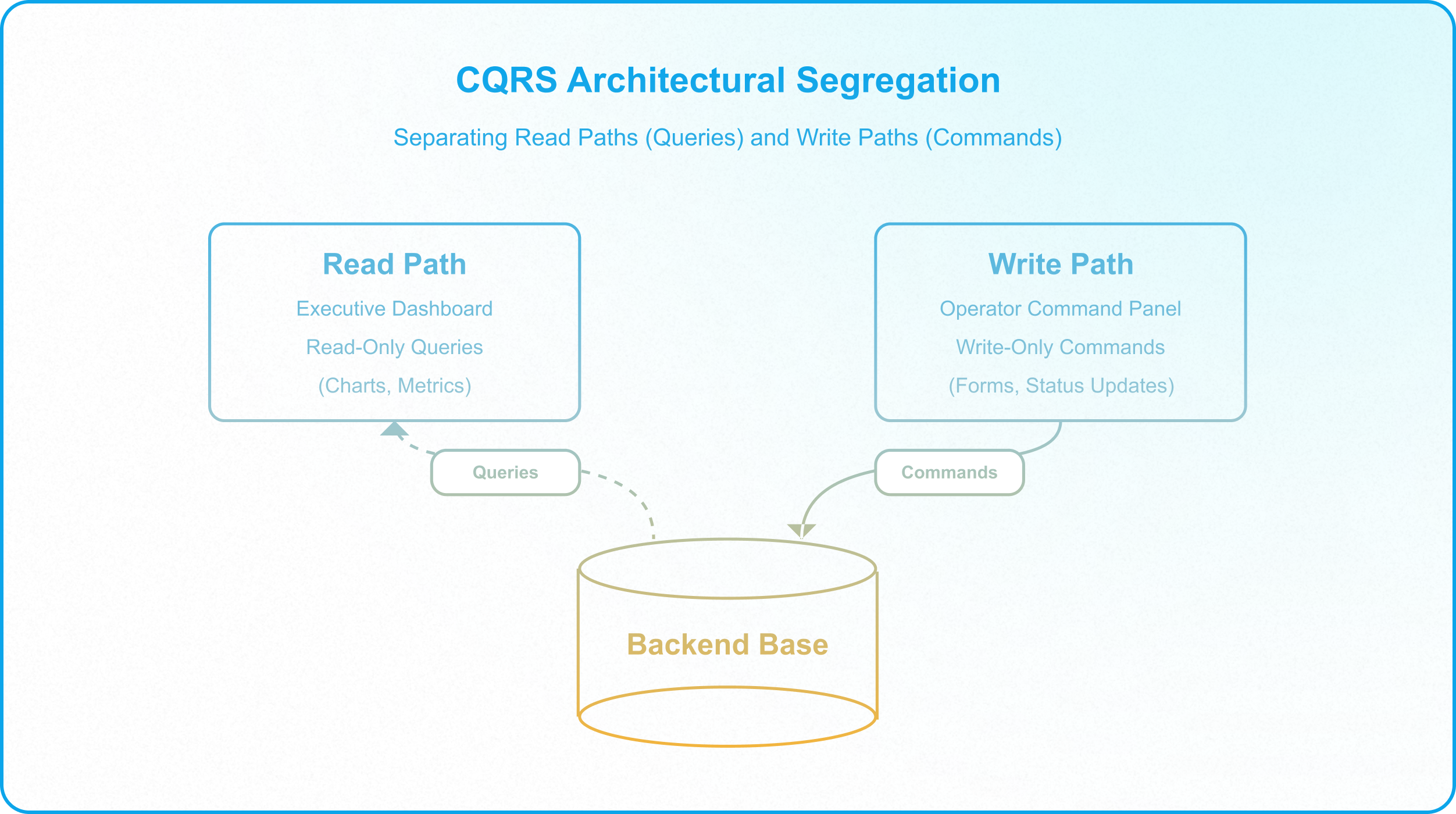
By enforcing CQRS at the interface layer, you structurally segregate the read path (queries) from the write path (commands). Collaborators never interact with the database directly; instead, they consume data through read-only query portals and submit updates through validated command gates, reinforcing the permission boundaries detailed in Why Base-Level Permissions Create Enterprise Vulnerability.
1. The CQRS Architectural Segregation Model
In a standard database deployment, CQRS separates read and write operations into distinct models. When applied to Airtable, this segregation is executed by restricting collaborators to role-scoped Interfaces:
- The Command Path (Write Only): Actions that mutate state, such as registering a new SKU, modifying a budget, or changing a project lifecycle state are treated as transactional commands. Operators have zero direct edit access to the base; they submit commands strictly through interface forms and action buttons that validate data before entry.
- The Query Path (Read Only): Actions that read database state, such as reviewing portfolio performance, checking inventory counts, or auditing logs are treated as queries. Users consume queries through read-only interface views, KPIs, and charts.
By segregating these paths, you isolate database updates from reporting layers. Standard operators cannot bypass validation rules, and executives can review operational dashboards without the risk of accidentally altering a cell.
2. Hardening the Write Path: Implementing Command Gates
Exposing editable database views to operators invites data corruption. If an operator can click and edit directly into a record, they can enter malformed values, modify records out of order, or skip mandatory approval fields.
Under a CQRS model, the write path is secured through Command Gates:
- Transactional Forms: Operators submit updates through structured interface forms rather than inline edits. To update a product cost, the operator does not edit the field directly. Instead, they complete a "Price Revision Command" form. This form enforces required fields and character limits on the front-end before writing the transaction to a change log.
- Dynamic Input Containment: Use conditional visibility to expose input fields progressively. If a pricing override is requested, the interface dynamically displays the Justification field and keeps the "Submit" button locked until the explanation is written.
- Dynamic Action Gates: Hide approval buttons from standard operators. The "Approve SKU" button only appears when the logged-in user belongs to the manager group and the SKU record contains no missing data.
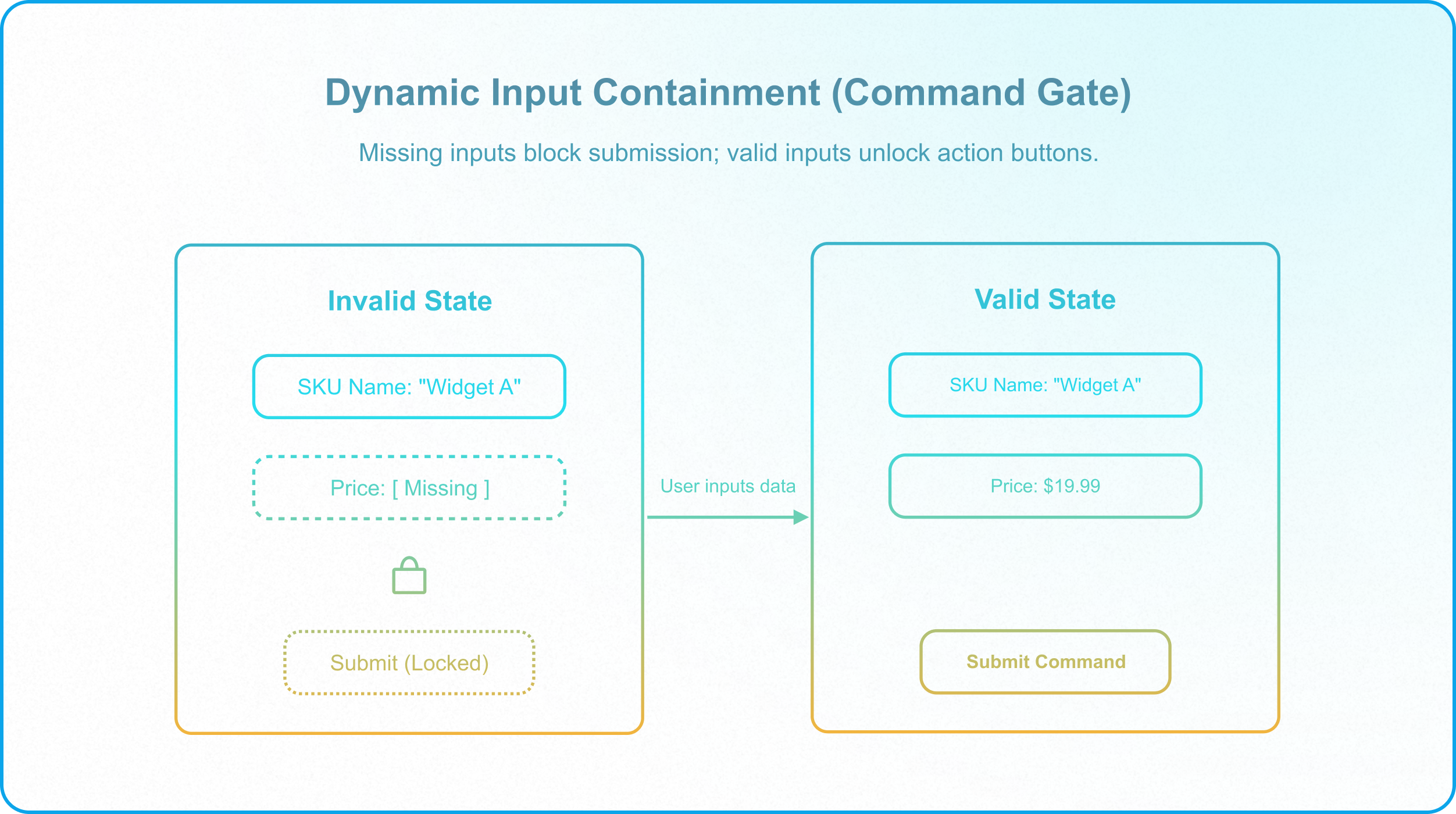
This process ensures that malformed data is blocked at the border, protecting the active databases from error states before automations execute downstream operational logic.
3. Hardening the Read Path: Serving Query Abstractions
When users are granted base-level access, they use the backend schema as their personal reading environment. This creates severe security risks and degrades base performance when users run heavy lookups and filtered views.
To secure data consumption, architects serve queries through locked Query Abstraction Layers:
- Role-Scoped Read-Only Portals: Group read-only metrics, timeline charts, and list views into dedicated interface dashboards. Set the permissions of these elements to read-only, ensuring that users can filter and browse without edit capabilities.
- Decoupled Sync Bases: For high-volume reporting, isolate the query path entirely. Sync read-only datasets from the master base to a downstream destination base (as detailed in Airtable Access Matrix). Executives query the downstream base, ensuring that reporting traffic has zero performance impact on active operational write paths.
- Locked Export Pathways: Disable global base sharing. If a partner requires data egress, build a dedicated export interface page containing only the approved fields, preventing users from exporting sensitive cost margins or internal metadata.
This isolation preserves data privacy and ensures that dashboard rendering never stalls database execution.
4. Deletion Prevention via Soft-Delete Commands
In a unified base where read and write paths are combined, record deletion is a catastrophic risk. An operator trying to clear a cell can accidentally delete an entire record, silently breaking relational links and downstream syncs (creating the unmapped dependencies detailed in The Dangers of Circular Syncs in Airtable).
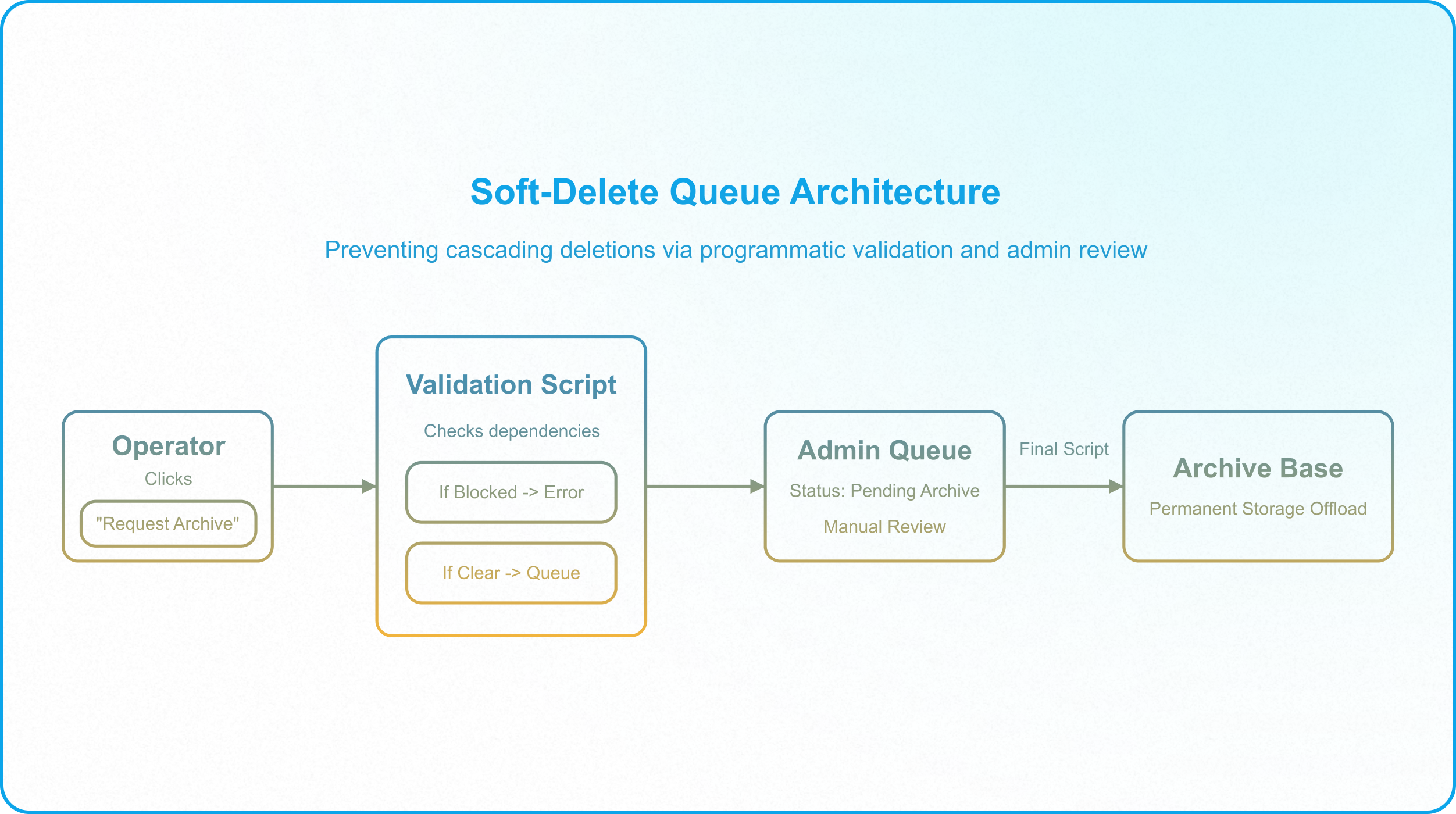
Under CQRS, "Delete" is not a layout option; it is a transactional command processed through a Soft-Delete Queue:
- Omit Native Deletions: Disable native record deletion settings by toggling off the native "Add/delete records inline" setting on all interface list layouts (including List, Kanban, Gallery, Grid, and Timeline layouts). Note that Airtable does not have a standalone "Allow users to delete records" toggle; instead, disabling deletion in these layouts is governed strictly by the "Add/delete records inline" setting.
- Expose an Archive Action: Provide a button labeled "Request Archive."
- Run Dependency Validations: When clicked, the button runs a validation script. If the record is linked to active child records (e.g., an active SKU linked to open purchase orders), the script blocks the action and displays a validation warning in the interface.
- Queue for Review: If the record has no dependencies, the script updates the status to Pending Archive, routing it out of the operator's view into an administrative queue (as mapped in How to Build Controlled Interface Pathways in Airtable).
- Systematic Offloading: The administrator reviews the queue and executes the final archival script, moving the record to a secure, permanent storage base to ensure systemic stability during high-load error scenarios.
This ensures that no record is removed without checking dependencies, protecting downstream sync contracts from cascading failures.
5. Why CQRS is the Only Path to Scale for App Managers
For enterprise application managers like Alex, segregating read and write paths is not a matter of interface aesthetics; it is the prerequisite for scaling a secure database environment:
- Eliminates Schema Drift: Because operators have zero backend base access, they cannot add fields, delete columns, or modify automation structures. The schema remains a stable, locked contract.
- Blocks API Exfiltration: Transitioning collaborators to Interface-Only access prevents them from generating Personal Access Tokens (PATs) that target backend bases. The Airtable API strictly blocks Interface-Only credentials from invoking raw database endpoints.
- Provides Zero-Downtime Updates: Because the write path (commands) is separated from the read path (queries), Alex can modify backend validation scripts and database automations without altering the executive dashboards, enabling clean change management.
Enforcing the Interface-Only Mandate
CQRS transforms Airtable from an open, vulnerable spreadsheet into a structurally fortified business application. By routing all users through validated, role-scoped pathways, you protect the core relational database structure from human error.
However, these pathways are only secure if you enforce the Interface-Only Mandate. All general collaborators must be completely removed from the backend database collaborator list and invited strictly as Interface-Only collaborators. This blocks their ability to access the backend bases, preserving your data schemas and ensuring your compliance gates and deletion workflows cannot be bypassed.
If your team is managing a growing Airtable database and needs to deploy secure, governed interface layouts, Schedule a Discovery Call with InAir. We audit your bases and build structural pathways that protect your data integrity as your operations scale.