 ·
5 minute read
·
5 minute read
Relational databases at scale must be designed to survive both human and mechanical error. In the Enterprise Airtable Architecture Foundations, we establish that treating Airtable as a flat, collaborative spreadsheet leads to operational vulnerabilities. While previous clusters detail access controls (such as the Airtable Access Matrix) and front-end input containment (detailed in Enforcing Governance Through Conditional Visibility in Airtable), true system resilience requires hardening the platform's backend limits and database replication pathways.
This guide provides technical strategies to manage API rate throttling, automate schema drift detection, and programmatically reconstruct relational links during disaster recovery.
1. Fault Tolerance: Hardening the Platform's Physical Limits
Enterprise operations running high-frequency integrations or massive batch processes face physical limits that can silently halt business workflows. When designing for fault tolerance, architects must mitigate two core vulnerabilities:
API Rate Throttling Mitigation
The Airtable API enforces a limit of 5 requests per second per base. The Airtable API enforces a limit of 5 requests per second per base. When multiple external integrations (via Make, Zapier, or custom scripts) write to a base at once, the platform returns a 429 Too Many Requests status and rejects the excess calls.
A 429 does not always mean lost data. Both major iPaaS platforms can automatically retry rejected requests, though the defaults differ. Zapier's auto replay is not enabled by default, but once enabled it activates on each Zap unless you manually disable it in that flow's configuration. In Make, the equivalent must be enabled manually for each scenario. Custom scripts have no such safety net unless you build the retry logic yourself.
Retries handle occasional spikes, but they don't raise the ceiling. For sustained high volume, architects should move away from point-to-point connections and route traffic through an off-platform buffer, such as an AWS Lambda function backed by an Amazon SQS queue. The queue absorbs spikes and paces writes to the Airtable API so it never exceeds the 5 requests per second threshold. Custom integration scripts should also use Airtable's batching capability, combining updates into arrays of up to 10 records per API call to maximize throughput.
Automation Run Consolidation
Airtable billing plans enforce strict limits on monthly automation runs (executions). It is critical to understand the platform's billing logic: a single automation execution (from trigger to the completion of all subsequent action steps) counts as a single run, regardless of how many visual action blocks are configured within it. This is in stark contrast to iPaaS tools like Make and Zapier, which charge per individual task or operation (so three actions would require three tasks).
However, Script-Based Automation Consolidation remains a core pillar of operational resilience for different reasons:
Consolidating Overlapping Triggers: Citizen developers frequently build multiple separate automations that trigger off the same database event (e.g., one automation to notify Slack, a second automation to update a status, and a third to sync data). This setup triggers three separate runs. Merging these overlapping workflows into a single script-based automation reduces the footprint to a single run.
Bypassing Native Logic Limits: Airtable automations do support conditional logic and looping through conditional groups and repeating groups, but only in a constrained form. Conditional groups don't allow arbitrary nested branching, and repeating groups offer limited iteration over lists. While automations also cap at 25 action blocks, that ceiling is rarely the binding constraint in practice; the more common wall is the logic itself. Moving the work into a scripting action lifts both limits at once, giving you full conditional branching, real loops, and data manipulation the visual builder can't express.
Eliminating Redundant Downstream Steps: iPaaS tools like Make and Zapier bill per action step executed, not per webhook received, since inbound triggers are free. So consolidating multiple webhooks into one payload saves nothing on its own; the same downstream actions still run and still count. The real saving is narrower: if separate automations each fire a webhook that repeats the same setup work downstream (an identical search, lookup, or record-fetch step), a single consolidated call lets that shared step run once instead of N times. Consolidate to remove duplicated steps, not simply to reduce the number of webhook calls. Honestly, though: given how narrow that legitimate case is, and that it depends on a downstream scenario you can't guarantee your reader has, I'd lean toward cutting this bullet entirely. It's the weakest item in the list and the one most likely to draw a "that's not how billing works" from a sharp reader. If the section still has enough strong reasons to split automations without it, drop it.
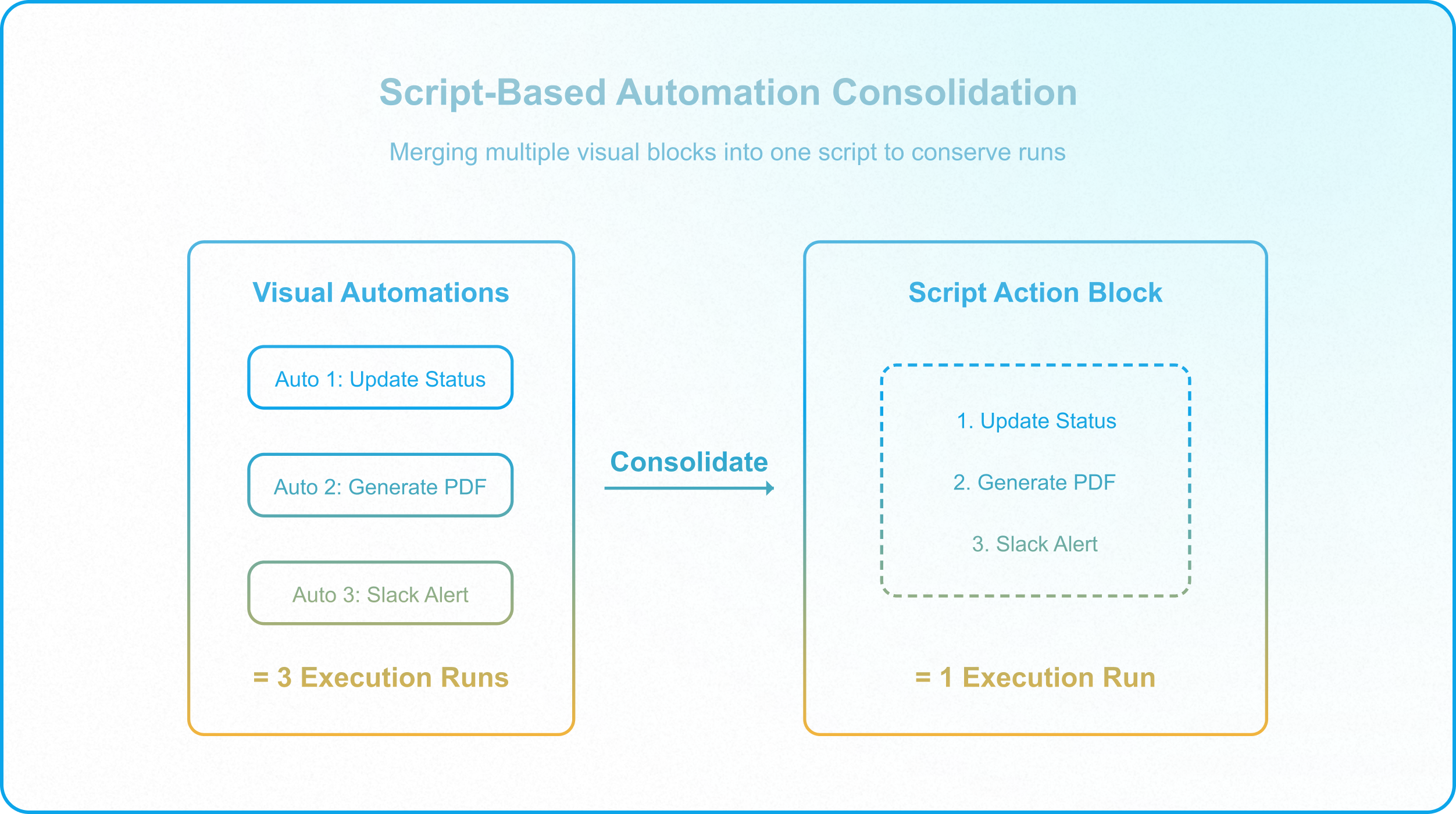
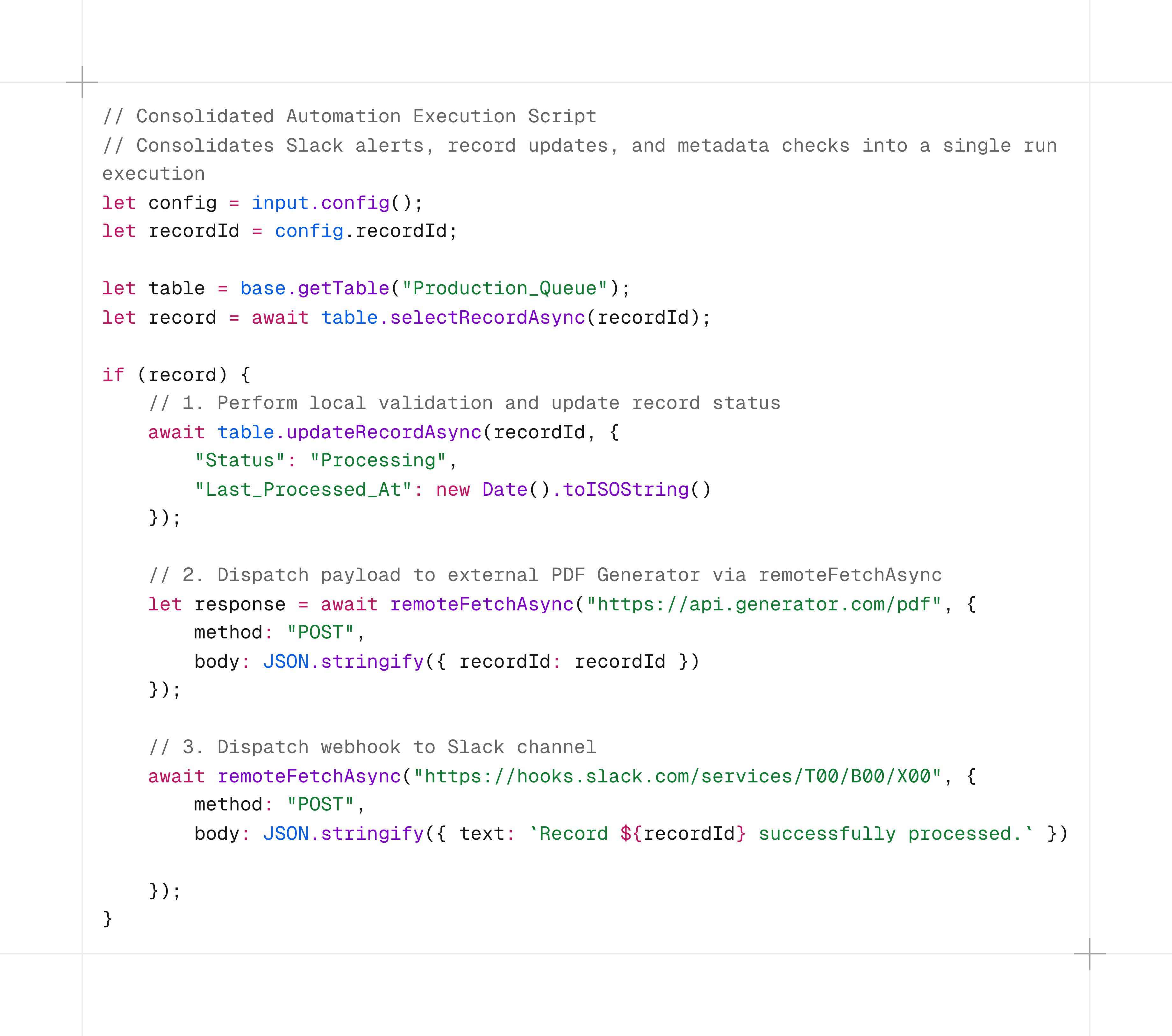
By transitioning visual steps into consolidated scripting blocks, operations teams reduce their automation run footprints by up to 70%, preserving capacity for high-volume periods.
[!NOTE] Consolidation in iPaaS Environments: While a single visual automation with multiple actions only counts as one run in Airtable, consolidating these steps is highly recommended when integrating with tools like Make and Zapier. Unlike Airtable, those platforms count every individual task or operation executed towards your plan limits. Compiling a single payload via a script and dispatching one webhook is critical to keep iPaaS costs under control.
2. Schema Change Management: Automated Drift Watchdogs
As bases evolve, builders modify field names, delete tables, or edit select options. In a single base, this causes minor disruptions; in a multi-base ecosystem connected via syncs or API keys, it is catastrophic.
Because Airtable's Metadata API does not expose cross-base sync sources or downstream target destinations, architects cannot query the system to identify which child bases depend on a modified column. This makes manual auditing registries, like the ones detailed in The Dangers of Circular Syncs in Airtable, mandatory.
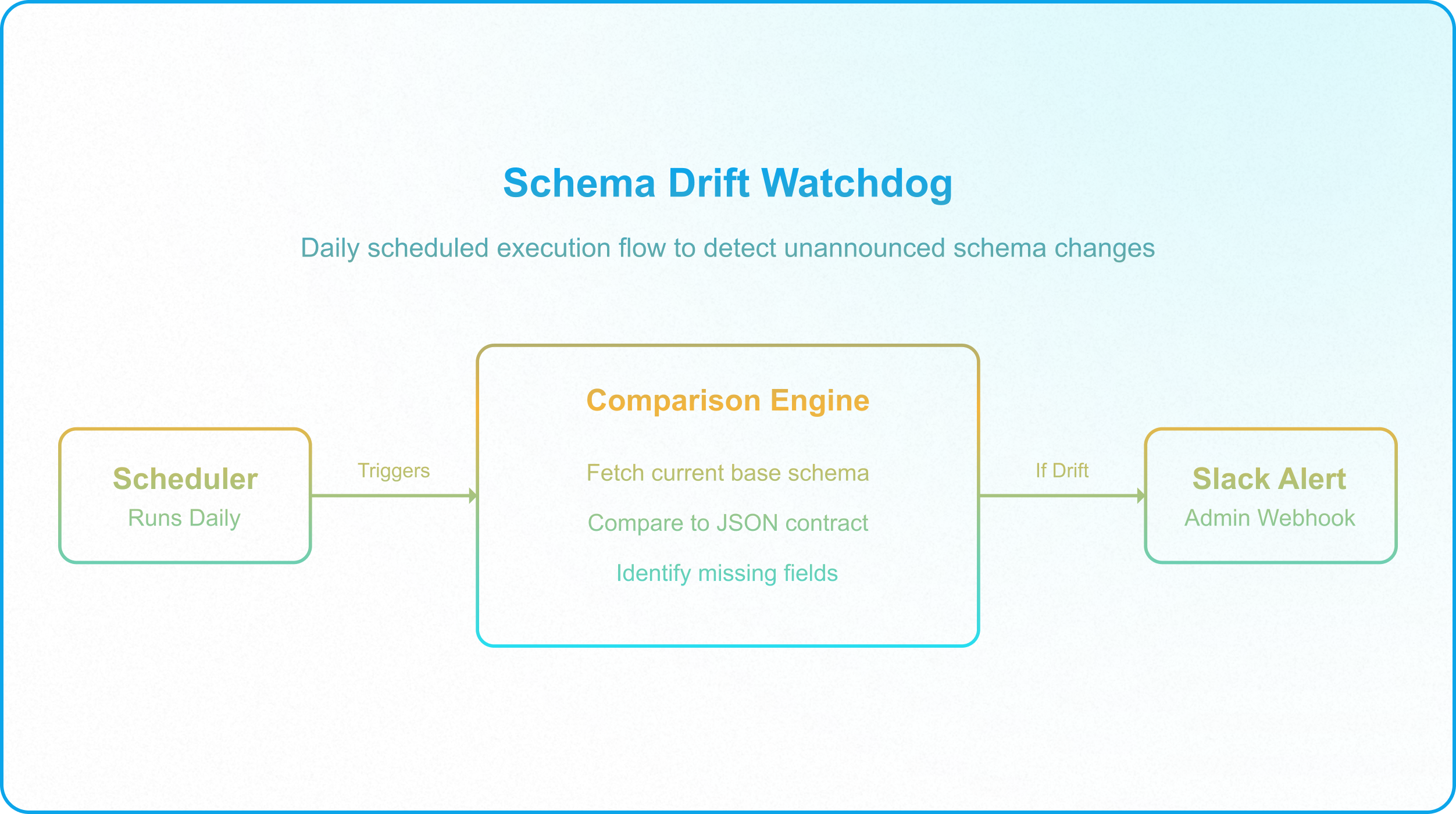
To actively protect the data schema from unannounced changes, architects should deploy an automated Schema Drift Watchdog:
-1.png?width=3680&height=3252&name=ray-so-export%20(3)-1.png)
This watchdog script runs as a scheduled automation, auditing the database topology and alerting administrators immediately if a critical field is deleted or renamed, preventing silent failures in downstream replication tables.
3. Disaster Recovery: Reconstructing Relations with Recovery Anchors
If an automated script runs amok or a user with base-level access accidentally deletes records (a risk detailed in Why Base-Level Permissions Create Enterprise Vulnerability), the database state must be restored.
However, restoring from an exported CSV or a base snapshot breaks relational links: when parent records are re-created, they receive brand-new system IDs, leaving child tables linked to deleted, orphaned IDs.
To recover from a structural data corruption event, architects rely on Record IDs as Recovery Anchors:
The Recovery Anchor Pattern
When configuring automated CSV backups or custom export portals inside Interfaces (as outlined in CQRS in Airtable), you must include an uneditable, unique identifier in the export structure. While many developers default to the native RECORD_ID() formula, this recovery anchor can also be a system-generated Autonumber field, a composite unique key formula, or any other immutable unique key that remains consistent across backups.
Relational Reconstruction Protocol
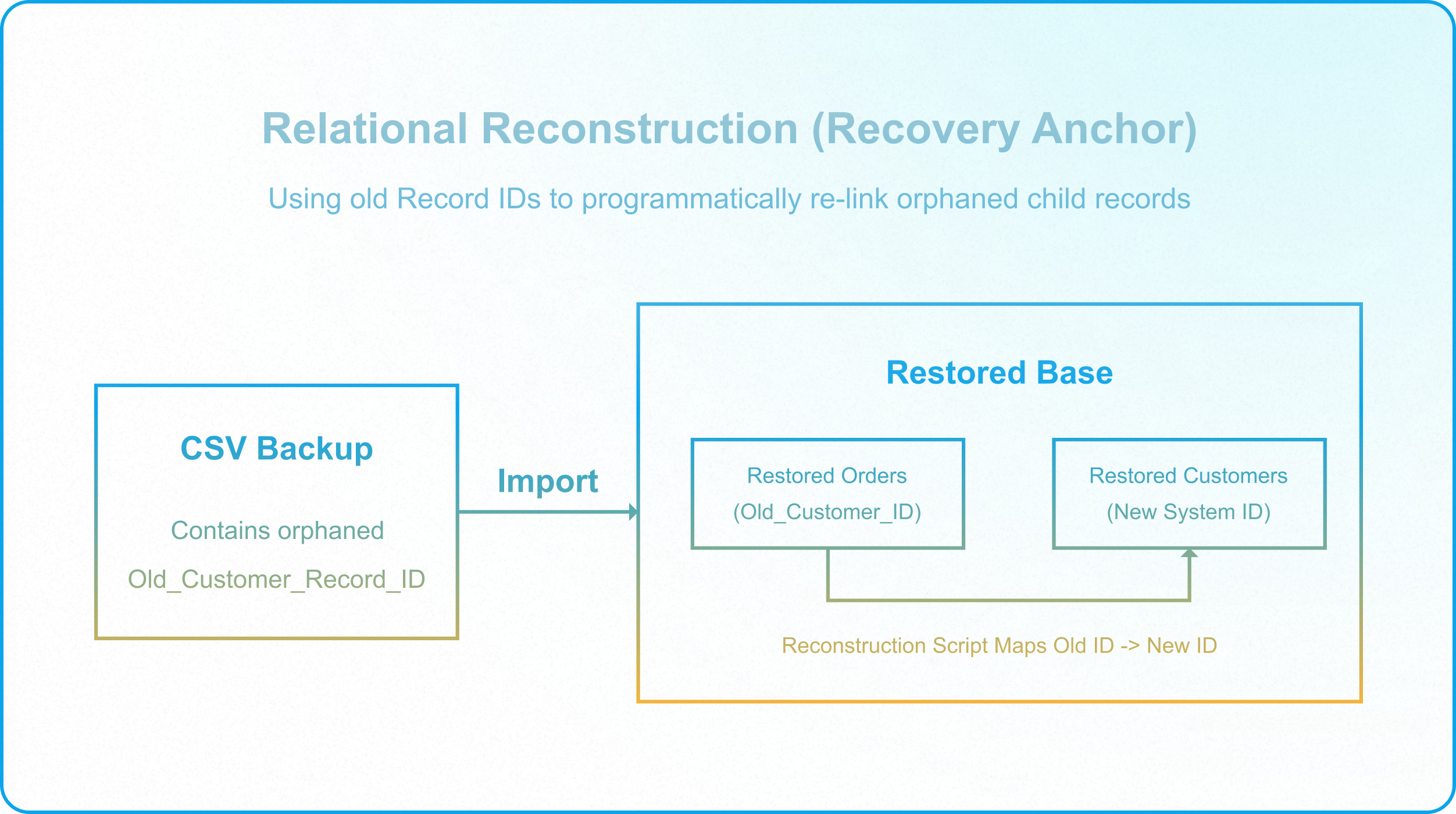
If data is corrupted and records must be restored, the restoration script uses the anchor ID to reconstruct parent-child relationships programmatically rather than creating duplicate entries:
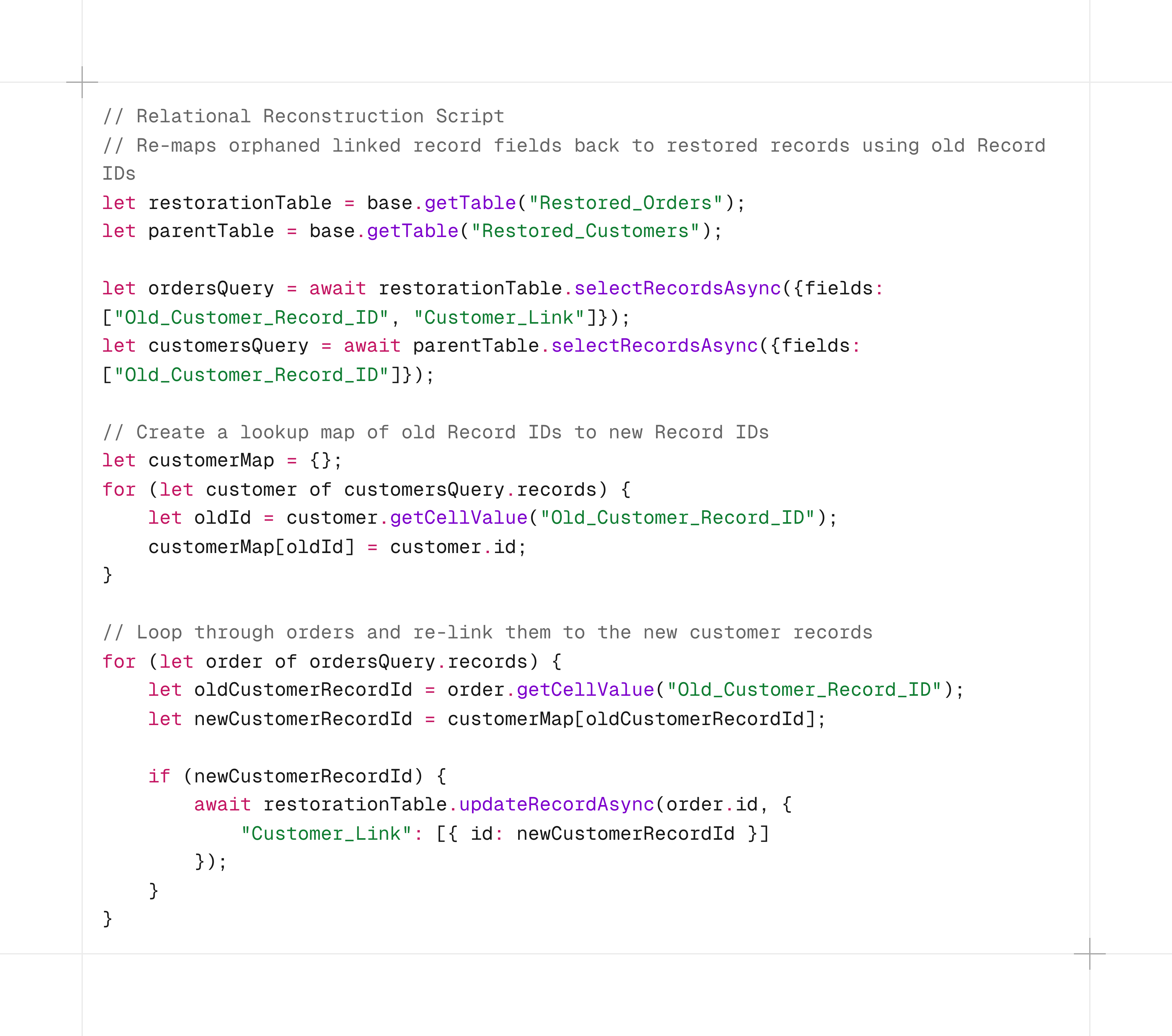
This procedure ensures that relational database structures are restored cleanly, preserving parent-child lineage and preventing the creation of duplicate records.
4. Schema Deployment Workarounds: Staging vs. Production
Because Airtable lacks native SQL-like database migrations and Git-like code branch controls, applying schema changes directly to a live base invites disruption. To test structural edits safely, application managers like Alex must use a staging-based workaround:
- Create a Schema Copy: Duplicate the production base structure (toggling off the "Duplicate record data" option). This creates a lightweight, clean schema environment that acts as the Staging base.
- Execute Changes in Staging: Add new fields, configure automation scripts, and test integration webhooks in the Staging base. This ensures testing runs do not consume production automation limits or overwrite live operational data.
- Audit against the Production Base: Once testing succeeds, manually recreate the fields in the Production base following the deprecated field sequence (Addition -> Alignment -> Deprecation -> Deletion), ensuring zero downtime.
5. The Operational Resilience Protocol
Before registering a new base or modifying an active integration, verify your setup against this architectural protocol:
- Consolidate Automations: Verify that multi-step visual workflows are consolidated into single JavaScript script runs to conserve execution limits.
- Consolidate Overlapping Automations: Verify that separate, overlapping automations triggering off the same event are merged into a single script-based automation. This conserves two distinct limits at once: run counts (against your monthly quota) and active automation slots, which are capped at 50 per base even on Enterprise plans.
- Deploy Schema Watchdogs: Ensure that a scheduled schema validation script is active on the parent base to notify administrators of schema drift.
- Log Recovery Anchors: Confirm that all automated CSV backups and interface data exports include the RECORD_ID() field to support relational reconstruction.
- Simulate in Staging: Ensure all new schema modifications and API scripts are validated in an empty Staging base before manual execution in Production.
Securing Your Scale
Operational resilience is not an aesthetic addition; it is the structural glue that prevents a scaling enterprise Airtable environment from collapsing under the weight of API limits and schema drift. By implementing script-based automation consolidation, schema watchdogs, and recovery anchor patterns, architects build workspaces designed for continuous enterprise execution.
If your team is managing a complex, multi-base Airtable ecosystem and wants to build fault-tolerant databases that protect data integrity, Schedule a Discovery Call with InAir.
We audit your schemas, map your data lineage, and engineer resilient workspaces designed for enterprise execution.