 ·
7 minute read
·
7 minute read
Most Airtable automations are reactive. A record changes, a trigger fires, an action executes. The automation responds to something that already happened and then stops.
Active logic operates differently. It does not wait to respond, it enforces. It governs the state transitions a record is allowed to make, sequences the downstream operations those transitions must trigger, and guarantees that the schema's structural rules are upheld every time data moves through the system. The difference is not technical; it is architectural. Reactive automations patch workflows. Active logic extends the data model.
This is the technical blueprint for designing automations as active logic, not isolated event handlers, but a cohesive execution layer that programmatically enforces and extends your relational database schema. It builds directly on the governance framework established in Why Your Automation Layer Is the Execution Engine of Airtable.
1. State Machines: The Foundation of Active Logic Design
The most reliable way to design an automation layer is to treat every core business entity as a state machine: a record that can only exist in a defined set of states and can only move between those states through explicitly designed transitions.
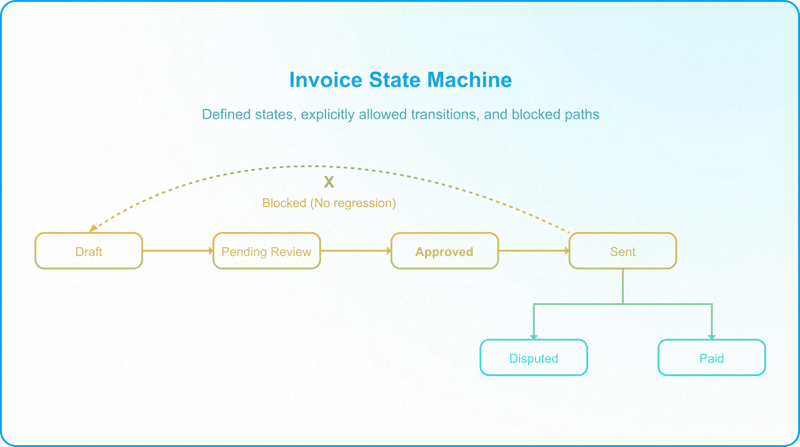
An invoice in a governed system does not have a freeform text field called "Status" where an operator can type "done" or "DONE" or "Done!" interchangeably. It has a locked Single-Select field with exactly six allowed values: Draft, Pending Review, Approved, Sent, Paid, Disputed. Every transition between those values is a trigger condition for one or more automations. No transition is allowed unless the automation governing it validates that the preconditions for that transition are met.
This is active logic. The automation is not responding to a status change, it is the enforcement mechanism that makes the status change valid.
Designing a state machine for a core entity requires defining three things before writing a single automation. This work begins at the schema design phase, specifically, as part of the Entity Relationship Diagram that maps every entity's states, transitions, and ownership boundaries before any table or automation is built.
The state inventory. Every state the record can occupy, with a definition of what that state means operationally. Pending Review means the invoice has been submitted by the operator and is awaiting approval from a Finance lead. Disputed means the client has raised an objection and the invoice is locked from further processing until the dispute is resolved.
The allowed transitions. A matrix of which state can transition to which other state, and under what conditions. An invoice in Sent status can transition to Paid or Disputed. It cannot transition back to Draft. The enforcement mechanism for this constraint is the Status field itself: there is no way to lock individual options on a Single-Select field — no matter how tightly it is locked, anyone with edit access can select any value at any time — so the entire Status field is made view-only. Operators do not update it directly. Instead, they update other fields or trigger Interface actions to confirm a status change, and the active logic automations write to the Status field only after validating that all required conditions for the transition are met.
Important: What does not enforce this constraint is the absence of an automation, Airtable will allow a field to be set to any valid Single-Select value regardless of whether an automation exists to handle that transition. The architecture governs through permissions and Interface design, not through automation gaps.
The transition owners. For each allowed transition, which role or system is authorized to trigger it. An operator can transition an invoice from Draft to Pending Review. Only a Finance lead can transition it from Pending Review to Approved. The API integration transitions it from Approved to Sent after document generation completes. Human transitions happen through governed Interface actions, the only surface operators interact with, provided they are configured as Interface-only users with no base-level access.
Prerequisite: Operators with base-level Editor access can bypass the Interface and edit the Status field directly. The state machine only holds when the access model established in the Permission Architecture is correctly implemented.
The field-level permission configuration that enforces these boundaries, including which departments own which fields and how Interface layouts restrict edit paths, is detailed in Data Responsibility Map.
2. Orchestrated Grouping: Between Microservices and God Automations
The structural failure mode on one end is the god automation, a single chain that handles an entire business process and fails unrecoverably when any step breaks. The structural failure mode on the other end is extreme fragmentation, twenty isolated micro-automations all triggering on the same field, all of which break simultaneously when that field is renamed.
The correct design pattern is orchestrated grouping: automations are grouped by transactional boundary, not by action type. A transactional boundary is the point at which a failure should stop the entire sequence.
Consider an invoice approval workflow:
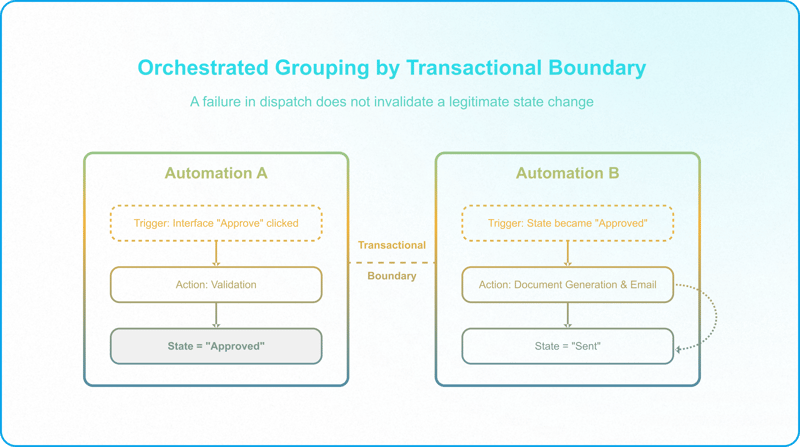
Automation A — Validation and State Transition. Triggered when a Finance lead clicks Approve in the Interface. Validates that all required fields are populated, transitions the invoice status from Pending Review to Approved, and writes a timestamp to the Approved At field. This automation owns the state transition. If validation fails, it halts and writes to the error log.
Automation B — Document Generation and Dispatch. Triggered by the Approved status change, not by the Interface action. Generates the invoice PDF via an external API, attaches it to the record, sends the client notification email, and transitions status to Sent. This automation is triggered by the state, not by the original user action.
Critical architectural decision: If a Finance lead manually sets status to Approved directly in the base (bypassing the Interface), Automation B still fires. The dispatch logic is bound to the state, not the interaction path.
The separation between A and B is a transactional boundary. If document generation fails in Automation B, the invoice is already in Approved state, which is correct. The record has been reviewed and authorized. The failure is in the downstream operation, not in the approval itself. The system flags the record with a Dispatch Failed status, alerts the administrator, and the corrective action is to retry the dispatch, not to reverse the approval.
3. Trigger Architecture: The Single-Field State Transition Model
Every automation in an active logic layer triggers on the transition of exactly one field from one defined value to another defined value. This is not a recommendation. It is a structural requirement. This single-field trigger model governs in-base automation recursion. It is architecturally distinct from cross-base sync loops, which arise at the database topology level and are covered in Airtable Spaghetti Architecture.
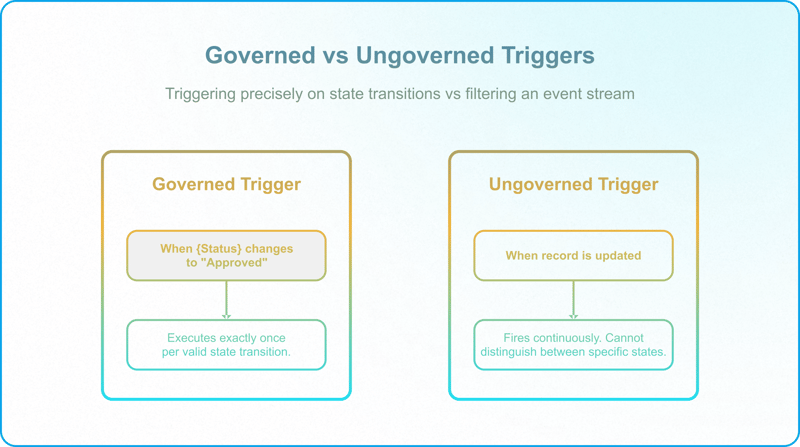
When {Status} changes to {Approved} is a governed trigger. It fires exactly once per valid state transition and for no other reason.
When record is updated is an ungoverned trigger for this use case. The problem is not that it fires on every field change in the table — Airtable lets you limit "when record is updated" to only the selected field or fields, unlike most traditional databases. The problem is narrower: scoped to the Status field, it fires every time the Status field changes, regardless of which value it changes to. It cannot distinguish a transition into Approved from a transition into Disputed or Paid. A trigger this broad can really only support generic logic that does not depend on the specific state — for example, a notification automation: "This is to update you that the Status of your invoice has changed. It is now {Status}."
The single-field model also prevents automation loops. In a governed state machine, the only way Automation A can trigger Automation B is if A writes to B's specific trigger field. That write is intentional and documented. There are no accidental trigger chains from unrelated field updates propagating through the table.
Operational implication: Every state transition in your state machine must have a dedicated field that owns it. When the trigger field is shared across multiple workflow phases, the automations competing for it become interdependent in ways that are invisible until one of them fails.
4. Automation Sequencing and Dependency Management
Active logic layers have dependencies. Automation B requires that Automation A has completed successfully before it executes. Automation C requires data written by Automation B. In a distributed execution environment with asynchronous triggers, these dependencies cannot be assumed — they must be designed.
The dependency design pattern has two components:
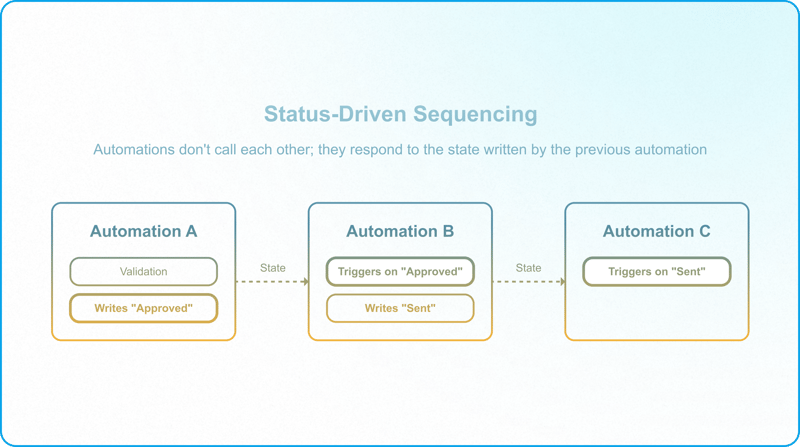
Status-driven sequencing. Automations do not call each other. They respond to the state that a preceding automation wrote. Automation A writes Approved to the Status field. Automation B triggers on Approved. Automation B writes Sent to the Status field. Automation C triggers on Sent. Each automation is independent. Each automation has a single trigger. The execution sequence is enforced by the state transitions, not by nested action chains.
Guard fields for in-progress states. When an automation is processing a record, it immediately writes an in-progress status to a dedicated field before executing its primary logic, for example, Processing: Document Generation. Any other automation that might also trigger on this record's state checks for the presence of this guard field and exits without acting if it is set. When processing completes, the guard field is cleared and the terminal state is written.
Caution — guard fields can fail silently: A guard check that simply blocks and exits is a common mistake that leads to automations failing silently. Suppose the document generation automation is running and has set the guard field. While it runs, a user checks the Send Invoice box. The Send Invoice automation, set to fire when Send Invoice changes to true, triggers, sees the guard field is set, and exits — logging success while doing nothing. The invoice never gets sent, and nothing signals the failure. There are two simple solutions, and you only need one of them — both serve the same purpose, so which one you choose depends on the use case. One option is to add the guard to the trigger condition itself: fire only when the Guard Field is empty AND Send Invoice is true, so the automation runs the moment the guarding automation clears the field. The alternative is to have the guard check clear or revert the triggering field before exiting, rather than silently doing nothing, so the user can see that their attempt — sending the invoice, in this example — did not go through and can retry.
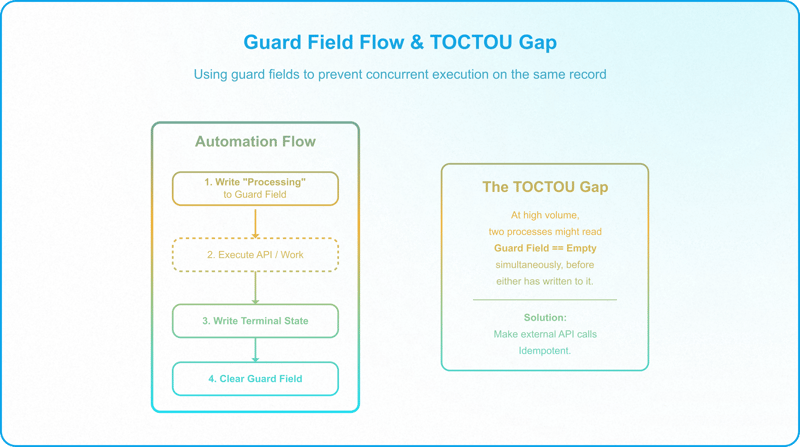
Guard fields are a mitigation, not a complete solution: At very high throughput, two runs can read the guard field in the same instant before either has written to it, a time-of-check to time-of-use (TOCTOU) gap that Airtable has no native mechanism to fully close. For workflows where duplicate execution would cause irreversible harm (financial records, external API calls that charge per request), design the downstream operations as idempotent rather than relying on the guard field alone.
An additional constraint: Airtable's execution time limit per automation run is approximately 30 seconds for scripts. In workflows where Automation B calls an external API that responds slowly, the run can timeout before writing the terminal state. If a guard field was set at the start of that run, it remains active after the timeout, leaving the record in a permanently blocked state that requires manual intervention. The mitigation is to architect API calls with explicit timeout handling inside the script: if the external call does not respond within a defined window, the script writes a Retry Required status to the record and clears the guard field, rather than allowing the run to timeout silently.
The Active Logic Diagnostic
Run these four checks against your current automation layer before designing any new state machine.
1. The State Inventory Test
For your most critical business entity, list every state it can be in. If you cannot produce a finite, exhaustive list in under two minutes, the entity does not have a governed state machine. It has a freeform status field operators use inconsistently.
2. The Transition Matrix Test
For each state, define which states it can transition to. If any transition is possible from any state — if an operator can move a record from Paid back to Draft, your state machine has no enforcement. The Interface and automation layer are not preventing invalid transitions.
3. The Trigger Audit
Open your active automations. Count how many use "when record is updated" without a specific field condition. Each one is an ungoverned event listener. In a state machine-governed system, the correct number is zero.
4. The Dependency Test
Identify any two automations that must execute in sequence. Document what prevents them from executing simultaneously on the same record. If the answer is "nothing," you have a race condition that will corrupt data at sufficient volume.
If any of these checks surface ungoverned states, missing transition logic, or undocumented dependencies, the active logic layer is exposing the schema to execution failures that will compound as volume increases, because active logic only delivers when it's designed as one governed layer of a larger Enterprise Airtable Architecture.
Schedule a Discovery Call with InAir.
We map the state machine, design the transition matrix, and build the automation layer on top of it.