 ·
5 minute read
·
5 minute read
Every developer knows that code fails. API endpoints timeout, servers drop connections, rate limits throttle traffic, and webhook payloads arrive malformed.
In a traditional software stack, engineers handle these realities with middleware queues, retry policies, and centralized logging. Yet, in Airtable, automations are frequently designed under the "happy path" assumption: that the trigger will fire, the API will respond instantly, and the data will write correctly.
This is an operational liability. If your execution layer processes thousands of runs, a minor 0.5% failure rate quietly drops dozens of records weekly. Because Airtable fails silently to the operator, these dropped runs corrupt data, disrupt downstream flows, and trigger costly manual audits.
To build enterprise-grade systems, architects must implement a zero-trust automation policy: assume every run will fail, and design structural guards to capture, log, and isolate failures before they touch your live production data.
1. The Limitations of Native Airtable Error Handling
Airtable's native automation engine provides two default error mechanisms, both inadequate at scale:
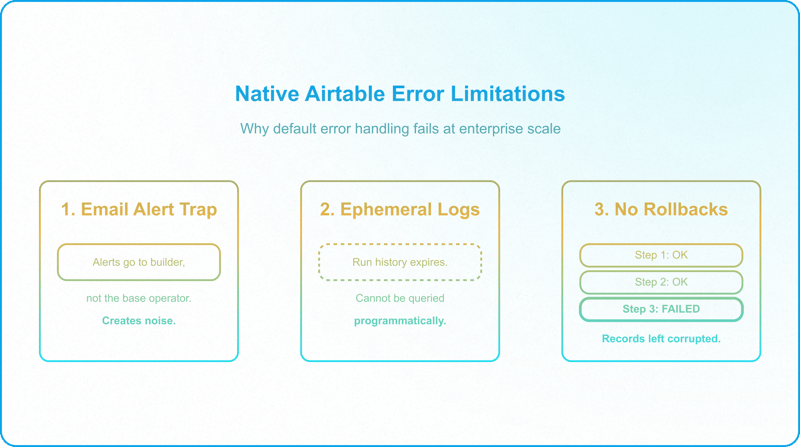
- The Email Alert Trap: Failed automations send an email alert to whoever last edited or published the automation — the architect or builder, not the base owner. At high volumes, these notifications become noise. More importantly, they reach whoever last touched the automation, not the business operator who needs to fix the transaction.
- The Ephemeral Run History: Native run logs have a retention window that varies significantly by plan, as short as two weeks on the Free plan, up to three years on Enterprise, and cannot be queried — not programmatically, and not in any practical way manually. The run history can only be filtered by status (succeeded or failed); from there, you have to scroll through and open each run one at a time to find the one you are looking for. If your team is on a lower-tier plan and a failure goes unnoticed, the audit trail may already be gone by the time someone investigates.
- No Database Transactions: Airtable does not support rollbacks. If a multi-step automation fails at step four, steps one through three remain committed. This leaves records in a corrupted, half-processed state.
To scale reliably, error handling must be built directly into your database schema and interface design.
2. Try/Catch Scripting: Defending the 30-Second Limit
When automation logic moves from visual blocks to Configurable Scripts, you must wrap all network requests and database writes in structured try/catch blocks to prevent silent crashes.
Additionally, scripts must respect Airtable's strict 30-second execution limit. If an external API dispatcher hangs for 31 seconds, Airtable terminates the container instantly. This bypasses any cleanup logic in your catch block, leaving system status flags permanently frozen.
The solution is active timeout monitoring. By tracking execution time, the script can abort gracefully and write a failure state before the platform shuts it down:
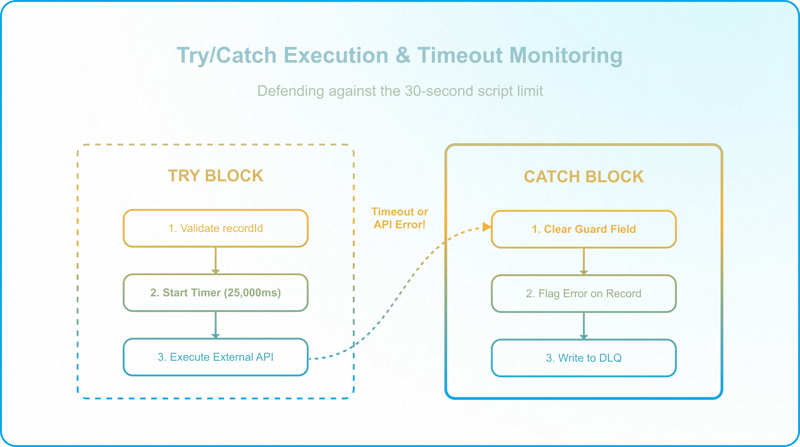
Key implementation details from the pattern above:
- Safety margin: Set the timeout threshold at 25,000ms, 5 seconds before Airtable's hard 30-second limit, to guarantee the catch block has time to execute.
- Guard field cleared in catch: The script sets Guard Field to null before attempting the DLQ write. If the DLQ write subsequently fails, the primary record remains unlocked for manual correction.
- Validation before dispatch: The recordId is validated from input.config() at the top of the try block. A missing ID throws immediately, before any external call is attempted.
The double-failure edge case: If the catch block itself fails, for example, if writing to [SYSTEM] Automation Logs throws a rate-limit error, the primary record has already been flagged with its dedicated error field and the guard field has already been cleared. The record is unlocked for manual correction. Airtable's native email notification fires as the absolute fallback.
3. The Dead Letter Queue (DLQ) Pattern in Airtable
In software engineering, a Dead Letter Queue (DLQ) holds messages that cannot be processed successfully, isolating them for inspection. In Airtable, you build this by creating a dedicated [SYSTEM] Automation Logs table.
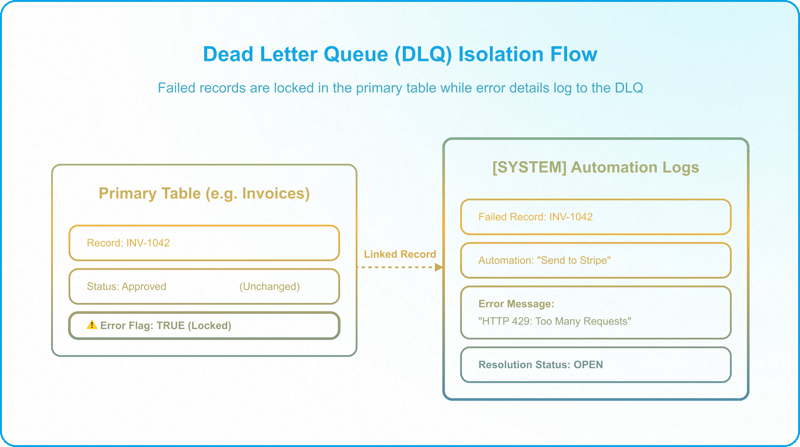
A functional DLQ schema requires five fields:
- Timestamp: Created time of the error.
- Automation Name: The specific script or workflow that failed.
- Error Message: The exact exception message or raw API payload.
- Record Link: A linked record field pointing directly to the failed record in the primary table.
- Resolution Status: A Single-Select field (Open, Retrying, Resolved, Ignored).
Isolate and Contain
When a script catches an error and writes to the DLQ, it must immediately isolate the record — but not by writing Failed to the primary Status field. As covered in the previous pillar on controlled state changes, each Status value can only lead into a defined next state, and "Failed" has no place in that transition matrix; using the primary Status as the error gate would break the state machine. Instead, the script sets a dedicated error-flag field, separate from the primary Status, that marks the record as needing attention and prevents any downstream "success" automations from acting on it — for example, flagging a failed invoice so it is never picked up and marked as Sent. The error itself is recorded in the DLQ for the operator to resolve.
4. Human-in-the-Loop Error Resolution
Instead of granting business teams backend access to clean up data in raw grids, build a dedicated Admin Operations Dashboard in Interface Designer to make errors actionable. The structural design of these controlled interface pathways, including task-driven queues, role-based tab visibility, and governed data egress, is covered in How to Build Controlled Interface Pathways in Airtable.
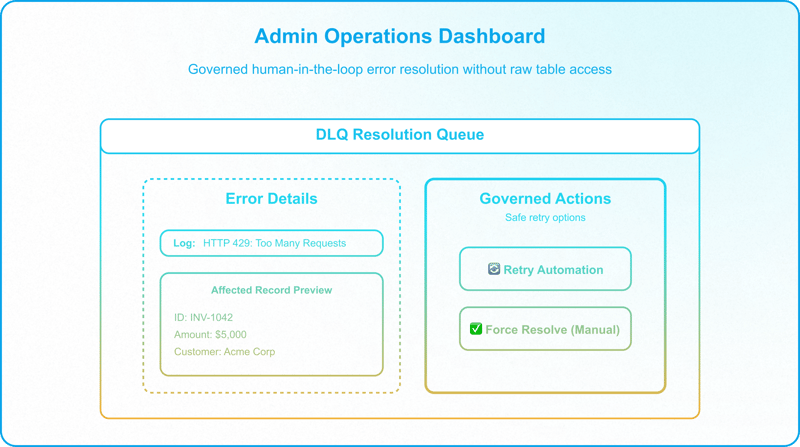
The dashboard exposes two core actions via Interface buttons:
- Retry Button: Resets the status of the primary record to its initial transition state (e.g., back to Approved), re-triggering the automation while marking the DLQ log as Resolved.
Retry safety caveat: This action is only safe if the record has not been modified downstream by other systems or operators while sitting in the DLQ. If downstream state has changed since the failure, retrying may reintroduce race conditions or overwrite subsequent data updates. Verify before retrying.
- Force Resolve Button: If the operator manually executed the transaction downstream, this button prompts them to input the missing data point (e.g., Stripe ID) and forces the record state to Sent, bypassing further automated runs.
This keeps the base secure: operators interact exclusively with governed retry options, eliminating manual data overrides in raw tables.
5. Webhook Failure and Rate Limiting
Connecting Airtable to external services expands the failure surface. Protect these touchpoints with three patterns:
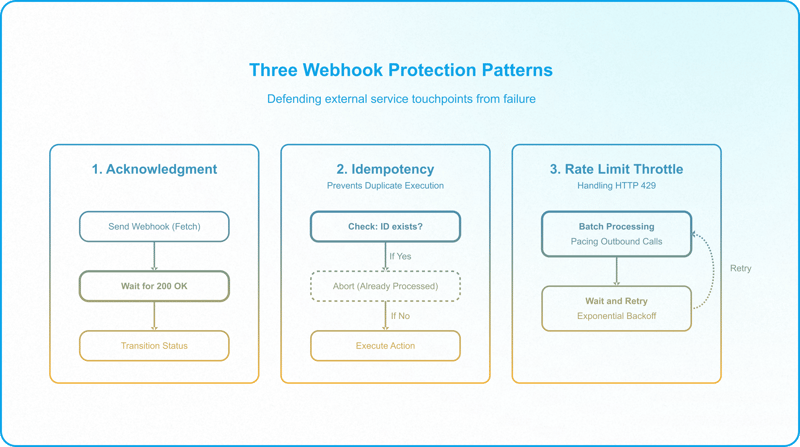
- Payload Acknowledgment: Native webhooks fire blindly. Instead, use a script action executing await fetch(). Await a 200 OK response before transitioning the record status. If the receiver fails, halt and log to the DLQ.
- Idempotency Checks: If network glitches trigger a retry, verify the target state first. If the record already contains a Stripe Customer ID, exit the creation script immediately to prevent duplicate charges or accounts.
- API Rate-Limit Throttling: Airtable's own API limit is a flat 5 requests per second per base — the same on every plan, not something that scales with tier or enterprise agreement — and it governs inbound calls made to the Airtable API. When your scripts dispatch data outward to a third-party service, as in the scenarios above, the limits that matter are that external service's, not Airtable's. Either way, any high-volume bulk operation will eventually trigger 429 Too Many Requests codes. Handling this does not require dedicated middleware: a simple batching script that paces out bulk requests, and/or a wait-and-retry step for any failed attempts, is enough to stay within the limit.
The Zero-Trust Automation Diagnostic
Run these four checks against your current automation layer before any new integration goes to production.
1. The Silent Failure Check
Are error alerts sent via email only? If you lack a centralized [SYSTEM] Automation Logs table, your automation errors are silent debt.
2. The Catch Block Audit
Open your custom JavaScript automations. Do they run without try/catch wrappers? Any script dispatching API calls without defensive blocks is an operational risk.
3. The Retry Capability Test
When an automation fails, must a developer manually toggle fields in the backend to retry it? If so, you lack a human-in-the-loop resolution UI.
4. The Idempotency Test
If you run a dispatch automation twice on the same record, does it duplicate the external action (e.g., sending two emails)? If yes, your layer lacks idempotency checks.
If your workspace fails these tests, your automation engine is a fragile asset, and failure handling only holds when it's designed as part of a larger Enterprise Airtable Architecture, not bolted on afterward.
Schedule a Discovery Call with InAir. We implement structured catch blocks, build centralized DLQs, and design interface-driven error resolution dashboards that guarantee operational continuity.