
 ·
7 minute read
Every enterprise Airtable environment reaches a point where the question "are our integrations working?" stops being useful. The answer is almost always yes. Syncs complete, webhooks fire, automations log green checkmarks. And yet reports drift, duplicate records appear, and nobody can say with confidence which system holds the current value of a field that three of them touch.
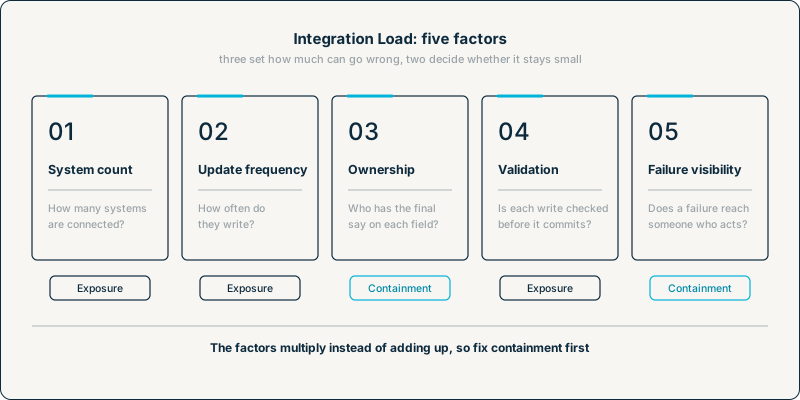
Often, none of the integrations is technically failing. What's missing is a way to assess how much strain the landscape around Airtable is carrying, so the risk stays invisible until something downstream exposes it. InAir calls that strain Integration Load, and this post defines it in full: what it covers, the five factors that drive it, and why those factors compound instead of simply adding up.
Integration Load is how InAir puts a measure on a broader question: what happens once a well-built Airtable base is wired into everything around it. That page covers the architecture. This one gives you a way to assess it.
What Integration Load Is (and What It Isn't)
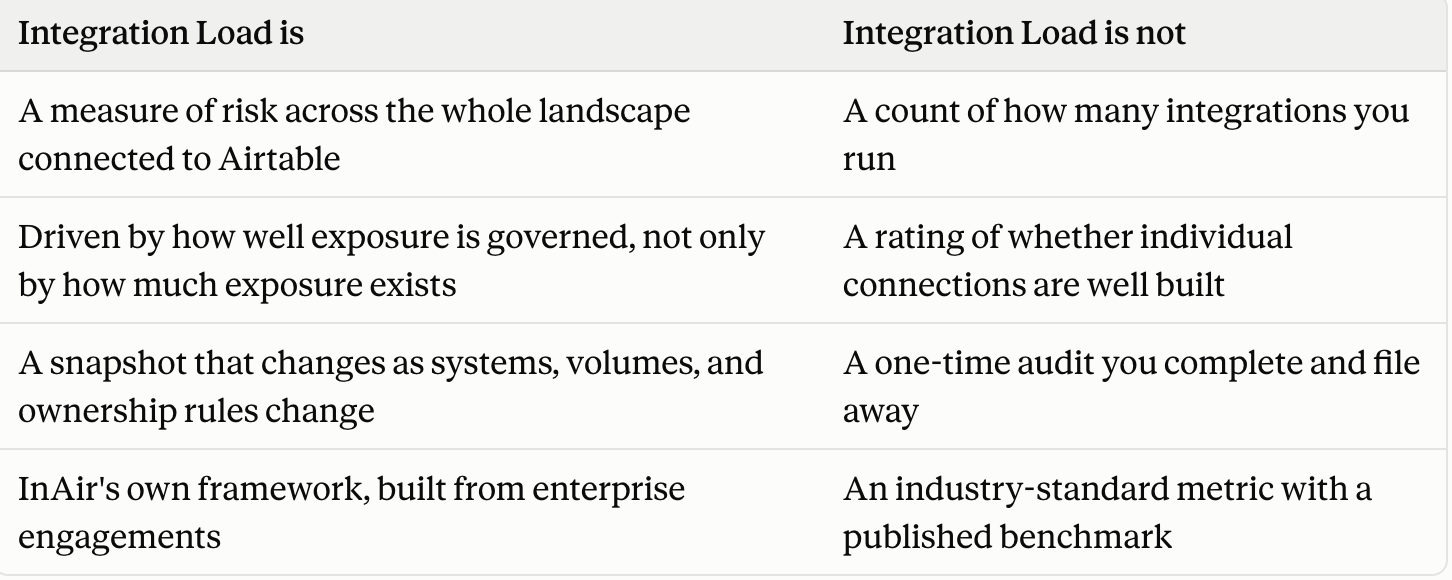
Integration Load is the combined risk an Airtable environment carries because of the systems connected to it. It's assessed through five factors: how many systems are connected, how often they update, whether field ownership is defined, whether incoming writes are validated before they commit, and whether failures are visible when they happen.
It's worth being clear about where the term comes from. Integration Load is InAir's own framework, not an established industry standard. The closest common language is "integration complexity," which people use loosely to describe a landscape that feels hard to manage, and it's rarely broken down into factors you can check. Integration Load fills that gap. It isn't a new industry consensus. It's a way to turn a vague warning into something a RevOps Director or systems architect can assess and act on.
Why Counting Systems Gets the Answer Wrong
The instinct is to measure integration risk by counting connections. That number matters, but treating it as the measure leads to the wrong conclusion in both directions. Picture two landscapes.
Landscape A connects two systems, a CRM and Airtable. Nobody has written down which one owns the phone number field, both systems write every few seconds, and every write goes straight into production with nothing checking it first.
Landscape B connects five systems: a CRM, a billing platform, a support desk, a BI tool, and Airtable. Every shared field has a named authoritative source, syncs only push records that changed, and every incoming write passes through a staging check before it touches a live record.
Landscape A has fewer than half the systems and carries far more risk. System count works like square footage in a building. More square footage means more area that could catch fire, but whether anything burns depends on the wiring, not the size. InAir breaks this down further in why more Airtable integrations doesn't mean more risk, and fewer doesn't mean you're safe.
The Five Factors of Integration Load
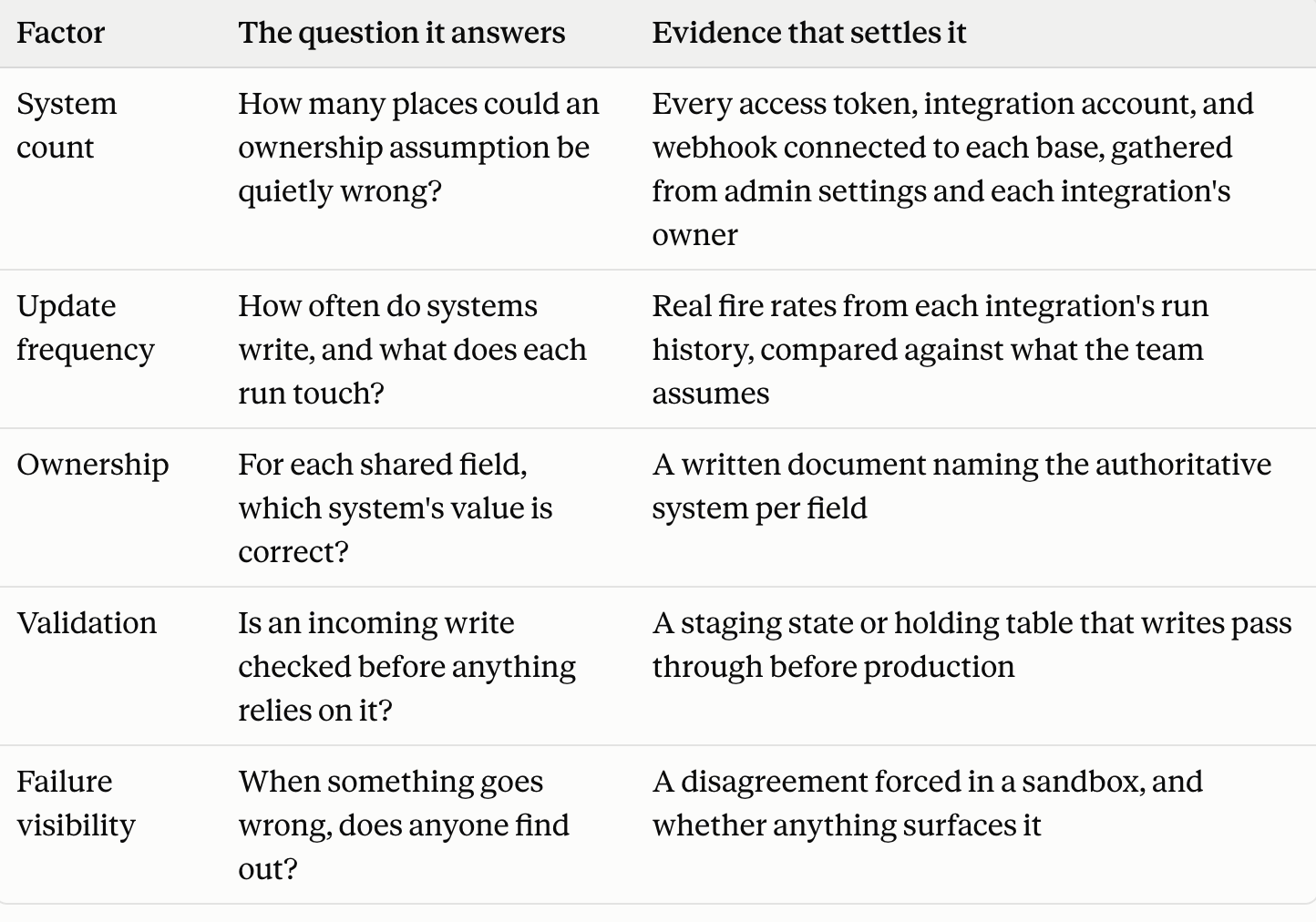
Each factor answers one question about the landscape, and each has a specific piece of evidence that settles it. If the evidence can't be produced, the honest answer is that the factor isn't handled.
1. System count
System count sets the baseline exposure. Every direction data can flow between two systems is a separate place where an assumption about shared data has to hold. In a peer-to-peer setup, where systems connect directly to each other, the number of those one-directional connections grows as N × (N−1). Five systems means up to twenty, and ten means up to ninety. A hub design, where each system connects only through a central point, keeps the growth linear. That's one reason the shape of a landscape matters as much as its size. InAir traces the peer-to-peer curve and what it does at scale in The Danger of Integration Glue.
Count from access records, not from memory. Forgotten automations and abandoned pilots often keep their access long after anyone uses them, so the real number is often higher than what a team can name.
2. Update frequency
Frequency fails quietly at both ends. Syncing every few seconds, when each run rewrites records whether or not they changed, means more write events, and each one is another chance to overwrite a value the other system just changed. Every one of those API requests also draws on Airtable's limit of 5 requests per second per base, a ceiling shared by every system calling the API.
Syncing less often reduces collision risk but creates a different failure: stale data. Suppose the CRM syncs to Airtable once a day and Airtable syncs to billing once a day on a different schedule. A CRM edit made at 10 am can then take nearly two days to reach billing, while every run reports success.
The workable middle for most landscapes, a sync every couple of minutes, holds up best when each run is limited to the records that changed since the last one. A sync that re-touches every record on every run spends the rate limit on records that didn't change. The trade-off is covered in depth in why update frequency changes your integration risk, even with zero errors [UNWRITTEN: Cluster 2.1.2].
3. Ownership
Ownership decides whether a disagreement between two systems has a defined resolution. When a CRM and Airtable both hold a customer's phone number and nobody has named which one is authoritative, the outcome depends on whatever the integration happens to do. Usually that means whichever write lands last overwrites the other, and nothing flags that a conflict happened.
InAir has already solved this inside a single base, restricting who can write each field to the department that owns it in How to Build a Data Responsibility Map in Airtable. Integration Load applies the same question one level up: not two departments inside one base, but the CRM versus Airtable across systems.
4. Validation
A validation step refuses to trust a write just because it arrived. The write lands in a pending state, a script checks it against defined rules, and only a pass moves it into the table other automations and reports depend on. A write that fails is flagged and routed for review, instead of sitting in production looking identical to a clean record.
The principle is well established in software architecture. Microsoft documents a version of it as the Quarantine pattern. It's written for software supply chains rather than data, but the mechanics carry over: an untrusted input waits in a separate space until a defined check marks it safe to use.
InAir built this for base-to-base sync as the Schema Validation Gate in Enforcing Data Contracts in Airtable. Third-party writes have no sync view to gate, so the same check runs on a holding table that incoming writes land in first.
5. Failure visibility
A mismatch that gets flagged can be fixed the day it happens. A silent one often gets discovered only when a report looks wrong, and nobody can say how long it's been wrong. What separates the two is whether failure has somewhere to go: a commit status on each record, and a dedicated table where failed writes stay visible until someone resolves them. InAir documents that pattern in Preventing Silent Failure Chains in Airtable Automations.
Exposure and Containment: The Two Roles the Factors Play
The five factors don't all do the same job. Three of them set how much could go wrong, and two decide whether a problem stays small when it happens.
- Exposure factors: system count, update frequency, and lack of validation. They determine how often a bad write or a conflict can occur.
- Containment factors: ownership and failure visibility. They determine whether a problem gets caught and resolved, or compounds for months.
A landscape can carry serious exposure and still be reasonably safe if containment is strong. Weak containment is dangerous even when exposure is low, because a single ownership conflict with nothing built to catch it can sit unnoticed indefinitely. So if you can only fix one thing first, fix containment. The reasoning behind that rule is set out in exposure vs. containment: the two kinds of integration risk.
Why the Factors Multiply Instead of Adding Up
It's tempting to treat each factor as its own small increment of risk, but they don't behave that way. More frequent writes raise the odds that a conflict over an unowned field actually occurs. That conflict raises the odds that an unvalidated write lands somewhere it shouldn't. And when failure isn't visible, each of those steps goes unnoticed long enough to make the next one more likely.
InAir describes a similar pattern inside a single base in What Breaks First at Enterprise Scale. It traces three stages of decay, from silent schema drift to a full governance freeze, where the decay is gradual and much of it happens silently. Integration Load compounds the same way, across systems instead of within one. That's also why a checklist that scores each factor on its own and adds up the results tends to understate the risk.
Two Ways High Integration Load Fails
Integration Load produces two kinds of failure, and they call for different responses.
Loud failures happen when something actively refuses to proceed. A burst of requests exceeds the rate limit, Airtable returns an HTTP 429, and the sender has to wait 30 seconds before its requests succeed again. A validation script finds a required field missing and holds the record in pending. Something stops in both cases, but the signal lands in different places. The 429 typically shows up in the sending system's logs, visible to whoever built the integration. The held record sits in Airtable, visible only to whoever checks that view. Neither place is necessarily where the person relying on the data is looking. Getting the signal to someone who can act on it is its own discipline, covered in alert ownership: making sure a loud failure reaches someone who can act on it.
Quiet failures happen when nothing refuses anything. A sales rep updates a customer's phone number in the CRM, and a support agent enters a different number in Airtable the same afternoon. Both writes succeed from each system's point of view, and now the two systems hold different values for the same field. Nothing compares them, so the difference usually surfaces only when a report, a customer, or an auditor forces the comparison, days or months later. The mechanism that catches these on purpose is described in building a cross-system agreement check.
High Integration Load makes both kinds more likely at once, which is why it can't be managed by watching one type of alarm. Loud failures at least leave a signal somewhere, even if it doesn't always reach the right person. Quiet failures leave nothing, which is why they're the ones that compound.
Integration Load Keeps Changing
A landscape's Integration Load isn't fixed the day it's assessed. Systems get added. A nightly batch becomes an hourly one because someone needed fresher data. An ownership rule that made sense with three systems stops making sense with six. ThoughtWorks makes the same point about evolutionary architecture, whose first principle is enabling incremental change in an architecture over time. An assessment is a snapshot, and it's only as current as the last time it was run.
Three events should trigger a fresh assessment:
- A new system is onboarded.
- A new system could plausibly write to a field that already has an owner.
- Any integration involved in ownership or failure detection is modified.
A working method for scoring each factor from evidence, and turning the result into a fix order, is in the Integration Load Scorecard.
Measure the Landscape, Not the Connections
Integration Load changes the question enterprises ask about their integrations. "Are they working?" gets a yes almost every time and tells you very little. "How much risk is the landscape carrying, and is it contained?" has an answer you can check, factor by factor, with evidence. Once that answer exists, the fixes stop being guesses: containment first, then exposure, then a schedule for checking again.
InAir does this work for enterprise Airtable environments: assessing Integration Load across a live landscape, then redesigning the ownership rules, validation gates, and failure routing it exposes, without breaking the flows already running. Schedule a Discovery Call with InAir to find out what your integrations are actually carrying.