
 ·
4 minute read
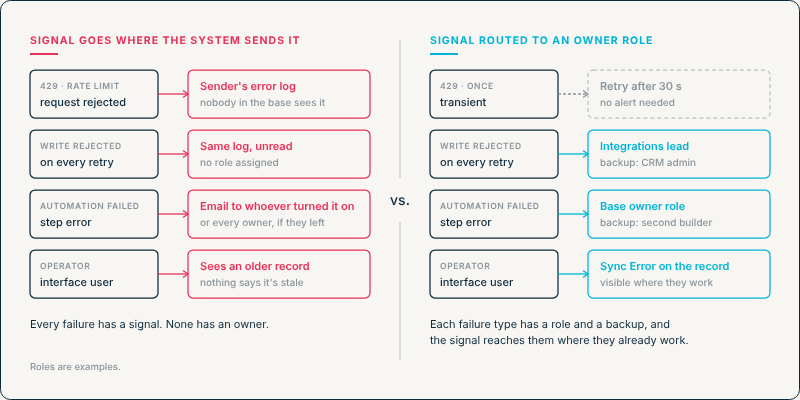
A loud failure feels like a solved problem. When a request is rejected with an HTTP 429, or a validation check holds a record back, something has clearly gone wrong, and a signal exists. But a signal only helps if it reaches someone who can act on it. In a multi-system landscape, each signal goes wherever the system that produced it sends signals, and that's often not where the person who can fix the problem, or the person relying on the data, is looking.
This post turns a question from InAir's guide to operating Airtable inside complex system landscapes [PILLAR 2], "visible to whom?", into a method for connecting each type of failure to a named owner. Failure visibility is one of the five factors in InAir's Integration Load framework, and this post covers the part of it that's easiest to overlook.
Why a Loud Failure Still Goes Unheard
In a single system, the person who sees an error is usually the person who can fix it. In a connected landscape, that stops being true. Three different people are typically involved, often in different departments:
- The admin of the sending system, such as whoever manages the CRM or the middleware. Depending on the system, they may or may not be alerted when a request to Airtable is rejected.
- The Airtable base owner or builder, who manages the base's automations and receives some of its failure notifications.
- The operator working in an Airtable interface, who relies on the data being current and usually sees none of these signals.
The operator carries the most risk and has the least visibility. When a sync from the CRM is throttled, the interface still shows a record. It's just an older version of it, and nothing on the screen says so.
Where Each Failure Surfaces Today
Before assigning ownership, it helps to map where each type of failure actually reports. Most landscapes have at least these four:
A few details in that table are worth knowing precisely.
Rate-limit rejections stay with the sender. Airtable allows 5 requests per second per base. A request over that limit gets a 429, and the sender has to wait 30 seconds before its requests succeed again. The rejection is returned to the system that sent it, and it isn't shown to anyone working in the base.
Airtable automation failures go to specific people. By default, a failed Airtable automation emails whoever turned it on. If that person has left the workspace, the email goes to every workspace collaborator with owner permissions instead. Neither may be the one who should act on it, so add subscribers. A subscriber needs Creator permissions or higher on the base (troubleshooting guide). Each automation takes up to 10 subscribers, and adding a service account lets a distribution list receive the alerts. Failure notifications only go out while the automation is on (managing automations).
That has a practical consequence. The interface operators who depend on the data usually don't have Creator permissions, so they can't be subscribed individually. A distribution list can reach them, but it sends that automation's failure emails to everyone on the list, whether or not a given failure affects their work.
Quiet disagreements have no signal at all. They're a different problem, covered in building a cross-system agreement check. This post deals with failures that do produce a signal that doesn't reach the right person.
"It's Logged" Isn't Ownership
A failure that's logged somewhere has a record, not an owner. Ownership means a specific role is responsible for acting on a specific type of failure, and everyone knows which role that is.
Assign ownership by role, not by person, and give each role a backup. People change jobs, go on vacation or leave. If ownership sits with one named individual, it disappears when they do. Airtable's own behavior shows the risk: when the person who turned an automation on leaves the workspace, its notifications go to all workspace collaborators with owner permissions. A message sent to everyone is easy for each person to assume someone else will handle.
The roles here are examples. The point is that every row has one.
Route the Signal to Where the Owner Works
Once each failure type has an owner, the signal needs to reach them without anyone going looking. The aim is to move the failure out of the place it happened and into the place the owner already works.
Inside Airtable, three patterns cover most cases:
- A status on the affected record. A field such as Sync Error or Commit Status marks the record itself, so anyone who opens it can see it's incomplete. How a commit status makes a half-finished automation run visible is covered in the partial commit problem.
- A shared failure table. Failed writes are recorded as rows, each with the error, a link to the affected record and a resolution status. The owner works from a filtered view of that table. InAir's version is described in Architecting for the Failure State.
- A notification when a record enters that view. An Airtable automation using the "When a record enters a view" trigger can message the owner in the tool they already use, such as Slack or email. Recipients are set by whoever builds the automation, so they don't need Creator permissions on the base.
For failures that happen in another system, like a 429, the fix sits in that system's error handling. It should notify the owning role directly, or record the failure somewhere the owner watches.
Good routing also decides what not to send. A single 429 doesn't need a person, because Airtable asks the client to wait 30 seconds and the retry usually goes through. A write that's rejected on every attempt does need one. Microsoft's Retry pattern draws the same line between transient faults worth retrying and faults that are unlikely to succeed if repeated. Alert on both, and the real failures end up buried among alerts that already fixed themselves, until the owner stops opening any of them.
An Ownership Test You Can Run
This test checks whether each failure actually reaches its owner, not just whether a signal exists somewhere.
- List each integration and each failure type it can produce. Use the table above as a starting point.
- Name the owner and backup for each one. If the answer is "whoever sees it," the row has no owner.
- Force a failure in a sandbox. Send a payload missing a field the base depends on. Or make a test automation fail while it's turned on, since Airtable only sends failure notifications for automations that are on.
- Confirm the owner received it, in the place they actually work, and note how long it took.
- Repeat after any change to an integration, an automation or the people in the owning roles.
This goes a step beyond the failure-visibility check in the Integration Load Scorecard. That check asks whether anything surfaces a failure. This one asks whether it reaches the person who's supposed to act on it.
A Signal Needs an Owner
A loud failure is better than a silent one, but only if someone hears it. In a connected landscape, the system that detects a failure, the person who can fix it, and the person affected by it are often three different parties. Closing that gap takes three things: know where each failure reports, assign every failure type to a role with a backup, and route the signal to where that role already works.
If you want to map where failures in your landscape actually go, and make sure each one reaches someone who can act on it, that's the work InAir does. Schedule a Discovery Call with InAir to find out what your integrations are actually carrying.