
 ·
5 minute read
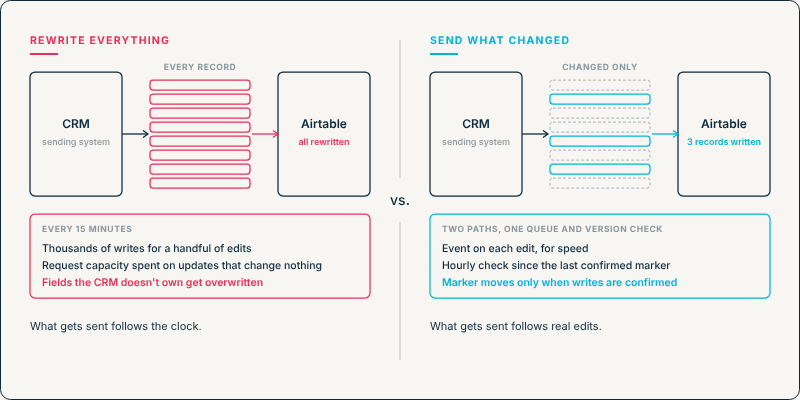
Deciding that a sync should send only the records that changed is the easy part. The work is in knowing, on every run, exactly which records those are, and in not losing one when a request fails halfway through.
InAir's guide to running Airtable inside complex system landscapes describes the problem this solves: a CRM that rewrites every customer record every fifteen minutes, overwriting fields it doesn't own and spending the base's request capacity on updates that change nothing. The fix it names has two forms, an event-based trigger and timestamp validation, and both run on the sending system. This post is about building them.
Why the Check Belongs on the Sending System
Airtable has no way to know which records changed in another system, so the sending system has to decide what to send. That also keeps the comparison simple. Timestamp validation compares two times that both come from the sending system: when a record was last updated there, and when it was last sent to Airtable successfully. Airtable's own last-modified time plays no part in deciding what to send.
Method 1: Send on the Edit
An event-based sync is triggered by a change to a field the sender owns. The edit itself is the signal to send the record.
It's the more immediate of the two methods, and it needs care at the receiving end, because events don't always arrive the way they were produced. Stripe's webhook documentation is a clear example of what to plan for. It states that Stripe "doesn't guarantee the delivery of events in the order that they're generated", that an endpoint "might occasionally receive the same event more than once," and that failed deliveries are retried "for up to three days with an exponential back off in live mode." Other systems behave differently, so check the documentation of the one you're connecting.
For a sync into Airtable, that leaves two things to build and one gap to cover:
- A way to handle late and repeated events. An older event can arrive after a newer one. Comparing the record's version number (or, where the system has none, its last-updated time, with a rule for ties) with the last one applied in Airtable keeps an older event from overwriting newer data. How to build that check is covered in out-of-order updates.
- A queue in front of Airtable. A bulk edit in the sending system can produce hundreds of events at once, and Airtable's API allows 5 requests per second per base, with a 30-second wait after a 429 response. A queue lets events arrive as fast as they're produced and go out at a rate the base can take. InAir's guide to creating operational resilience in Airtable covers the buffer and the batching.
- A way to catch events that never arrive. An event can fail every retry, or never be emitted at all, and nothing in the event path will notice. The scheduled check in Method 2, run alongside, is what catches those edits.
Method 2: Check on a Schedule
Timestamp validation keeps the schedule but changes what each run does. Before sending anything, the sync asks the sending system for the records updated since its last successful run, and sends only those.
The detail that decides whether this is reliable is when that "last successful run" time is recorded. A dependable version works like this:
- Record the run's start time, as the sending system reports it, before querying for changed records.
- Query for records updated at or after the stored time from the previous successful run.
- Send them to Airtable in batches. Airtable's API handles up to 10 records per request.
- Store the start time from step 1 as the new marker once every write in the run is confirmed. If a write fails, the marker moves less far, as described below.
A record edited while the run is in progress has an update time later than the start, provided the sending system sets that time when the change is saved, so the next run picks it up. Saving the finish time instead would skip that edit until the record changes again.
If a request fails partway through, the marker doesn't move to the run's start time. It moves only as far as the earliest update time among the records that weren't confirmed, so those records, and anything updated after them, are sent again on the next run with their current values. Records that were confirmed and come round again are written with the same values, which changes nothing. With the version check from Method 1 in place, those writes are skipped altogether.
Using Both
The two methods cover each other's gaps. Events keep Airtable close to current, and a scheduled check running less often, every hour for example, sends anything changed since its marker, which includes any edit whose event was lost. Both paths go through the same queue and the same version check. Anything the check finds that already arrived by event is skipped, and once both paths pass through that check, an older version can't replace a newer one, whichever path it came from.
What Neither Method Sees
Change detection answers one question: which records changed in the sending system. A few things fall outside it, and each needs its own handling.
- Deletions. A permanently deleted record has no update time to compare, so timestamp validation never sees it. Once the record is gone, nothing is left to read, so the sending system has to report the deletion separately, through a delete event that identifies the record that was removed.
- Changes that don't update the timestamp. If any process in the sending system can change a record without updating its last-modified time, that change is invisible to the query. It's worth confirming which timestamp the system updates, and when, before relying on it.
- Edits made in Airtable. Where the sender owns a field, someone can still change it in Airtable. The next send sets it back, but only when that record next changes in the sending system. Finding those differences in the meantime is the job of a cross-system agreement check.
Each Send Still Carries Every Owned Field
Sending fewer records doesn't mean sending fewer fields. When a record is sent, it carries every field the sending system owns, not just the one that changed, so an owned field that was altered in Airtable is set back to the sender's value. A field both systems legitimately write has no single owner, so it needs a conflict rule rather than an overwrite. Cross-System Source of Truth covers that rule and how to decide ownership. Fields the sender doesn't own are left out, and the request is a PATCH, which updates only the fields included in the request.
This is also why change detection lowers a landscape's Integration Load. The framework measures update frequency by what each sync actually sends, and the cost of a run depends on how many records it writes, as Why Update Frequency Changes Your Integration Risk [DRAFTED, NOT LIVE: Cluster 2.1.2] works through in numbers.
How to Tell It's Working
In a sandbox, run four checks:
- No changes, no writes. Run the sync with nothing edited in the sending system. It should write nothing to Airtable.
- One change, one record. Edit one field on one record. The next send should contain that record only, with every field the sender owns.
- An edit during a run. Edit a record after a scheduled run has queried for changes but before it finishes. It should arrive on the following run.
- A failed write. Make one batch fail, for example by sending a value the field can't accept. The marker shouldn't move past the failed records, and they should be sent again on the next run once the cause is fixed. Records that were already confirmed should be skipped.
If all four pass, what the sync sends follows real edits in the sending system, not the clock.
If you want to find out which of your syncs are still rewriting every record, and switch them over without interrupting the data they carry, Schedule a Discovery Call with InAir and we'll work through them with you.