
 ·
5 minute read
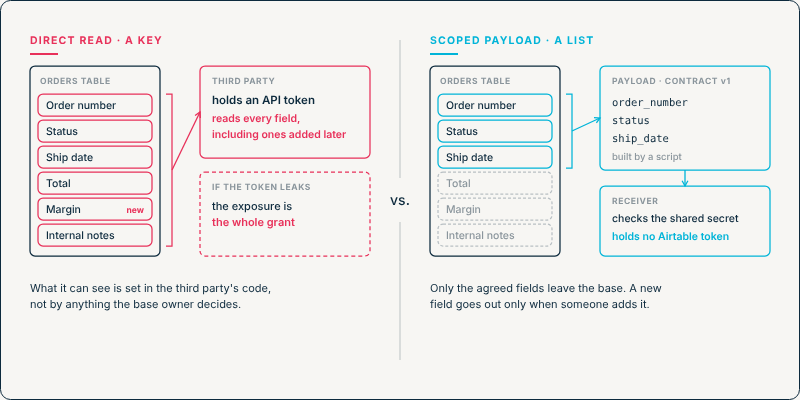
When a third-party system reads from Airtable through the API, its reach is set by the token's scopes and bases, not by what it needs. Whatever the table holds today, it can read. Whatever the table holds next year, it can read too, without anyone deciding that it should.
A scoped payload reverses that. Airtable sends the system a deliberately built message containing only the fields both sides agreed on, and nothing else goes to that system. This post covers what a direct read actually grants, what happens to it as the schema changes, how to build the outbound version, and how to write the contract that defines it.
InAir's guide to running Airtable inside complex system landscapes describes the difference as a list versus a key. This post is about building the list.
What a Direct Read Actually Grants
Access to the Airtable Web API runs through tokens. A personal access token is defined by its scopes, such as data.records:read, and the bases or workspaces added to it. Airtable documents no setting that limits a token to particular tables or fields.
What comes back from a read is wide by default. Airtable's List records endpoint returns only the fields named in its fields parameter when one is given. Neither of these is a flaw in the API. They mean that the decision about what a third party can see sits in the third party's code, which the base owner usually can't see and doesn't maintain.
What Changes When the Schema Does
A direct-read integration is built against the table as it was on the day it was set up. Three ordinary changes alter what it gets.
- A field is added. An integration that requests all fields picks up the new one as soon as it holds a value. A margin field, an internal risk score, or a notes field written for colleagues reaches the third party without anyone touching the integration.
- A field is renamed. The API keys fields by name unless the client asks for field IDs with returnFieldsByFieldId, so code that looks for a field by its old name stops finding it. Whether the integration then errors or quietly treats the value as empty depends on how it was written.
- A field changes type. A single select converted to a multiple select returns an array where the code expected a string, and a text field converted to a linked record field returns record IDs in place of the text.
None of these changes involves the integration, so none of them prompts anyone to check it. This is the same dependency problem traced in Blast Radius, seen from outside the base: the external reader is a consumer that Airtable's own dependency list doesn't show.
The Scoped Payload Pattern
The replacement turns the direction around. Instead of the third party pulling from the base, Airtable pushes a defined message to the third party.
- A trigger decides when data goes out. For actions a person should confirm, Airtable’s When a button is clicked trigger runs an automation from a button element in an interface. For data that should go out on its own, a record-based trigger such as a record entering a view does the same job. For data that should go out on a schedule, an At a scheduled time trigger can run the automation, and the script loops through the records in a view filtered to what the receiver should get, as long as each run stays within the script action’s time and fetch limits. If the external system does need to decide when it gets the data, it can send a request to an automation with a When webhook received trigger, including filter parameters that narrow the request further, such as a shared unique identifier, a date range, or a status. The script checks those parameters against what the contract allows, finds the matching records, and sends the payload to the receiver’s endpoint in a separate request, since the webhook’s response to the caller can’t carry the data back.
- A script builds the payload. Airtable automations don't have a native action for sending HTTP requests, so the outbound call is made from a Run a script action using fetch(). The script reads the record, picks out the agreed fields, and maps them to the contract's own keys.
- The receiving endpoint checks the sender. The script reads a shared secret stored as an automation secret, so the value isn’t visible in the script editor or the run history, and sends it in a request header. The receiver rejects any request whose header doesn’t match. The script below sends the secret itself. A stronger setup uses the secret to sign each payload instead, which also lets the receiver confirm the payload hasn’t been changed on the way, but that takes code not shown here.
Three details in that script do most of the work. The record query names its fields, so the script never loads anything outside the contract. The payload uses the contract's keys (order_number, not the Airtable field name), so a field rename in Airtable never reaches the systems that receive the data. And a rejected request throws an error, so it shows up as a failed run in the automation's run history instead of passing as a success. The example uses field names for readability. In production, reference fields by their IDs (fld…) so a rename in Airtable doesn't break the script itself.
InAir's guide to controlled interface pathways covers the interface side of this, where webhook-gated actions are one of several controls on what leaves the base. The Canonical Reference Architecture places the same logic in a dedicated integration layer, so a change on the partner's side means updating that layer rather than the base.
Writing the Payload Contract
The script implements the contract. The contract itself is a short document both sides agree to, and it needs to answer five things.
- Which fields, under which keys. Each field in the payload has a stable key that belongs to the contract, not to either system's schema.
- What type and format each value takes. Dates as ISO 8601 strings, currency as numbers in a stated unit, single selects as their option names. A value the receiver can't parse is a contract violation, and naming the format up front is what makes it one.
- How empty values are sent. A key sent as null and a key left out can mean different things to a receiver. The contract picks one, and the script sends it consistently.
- When a payload is sent. On a button click, on a status change, on a schedule. The receiver needs to know whether silence means "nothing changed" or "something is wrong."
- How the contract changes. A version number in every payload, and an agreed rule: adding an optional key doesn't need a new version, while removing a key or changing a type does.
Adding a field to the Airtable table changes none of this. Once the direct access is removed, a new field reaches the third party only when someone adds it to the script, and the contract is where that decision is written down. A direct read never asks anyone to make it.
What a Misconfigured or Compromised Integration Can Reach
The same design limits the damage when something goes wrong on the receiving side. A token held by a third party can read whatever its scopes and bases allow, through any endpoint those scopes cover, for as long as it stays valid. If that token leaks, the exposure is the whole grant.
A scoped payload leaves no Airtable token on the third-party side. The receiver holds only what it was sent: a set of agreed fields, for records Airtable chose to send. That is the principle NIST calls least privilege: restricting access "to the minimum necessary to accomplish assigned tasks." OWASP's API security guidance makes the same point about API responses, recommending that you cherry-pick the properties you return instead of serializing whole objects.
The shared secret still needs the same care as any credential. Stored as an automation secret rather than written into the script, it isn't visible to everyone who can open the automation.
Moving an Existing Integration Over
An integration that already reads directly can be moved without a cutover weekend.
- List what it actually uses. Ask the third party which fields their code reads, and check it against their request logs if they can share them.
- Write the contract for those fields only, with the five answers above.
- Build the automation and run it alongside the existing read until the receiver confirms the payloads match what it expects.
- Revoke the token, or remove the base from it if other systems use it, once the receiver has switched over. Until then, the old reach remains.
The fourth step is easy to skip, because nothing breaks when it is. Every token with access to a base adds to Integration Load, whose first factor, system count, is measured from that list of tokens, service accounts and webhooks. A direct reader left in place after the payload goes live is one more entry on it.
If you want to know which systems can read your bases today, and replace the widest of them with payloads you control, Schedule a Discovery Call with InAir and we'll map them with you.