
 ·
11 minute read
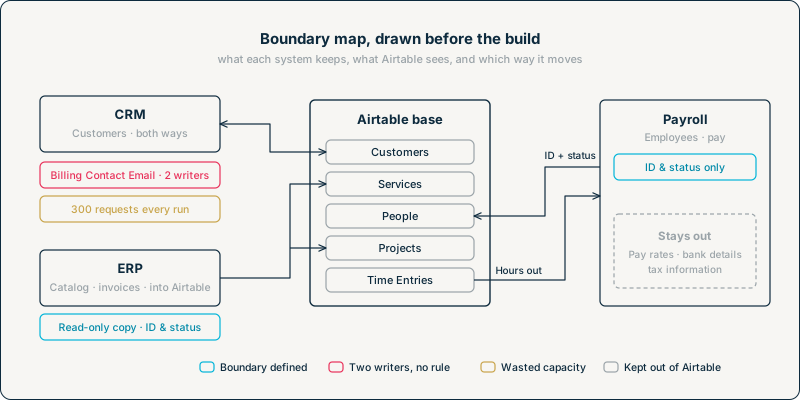
A services company runs its delivery work in one Airtable base: projects, the people assigned to them, and the hours they log. Two connections already feed it: a CRM integration brings in customers, and middleware brings in the ERP's service catalog and invoice statuses. Each was reasonable when it was requested, and each was built on its own, in the order the requests arrived.
The result is a billing contact email that delivery leads edit in Airtable and the CRM integration overwrites every five minutes, an integration that rewrites every customer on each of those runs, and two integrations sharing one base’s request limit and one account without anyone having added them up.
Now HR wants approved hours to go from the base to the company’s payroll system without the twice-monthly CSV export, and wants employee records to come back from payroll into the base instead of being typed in by hand. If that two-way connection is built like the first two, without anyone first deciding which payroll fields the base needs, whoever sets up the inbound side could map pay rates and bank details into the base along with the Employee IDs and statuses the base actually uses.
None of that is a build problem. It comes from not mapping system boundaries before the build: deciding, for each system, what it keeps, what Airtable sees of it, which system has the final say on anything they share, and what moves between them, how often and by what route. InAir's guide to running Airtable inside complex, high-volume system landscapes describes what this map feeds into once the build starts. This post covers what the map records, how to fill it in from evidence rather than memory, a one-page template, and the services company's map as a worked example.
What the Map Records
The map has one row per connected system and, under it, one row per shared field. For each system, it answers five questions.
1. Where the information lives
List the kinds of information the system holds: customers, products, invoices, employees, projects. For each one, decide where it lives and how much of it Airtable needs. There are four answers, and most landscapes use all of them.
|
Boundary |
What Airtable holds |
Typical case |
|---|---|---|
|
Lives in Airtable |
The full record. Airtable is where it's created and maintained. |
Projects, assignments, internal workflow |
|
ID and status only |
The other system's ID for the record and the one or two values a workflow acts on |
An employee's payroll record, an invoice's payment status |
|
Read-only copy |
The fields people need to see, which nobody in Airtable edits |
A product catalog with prices, maintained in the ERP |
|
Shared field by field |
Some fields owned by Airtable, others by the other system |
A customer record the CRM creates and the delivery team enriches |
The first decision is easy to skip, because copying everything feels safer than choosing. InAir's post on best-of-breed integration strategy makes the case for the second row with a payroll example: "Airtable does not need to store the employee's tax bracket, social security number, or bank routing details," and "It only needs to store the employee's unique ID and their operational status." Every field copied into Airtable is one more field to keep current, one more field someone can edit by accident, and one more place sensitive data can be exported from. The question for each kind of information is what the workflow in Airtable actually reads, not what might be useful one day.
2. Which system has the final say on each shared field
Every shared field needs one system named as the one whose value is correct: the ID and status values in the second row of that table, every field in a read-only copy, and every field in the last row. The map records the answer, field by field. How to make the decision, and what to do when two systems genuinely both need to write a field, is the subject of Cross-System Source of Truth.
Record it per field, not per system. “The CRM is the source of truth for customers” holds only while Airtable’s copy is strictly read-only. Once someone in Airtable needs to record the delivery lead’s name, which the CRM doesn’t know, that field has a different owner, and a rule written per system will let the CRM’s next run overwrite it with a blank.
3. What moves, and which way
For each shared field, record its direction: into Airtable, out of Airtable, or both. A field that moves both ways is a field two systems write, so it goes back to question 2 for a rule. Record the route as well: the CRM writing through Airtable's API with a token, an automation in the base posting to the ERP, a one-way Airtable sync, a person pasting values between tabs. The route decides who can see a failure and what limits apply.
4. How often it moves, and how much it sends
Record whether each connection runs when something changes, on a schedule, or by hand, and whether each run sends only the records that changed or every record every time. The second half is the one that costs capacity.
Airtable's API rate limits set two ceilings. The API is limited to 5 requests per second per base, and every integration that calls a base through the API shares that base's five. Separately, there is a limit of 50 requests per second for all traffic using personal access tokens from a given user, which also covers service accounts, so integrations that run on the same account share fifty across every base they reach. Requests that exceed either limit get a 429, and the integration must wait 30 seconds before its requests succeed again.
That's why the map records volume, not just frequency. Airtable's endpoints for creating and updating records take up to 10 records per request, so an integration that rewrites 3,000 customers every five minutes sends 300 requests a run. At 5 requests per second, that's at least a minute of the base's capacity in every five, spent mostly on records that didn't change, and every other integration using the base competes with it for what's left. An integration that sends only changed records might send three.
5. What still moves by hand
Exports, values re-typed from one tool into another, status updates sent by email or chat. These are part of the boundary even though no integration carries them, and they're often where the next integration request comes from. Record what moves, who moves it, how often, and what happens when that person is away. Some will become integrations. Others are better left manual with a named owner, and the map is where that's decided on purpose.
Filling It In From Evidence
A map built from a meeting records what people remember, and that's often a version of the landscape from a year ago. Each answer should come from a conversation with the system's owner and then be checked against something that can't forget.
Questions for each system's owner:
- What kinds of information does your system hold that Airtable or its users touch, read or ask about?
- For each one, what do people working in Airtable actually do with it? Read it, act on its status, edit it?
- Which fields does your system change after Airtable has a copy, and which does it expect Airtable to send back?
- What connects your system to Airtable today, under whose account, and on what schedule?
- What do people still copy, export or email between your system and Airtable, and how often?
- When the two systems disagree on a value today, how does anyone find out, and who fixes it?
Evidence to check the answers against:
- Tokens. Each person’s personal access tokens are listed in their own token panel, where each token’s detail page shows the scopes, bases and workspaces it was granted, and on Business and Enterprise Scale plans an admin can also see every user’s tokens in the admin panel’s user details, though not every detail of each token’s scopes. On Enterprise Scale, integrations can also run on service accounts that admins create and manage, and the admin panel shows which workspaces and bases each one can access, so check their tokens the same way. A token granted the whole workspace reaches this base without naming it. Ask everyone with access to the base to check theirs, starting with its creators, and to list any tools they’ve connected to it by signing in with Airtable, which authorizes through OAuth rather than a token. A token nobody can explain is a connection nobody mapped.
- Webhooks. There are two types of webhooks in Airtable that need to be checked here: base webhooks are created through Airtable’s Webhooks API with a personal access token, and the list webhooks endpoint returns, for each one, the specification of what it watches and the URL its notifications go to, if one was registered. A webhook with no URL is still a connection, since something has to call the API to read its payloads, and because a webhook created with a token expires after seven days unless it’s refreshed, one that’s still active means something has been looking after it within the last week. Webhook subscriptions registered by tools connected through OAuth work the same way, but according to Airtable’s Webhooks API guide, each OAuth integration can create up to two webhooks per base and can only access its own, so record them against the tool that created them. The third kind runs the other way: an automation with a When webhook received trigger gives another system a URL to post to, so inbound connections that don’t write through the API show up in the automations list instead. Automations can also reach other systems without any webhook, from a Run a script action or through built-in actions such as Slack or Jira, so search script code for outbound requests and check each automation’s action types as well.
- Automation run history. Each automation's run history shows when it actually ran. An automation described as nightly that shows runs every few minutes is a different frequency on the map.
Synced tables and sync sources. A synced table’s settings show where it syncs from. In the other direction, the base you’re mapping shows its own sync-outs: the views and fields shared to other bases appear in its field manager, so list each one there and ask the owner of each destination base what they use it for. - The other system's logs. Many CRMs, ERPs, and middleware tools keep their own record of API calls or scheduled jobs. That's where the number of requests per run comes from, and whether each run sends everything.
Where the evidence and the owner's answer disagree, the evidence wins, and the disagreement goes on the map as a finding. For a landscape that has already been running for years without any record of its connections, InAir's guide to unmapped architecture covers the forensic version of this step, starting with "Do not modify any tables until you identify who is querying the database."
The One-Page Template
The map fits on one page as two tables. The first has a row per connected system.
|
System |
Business owner |
Technical owner |
Kinds of information |
Boundary for each |
Route |
Direction |
Frequency |
Changes only? |
Requests per run |
Still moved by hand |
Checked against |
|---|
The second has a row per shared field, which includes every ID and status value, every field in a read-only copy and every field shared field by field.
|
Field |
Airtable table |
Systems that write it |
Final say |
Direction |
Frequency |
Rule when they disagree |
Validated before production? |
|---|
"Systems that write it" is the column that matters most. A field with one writer needs no conflict rule, though it may still need validation. A field with two writers needs a rule in the next column, and the build can't start until it has one.
Filled in, the map answers three of the five factors in the Integration Load framework before anything is built: how many systems are connected, how often they update, and whether ownership is defined. It also records where validation is needed. How that validation works, and how failures become visible, are decisions for the build.
Worked Example: A CRM, an ERP and Payroll Around One Base
The services company's base holds Projects, Assignments and Time Entries, plus the Customers, Services and People tables that other systems feed. Three systems surround it. To fit the page, the tables below leave out the owner and evidence columns, and the field table leaves out frequency, which each system row already shows, and lists Service Rate as the one example from the catalog.
The system rows
|
System |
Kinds of information |
Boundary |
Route |
Direction |
Frequency |
Changes only? |
Requests per run |
Still moved by hand |
|---|---|---|---|---|---|---|---|---|
|
CRM |
Customers |
Shared field by field |
CRM integration through the API, on a shared integration account |
Both |
Every 5 minutes |
No, all 3,000 customers |
300 |
Delivery leads email account managers when a project starts |
|
ERP |
Service catalog and rates; invoices |
Read-only copy (catalog); ID and status only (invoices) |
Middleware through the API, on the same integration account |
Into Airtable |
Nightly (catalog); hourly (invoices) |
Catalog: no, all 800 items. Invoices: yes |
80 nightly; usually under 5 hourly |
Finance re-types each project's start date and service into the ERP |
|
Payroll |
Employees; pay |
ID and status only (employees); stays out (pay) |
None yet, all by hand |
Both: Employee ID and status in, approved hours out |
As staff change (employees); twice a month (hours) |
n/a |
n/a |
HR types new Employee IDs and status changes into People, and exports approved Time Entries as CSV and re-types them into payroll |
Three findings come out of the rows before any field is examined. The CRM integration spends 300 requests every five minutes on 3,000 customers, most of which haven't changed, and it shares the base's 5 requests per second with the ERP middleware. Both run on the same integration account, so they also share its 50 requests per second across every base that account reaches. And the payroll connection, which started this round of work, is the only one that still runs entirely by hand, next to the most sensitive system in the landscape.
The shared field rows
|
Field |
Airtable table |
External System |
Final say |
Direction |
Rule when they disagree |
Validated before production? |
|---|---|---|---|---|---|---|
|
Customer Name |
Customers |
CRM |
CRM |
Into Airtable |
n/a, one writer |
No |
|
Account Owner |
Customers |
CRM |
CRM |
Into Airtable |
n/a, one writer |
No |
|
Delivery Lead |
Customers |
Airtable |
Airtable |
Out to CRM |
n/a, one writer |
No |
|
Billing Contact Email |
Customers |
CRM, and delivery leads in Airtable |
Undecided |
Both, today |
Needed: delivery leads currently overwrite it |
No |
|
Service Rate |
Services |
ERP |
ERP |
Into Airtable |
n/a, one writer |
No |
|
ERP Invoice ID |
Projects |
ERP |
ERP |
Into Airtable |
n/a, one writer |
No. Needed: arrives with Invoice Status on the same feed, so it goes through the same project and customer check |
|
Invoice Status |
Projects |
ERP |
ERP |
Into Airtable |
n/a, one writer |
No. Needed: arrives keyed by project ID, which must match exactly one project for the same customer as the invoice |
|
Employee ID, Employment Status |
People |
Payroll (typed in by HR) |
Payroll |
Into Airtable |
n/a, one writer |
No |
|
Approved Hours |
Time Entries |
Airtable |
Airtable |
Out to payroll |
n/a, one writer |
No. Needed on the payroll side before hours are paid |
Billing Contact Email is the row the build can't start without. Delivery leads edit it in Airtable when a client tells them on a call, the CRM integration rewrites it from the CRM every five minutes, and whichever wrote last is what the next report shows. The map doesn't decide which value is right. It shows that someone has to, using one of the options in Cross-System Source of Truth: timestamp priority, a source-of-record hierarchy, or a reconciliation queue.
How the Finished Map Shapes the Build
What stays out of Airtable. Pay rates, bank details, and tax information stay in payroll. Airtable gets Employee ID and Employment Status, which is all the assignment workflow reads. The Approved Hours that go out need a route that sends hours keyed by Employee ID and nothing else, so the base never needs the rest of the payroll record to make the connection work.
Which fields need a written rule? Every field with more than one writer; here, only Billing Contact Email needs a conflict rule. The rule can give the CRM the final say, have delivery leads send changes to the account owner, keep whichever value was written most recently, or send disagreements to a reconciliation queue for someone to settle.
If the rule gives the CRM the final say, delivery leads stop editing the field in Airtable, and it becomes read-only there, like Employee ID and Employment Status. Either way, the rule is written down before the connection that would enforce or break it is built.
Which connections need a validation step? Any connection where a bad value would reach something people act on before anyone could spot it. Here the clearest case is the invoice feed: an invoice whose project ID matches no project has nowhere to land and needs to be held rather than dropped.
Writes as that go to a staging table first, as in Building a Staging Layer for Third-Party Webhooks, and a script checks them before they reach production, as in Designing a Validation Script. The read-only catalog can skip the gate if the ERP already checks rates before they're published, so that the realistic failure is a run that doesn't happen and leaves yesterday's rates in place. That's a call the map makes visible rather than one it makes for you.
What each connection is allowed to send. The CRM integration moves to sending only customers that changed since its last successful run, which takes it from 300 requests a run to a handful, and the catalog does the same nightly. With both on one integration account, they also share that account's 50 requests per second, and the Billing Contact Email lock can't hold until the CRM integration writes as an account of its own, so the map points to splitting them.
What happens to the manual steps? The project start email becomes a project status field going out to the CRM alongside Delivery Lead, which already does, and it gets its own row in the shared field table before it's built. Finance's re-typing of start dates and services becomes a question for the ERP's owner: whether the ERP should read them from Airtable, or whether this is one handoff to keep manual with a named owner. The CSV export to payroll becomes the route described above: approved hours keyed by Employee ID, with nothing else from the payroll record in the base.
Once the connections are built, the map doesn't get filed away. Its system rows and shared field rows become the starting entries in an integration registry, one per integration, which adds each one's contract and keeps the record current as the landscape changes, and every new connection request starts by adding its rows to the map before anyone builds anything.
If you'd like help drawing that map for your own systems before the next connection goes in, Schedule a Discovery Call with InAir.