
 ·
3 minute read
·
3 minute read
When an organization discovers the rapid development speed of Airtable, the immediate temptation is to build everything inside it. If you can build a CRM in an afternoon, why pay $150 a seat for Salesforce? If you can track tasks effortlessly, why not build a complete Enterprise Resource Planning (ERP), double-entry accounting ledger, or Human Resources Information System (HRIS) entirely from scratch?
This is known as the All-in-One Trap.
While Airtable can handle a huge variety of business processes, it lacks the specialization necessary for certain highly technical aspects of business, which are best left in the hands of dedicated tools. The correct enterprise approach is a strict division of labor: Airtable acts as the orchestrator and intake surface, while specialized software acts as the execution engine—connected programmatically, with zero data duplication, a core principle of scalable, secure enterprise Airtable systems.
1. The Dangers of the All-in-One Trap
-
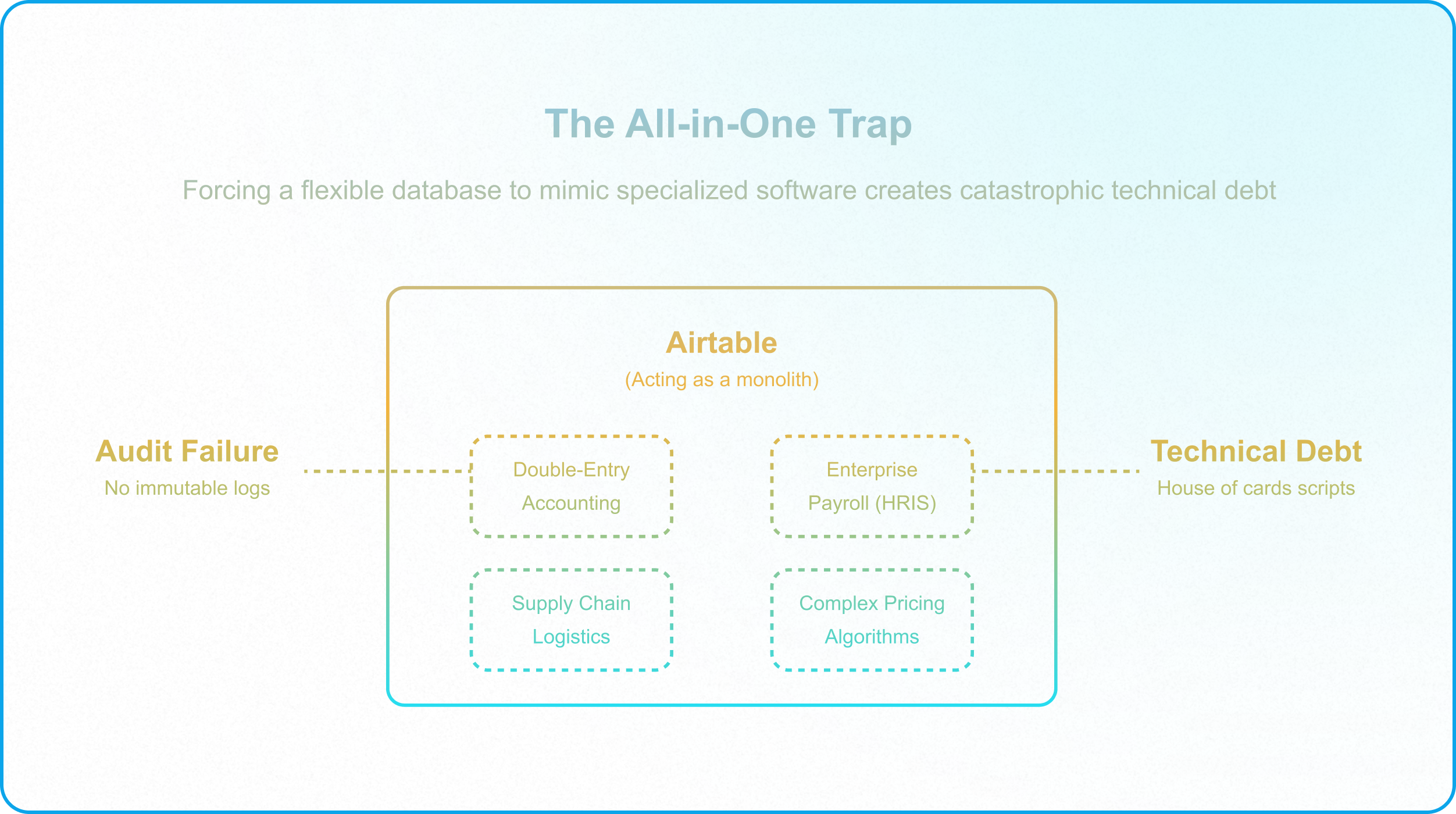
Airtable is a highly flexible relational database, not a specialized execution engine. The exact feature that makes Airtable so powerful—its absolute structural flexibility—becomes its greatest weakness when applied to heavily regulated or mathematically complex workflows.
Forcing a flexible database to mimic a highly regulated ERP environment or a strict payroll system can lead to two devastating outcomes:
- Catastrophic Technical Debt: Consider a citizen developer attempting to build double-entry accounting in Airtable. To enforce ledger balance (assets = liabilities + equity), they must string together dozens of Rollup fields, complex Scripting blocks, and self-referential automations. Every time the business logic changes or a new tax code is introduced, the entire house of cards must be manually refactored. You will spend hundreds of expensive engineering hours writing custom scripts to handle deprecation schedules, foreign currency conversions, or supply chain logistics that dedicated software (like NetSuite or Xero) handles natively out-of-the-box.
- Non-Compliance and Audit Failure: Flexible platforms are inherently difficult to lock down to the rigid standards required by SOC2, HIPAA, or federal payroll regulations. Airtable allows operators with Base access to modify schema, delete records, or alter view configurations. When managing financial ledgers or un-anonymized medical data, this level of flexibility is an instant audit failure. Dedicated platforms have built-in, unalterable compliance trails and immutable logs that Airtable simply is not designed to replicate at the schema level.
2. The Specialization Threshold
To protect the architecture, systems managers must establish strict governance rules that dictate exactly when a workflow must be pushed outside of the Airtable ecosystem. This boundary is known as the Specialization Threshold.
A workflow has crossed the Specialization Threshold and requires dedicated external software when it demands:
- Rigid, Industry-Specific Functionality: Managing complex supply chain logistics, multi-currency double-entry accounting, or enterprise payroll distributions. These systems require "enforced rigidity," the exact opposite of Airtable's core value proposition.
- Heavy Regulatory Compliance: Handling raw credit card numbers (PCI compliance), managing un-anonymized medical histories (HIPAA), or storing government identification numbers. Airtable is highly secure, but storing regulated data often requires specialized HIPAA-compliant vault storage and certified access logs.
- Hyper-Complex Math: Running massive pricing algorithms, machine-learning forecasts, or Monte Carlo simulations that would instantly exceed Airtable's strict automation execution timeouts and memory limits.
3. The Best-of-Breed Integration Strategy
Instead of attempting to rebuild complex software from scratch, enterprise architects must establish a strict division of labor through a Best-of-Breed Integration Strategy.
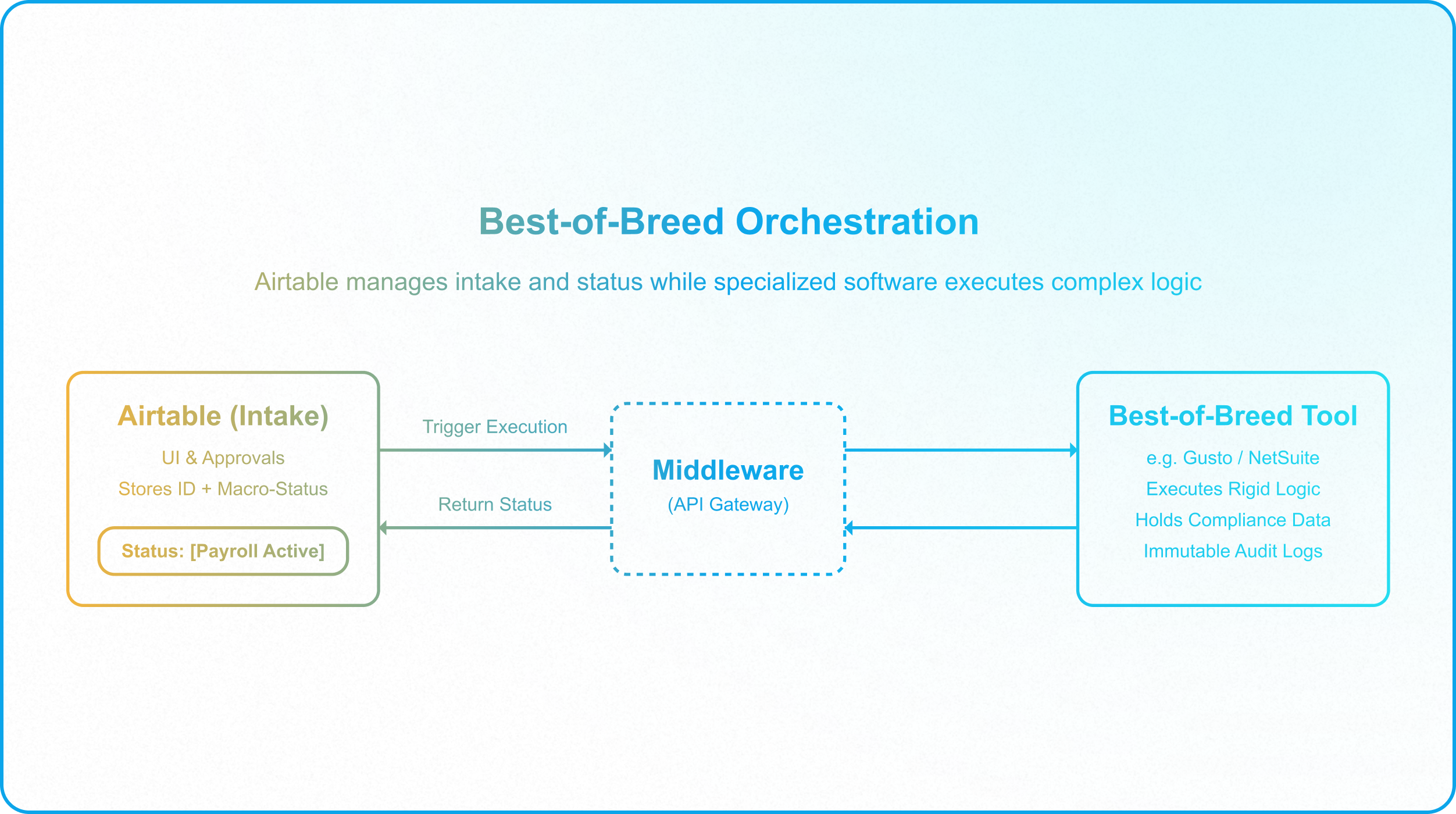
In this architecture, Airtable does not execute the specialized work; it orchestrates it. You pair Airtable's unmatched intake and relational capabilities with the specialized execution of tools like Workday, NetSuite, or Zendesk.
The Division of Labor in Practice
Consider an enterprise onboarding process that requires provisioning payroll and benefits in Gusto:
- The Intake (Airtable): Airtable serves purely as the front-end intake mechanism. It captures the raw employee request via an Airtable Form or Interface, organizes the relational data (Department, Manager, Start Date), and manages internal approval workflows.
- The Execution (Best-of-Breed): Once the HR manager clicks "Approve" in the Airtable Interface, an automation fires a lean webhook to a middleware layer (Make/AWS), which in turn triggers Gusto's API. Gusto—not Airtable—executes the rigid, compliant task of generating the payroll profile, calculating federal taxes, and handling direct deposit setups.
- The Programmatic Sync: Once Gusto finishes the task, the middleware sends a webhook back to Airtable, updating the employee's status field to [Payroll Active] and pasting a simple URL link to their Gusto profile.
Crucially, you do not duplicate data. Airtable does not need to store the employee's tax bracket, social security number, or bank routing details. It only needs to store the employee's unique ID and their operational status. The highly regulated, specialized data remains safely siloed in the specialized, compliant software.
4. The Build vs. Buy Audit
Before attempting to build a new departmental workflow in Airtable, force your team to run this diagnostic check to prevent falling into the All-in-One Trap:
- The Native Feature Check: Does a dedicated SaaS tool already exist that handles this exact workflow natively? If yes, paying for the software license and integrating it is almost always cheaper than spending months rebuilding, patching, and maintaining custom Airtable scripts.
- The Compliance Check: Does this workflow touch highly regulated financial, medical, or legal data that requires certified software? If yes, Airtable should only be used as a pointer and status-tracker, never as the raw storage engine.
- The Duplication Check: Are you trying to recreate another platform's dashboard in an Airtable Interface? If yes, stop immediately. Sync only the macro-status (e.g., "Invoice Paid") back to Airtable to trigger downstream operations, and leave the micro-data execution in the external tool.
Adopting a best-of-breed integration strategy ensures your Airtable architecture remains lean, fast, and infinitely scalable, acting as the ultimate operational orchestrator for your entire tech stack rather than a fragile imitation of specialized software.