
 ·
3 minute read
·
3 minute read
As an Airtable workspace matures, it invariably accumulates a silent killer of enterprise scalability: Automation Debt.
This guide details how fragile, citizen-built automations silently accumulate this debt, throttling the platform's ability to scale. It teaches enterprise architects how to identify the operational symptoms of automation debt, run forensic diagnostics on their workflows, and structurally eradicate the debt by decoupling execution logic and offloading it to asynchronous middleware.
1. The Anatomy of Automation Debt
Automation debt occurs when complex, mission-critical business logic is built using tightly coupled, visual automations designed by citizen developers.
Airtable's native automations are incredibly powerful and perfectly suited for simple, linear tasks (e.g., sending a Slack notification when a status changes to "Won"). However, they become catastrophic liabilities when used as a substitute for a dedicated execution engine.
When a citizen developer builds an automation that relies on 25 sequential visual steps, searching for records, evaluating multiple nested conditional branches, updating chained fields, and firing external scripts—it creates a highly fragile dependency tree. If step 14 fails, the automation halts entirely, often leaving the database in a corrupted, half-processed state.
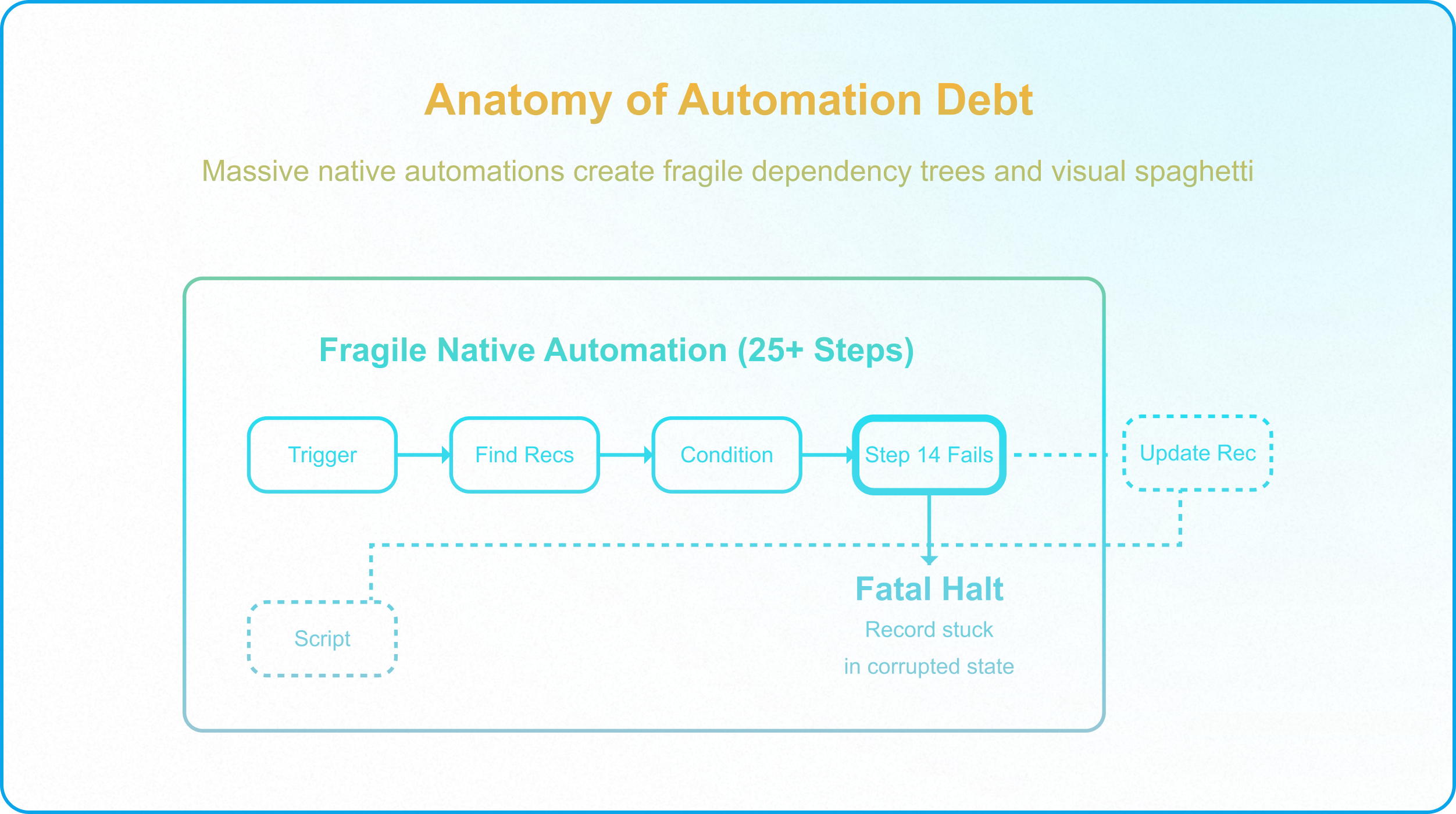
Symptoms of Automation Debt
You know your architecture is suffering from acute automation debt when you experience the following symptoms:
- The "Don't Touch That Field" Phenomenon: Modifying the cosmetic name or options of a single Select field causes three completely undocumented automations to instantly fail, because the visual logic was hardcoded to text strings rather than system IDs.
- Ghost Failures & Timeouts: Automations frequently fail during peak business hours due to invisible CPU timeout limits or memory ceilings. Because Airtable automations do not natively support complex retry loops, these failures leave records stuck in limbo.
- Visual Spaghetti: The logic is so visually convoluted that tracing a bug requires an engineer to click through dozens of nested condition groups. This makes the automation impossible for a new hire to decipher, effectively creating "Key Person Risk" around whoever built the workflow.
2. Eradicating Debt Through Decoupling
To structurally eradicate automation debt, architects must stop treating Airtable as a complex execution engine. The solution is Execution Decoupling.
Instead of building a 25-step native automation that handles API calls, formats data, runs complex mathematical calculations, and writes back to multiple tables, you must offload the execution logic to an asynchronous middleware layer (such as Make.com, AWS Lambda, or Pipedream).
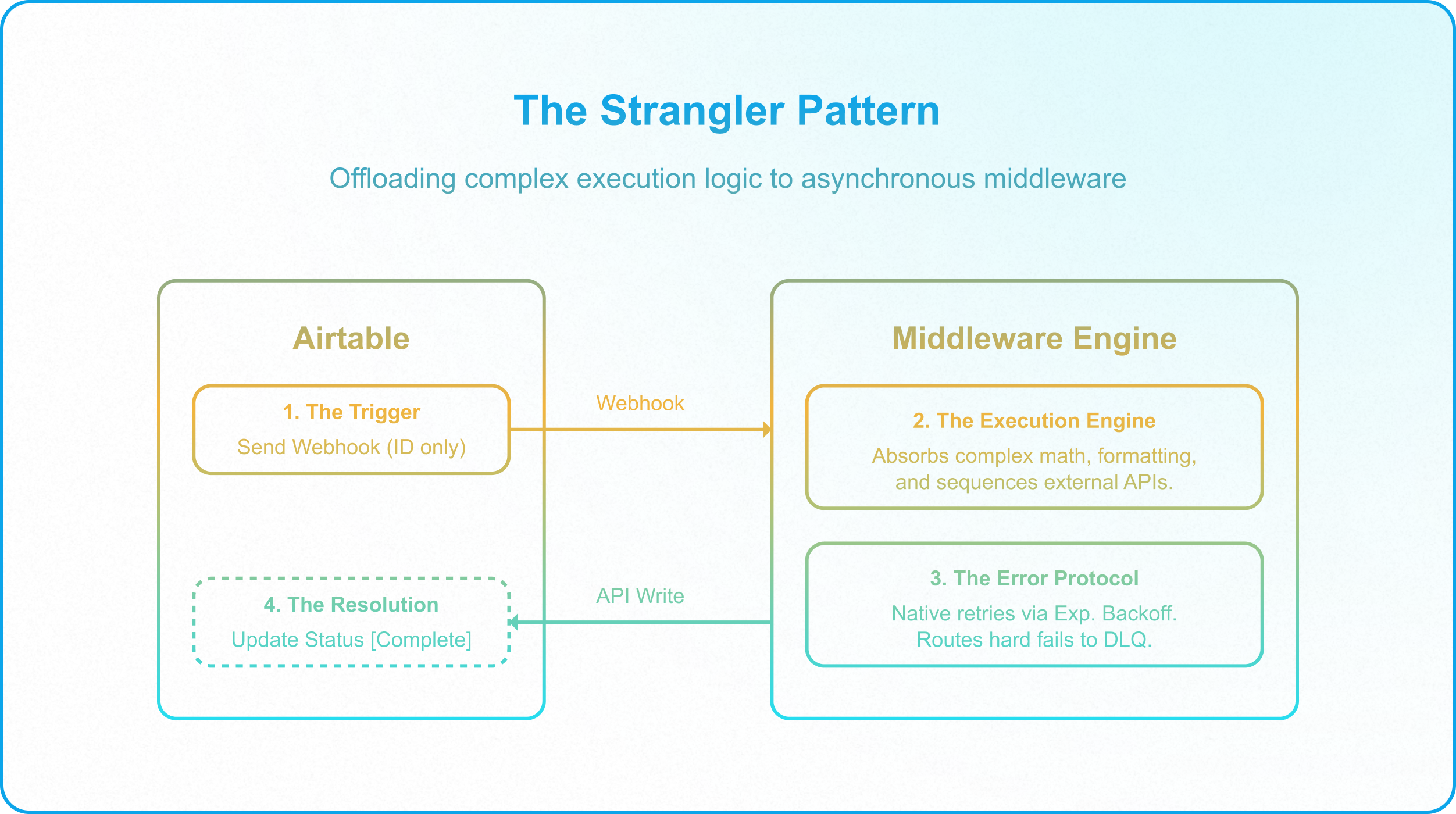
The Decoupled Workflow (The Strangler Pattern)
Transitioning away from Visual Spaghetti requires a phased approach, often utilizing the "Strangler Fig Pattern" to slowly replace native steps with external endpoints:
- The Trigger (Airtable): A massive native Airtable automation is reduced to a single, hyper-lean responsibility: detecting a state change (e.g., [Status] changes to [Ready for Processing]) and firing an optimized webhook payload (containing only the record_id) to the middleware.
- The Execution Engine (Middleware): The middleware catches the payload and absorbs all the complex logic. It executes external API calls, manages the heavy data formatting, and handles the sequential transformations. Crucially, middleware provides native error-routing.
- The Error Protocol (Middleware): If the middleware fails to process the offloaded task (e.g., the target API is down), it utilizes built-in exponential backoff to retry the task. If it fails permanently, it routes the error to a Dead Letter Queue (DLQ) and updates Airtable's status to [Error - Requires Human Review].
- The Resolution (Airtable): Once the middleware finishes the heavy lifting successfully, it pushes the finalized data back into Airtable via API, cleanly updating the record's status to [Complete].
3. The Eradication Diagnostic (Forensic Audit)
Is your workspace drowning in automation debt? Run this forensic audit on your most critical workflows to identify where decoupling is urgently needed:
- The Step-Count Check: Does any native Airtable automation exceed 5 sequential action steps? If yes, the logic is likely too complex for the visual UI. Massive step counts are the leading indicator of Visual Spaghetti and should be evaluated for middleware offloading.
- The Error Handling Check: If step 4 of your automation fails, what happens? Does the system automatically retry, or does it leave the record permanently stuck in a half-processed state without notifying an administrator? Native visual automations lack robust error handling; middleware provides native error-routing.
- The Field Dependency Check: Can you safely change the name of your core status fields without breaking your logic? Decoupled scripts and middleware architectures map operations to underlying Record IDs and Field IDs, making them immune to cosmetic field name changes. Visual automations tied to text strings break instantly.
Eradicating automation debt transforms a fragile, interconnected web of citizen-built workflows into a hardened, professional-grade Unified Operations Hub. By offloading execution, you protect Airtable's performance and ensure your architecture can scale infinitely, the payoff of running the automation layer as one governed tier of a larger enterprise Airtable architecture.