
 ·
6 minute read
·
6 minute read
When an Airtable base begins to stall (when records take several seconds to save, or when views hesitate during a scroll), operators almost immediately point to record limits. They assume the software cannot handle their scale and begin to delete or archive data in a panic.
This is a fundamental misunderstanding of how the platform computes.
Airtable is not a spreadsheet, nor is it a passive data warehouse. It is an active execution engine. When you populate a base with thousands of inactive, closed, or legacy records, you aren’t just storing data; you are forcing the computation engine to carry that historical weight on every single transaction.
As outlined in our Enterprise Airtable Architecture Foundations, scaling Airtable successfully is not about staying under the platform's raw limits. It is about understanding that historical bloat carries a computational tax that degrades automation speed, clutters the UI, and creates severe operational fragility.
1. The Active Execution Engine vs. Cold Storage
In a traditional database (like PostgreSQL or MySQL), data sits silently on a disk until a query explicitly requests it. You can store millions of historical rows without affecting the performance of active write transactions, because the database does not compute values until queried.
Airtable does not operate this way: Airtable is a visual relational database with an in-memory computation model. That means that every formula, rollup, lookup, and active interface element in a base is part of a single, interconnected dependency graph. When an operator updates a record:
- Airtable’s calculation engine instantly evaluates the change.
- It propagates that change through every connected Lookup and Rollup field.
- It updates any active Interface views in real-time.
This reactive design is highly effective for active operations, but it requires architects to enforce clear data lifecycle boundaries. When a base contains 90% "cold" data (such as closed projects, archived tasks, or multi-year logs) those records are not passive text. Because they remain part of the active dependency graph, the calculation engine continues to process them as if they were live operational elements.
For instance, if you have a Clients table linked to a Tasks table, and a rollup on the Clients table calculates "Total Hours Worked" from all linked tasks, the calculation engine must process every single linked record. If Client A has 5 active tasks and 9,995 completed tasks from past years, modifying Client A forces Airtable to run calculations across all 10,000 links. Similarly, editing the Client's name forces the system to push updates to all 10,000 tasks to refresh their lookup value.
For an Application Manager, managing this computational overhead is key to maintaining system health. When custom scripts or integration platforms (like Make or Zapier) write to records, they wait for these cascades of recalculations to complete. If the base carries a massive volume of legacy links, this operational overhead can manifest as webhook latency, API delays, and lagging user interfaces. This aligns with Airtable's official guide to Base Performance Best Practices, which notes that excessive linked records and complex calculated fields are key drivers of performance latency. This also compounds the structural fragility we analyze in The Principle of Minimum Viable Architecture (MVA): You are paying a continuous operational tax on every transaction for data your team has not accessed in years; hence, the historical bloat.
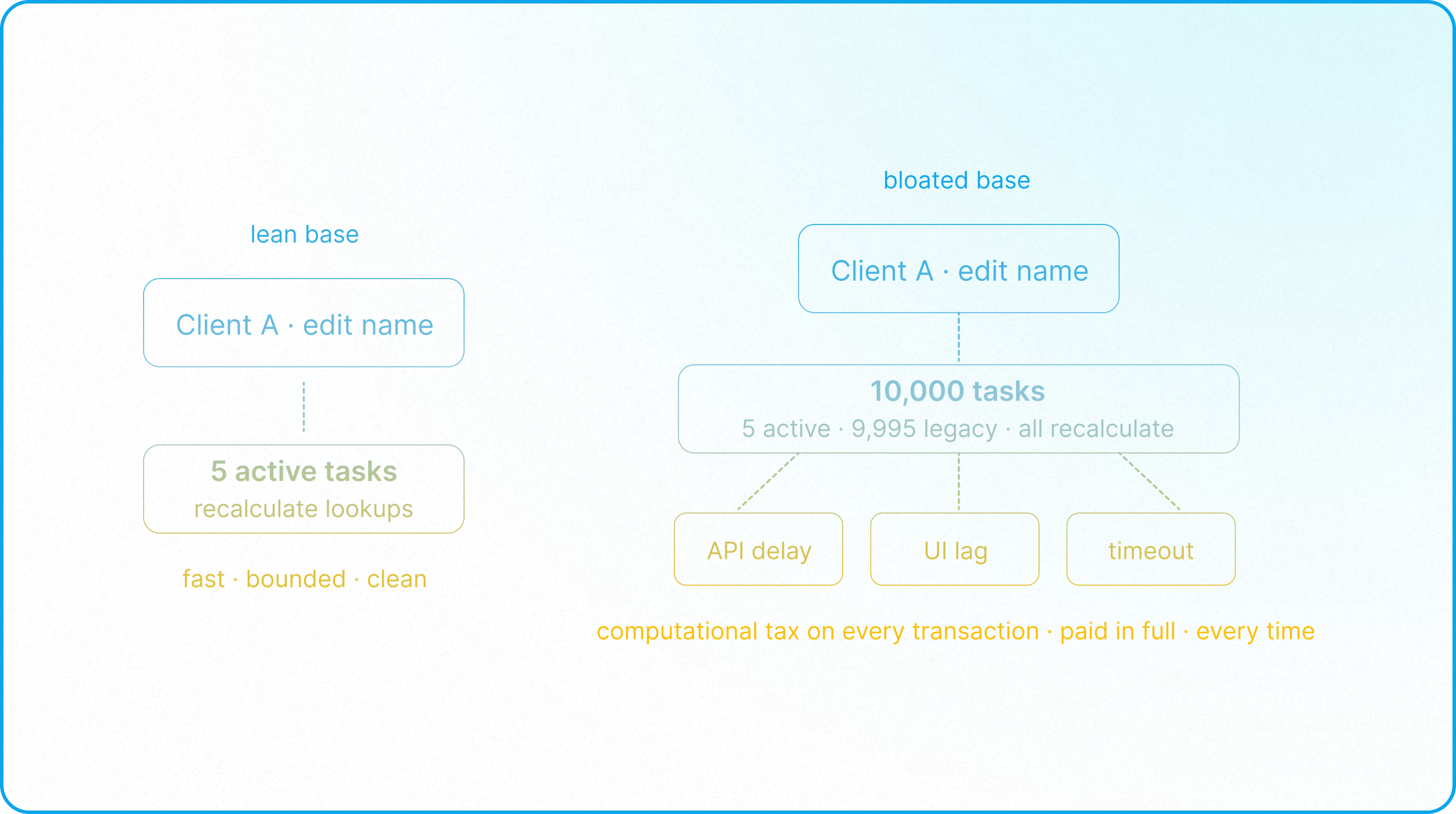
2. The Triple Threat of Historical Bloat
When you treat Airtable as a cold storage warehouse, the operational decay manifests in three distinct areas:
A. Automation Latency and Throttling
Every automation trigger in Airtable has to evaluate whether a record meets specific conditions. When you run a search step or execute a script on a table burdened by historical bloat, the execution plane must parse through a massive volume of records to locate the correct target. This increases execution time, leading to laggy automations, webhook delays, and in severe cases, platform throttling or execution timeouts.
B. UI Clutter and Browser Memory Exhaustion
Airtable renders data dynamically in the browser. When an operator opens a database view or an interface containing thousands of historical records, the browser’s DOM size balloons. This leads to high memory usage, laggy scrolls, and interface freezes (detailed in Google's guide to avoiding excessive DOM sizes).
C. Firm Record Limits
Every operational environment has database capacity thresholds. Without a defined data lifecycle strategy, high-velocity operational teams inevitably approach per-base record caps. Reaching these thresholds without prior planning leads to reactive, emergency data purging. This not only disrupts active workflows and downstream integrations but also risks breaking legacy reporting links and permanently losing historical business intelligence.
3. The Archival Trap: Why "Archive Bases" Fail
When teams realize they are hitting record limits, the standard workaround is to create a dedicated "Archive Base" within Airtable and copy-paste old records into it.
This is an architectural trap.
First, it does not solve the scaling ceiling. The Archive Base is bound by the exact same per-base record limits as the operational base. If your business generates 100,000 records a year, your archive base will hit its ceiling in a year or two, forcing you to create "Archive Base v2," "Archive Base v3," and so on. You end up with a fractured ecosystem where locating a historical record requires a manual search across multiple disconnected bases.
Second, it introduces high administrative overhead and operational friction. While you can automate the transfer of records between existing bases, you cannot programmatically provision new bases. This means that once an archive base reaches its capacity, new archive environments must be created manually, requiring ongoing administrative governance. Furthermore, transferring records between bases via scripts consumes valuable automation execution capacity, and any schema changes in the active base must be manually replicated in the archive base, leaving the integration vulnerable to schema drift.
4. Modern Data Tiering: Hot vs. Cold Storage
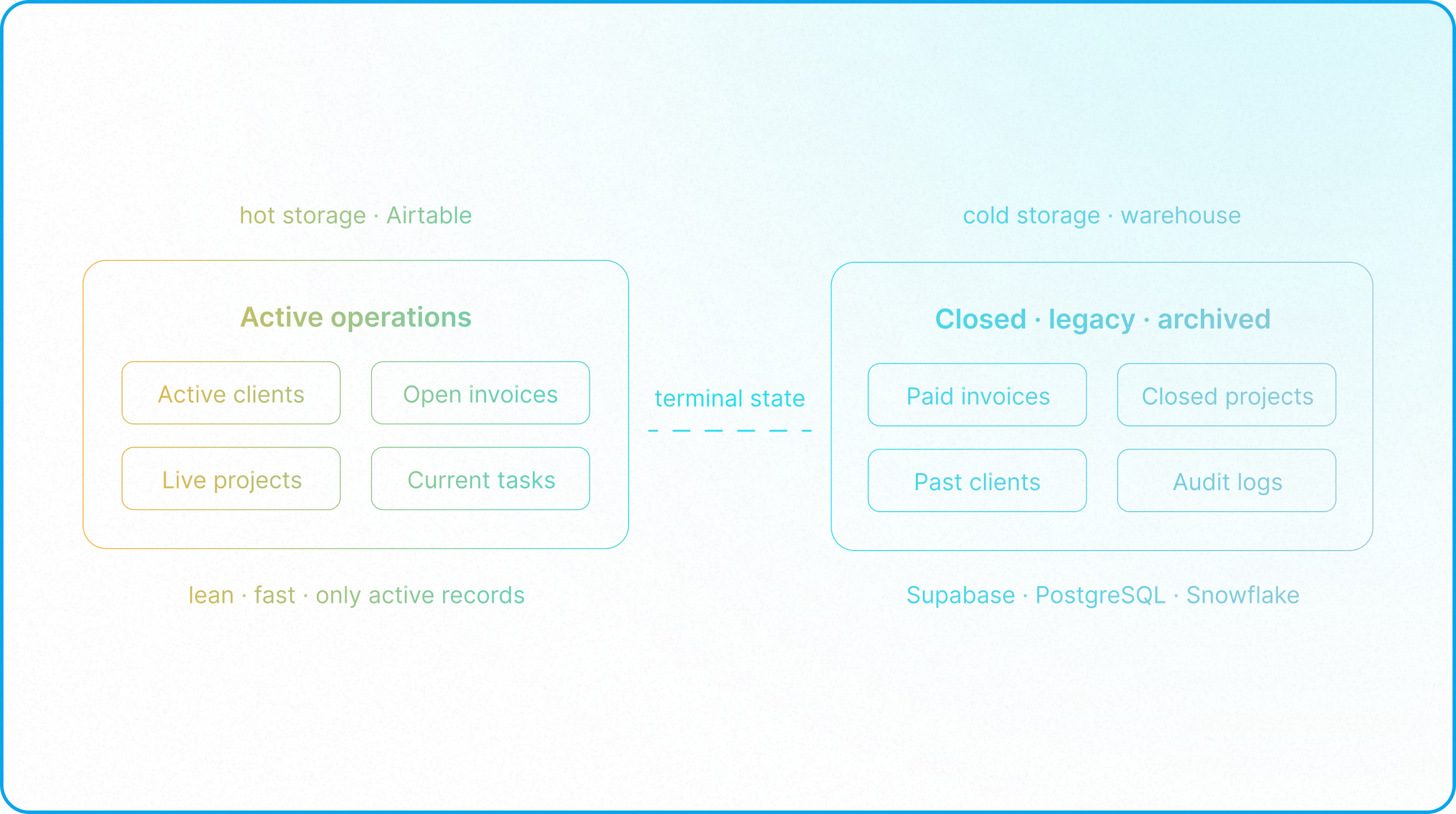
To build a zero-maintenance, highly performant architecture, the enterprise architect must enforce a strict separation between Hot Data (the execution plane) and Cold Data (the storage plane), applying traditional database practices to Airtable environments as outlined in Traditional Database Architecture in Airtable.
[ Active Operations ] ──(Trigger: Terminal State)──> [ Automation Pipeline ]
│ │
▼ ▼
[ Hot Storage ] [ Cold Storage ]
(Airtable Base) (Data Warehouse)
* Lean, fast, governed * Scalable, structured
* Live interfaces & scripts * Long-term BI reporting
Hot Data (Airtable)
- What it is: Data required to run the day-to-day business (e.g., active clients, ongoing projects, current deliverables, open invoices).
- Where it lives: Your primary operational Airtable bases.
- Governance goal: Keep this environment as lean and fast as possible. Records should only exist here while they are actively being processed, keeping the core schemas normalized as described in Database Normalization.
Cold Data (External Warehouse)
- What it is: Inactive, read-only data that has completed its operational lifecycle (e.g., closed projects, legacy financial transactions, historical audit logs).
- Where it lives: A dedicated external relational database or data warehouse (e.g., Supabase, PostgreSQL, AWS RDS, or Snowflake).
- Governance goal: Secure long-term storage that remains queryable for historical BI reporting (via tools like Tableau or PowerBI) without dragging down operational systems.
5. Architecting the Archival Pipeline
Executing this transition requires an automated, one-way pipeline that monitors record state and safely offloads data.
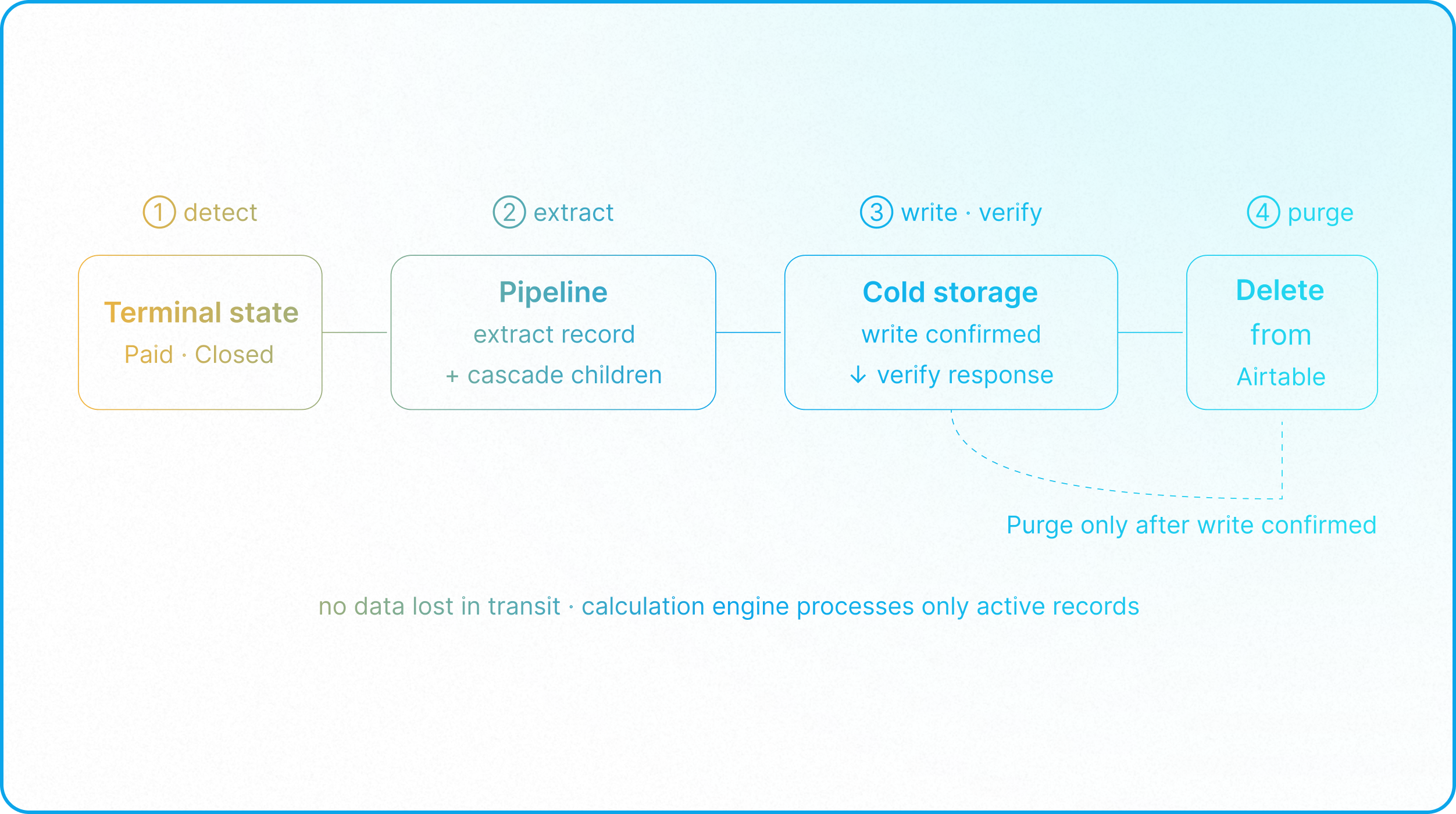
Step 1: Define the Terminal State
Every business entity must have a clearly defined terminal state (e.g., an invoice marked "Paid" for more than 90 days, or a project marked "Completed" with all deliverables delivered).
Archiving is usually done from the top down, as it's rarely a good idea to archive or delete a child record if its parent is still active. For instance, you would not want to remove past invoices or payment records from an active client. While there are exceptions, the terminal state of the parent record is typically what triggers the entire archiving chain.
Step 2: The Extraction and Write Loop
When a parent record enters its terminal state, an integration workflow (orchestrated via n8n, Make, or AWS Lambda) is triggered:
- Extract and Cascade: The pipeline extracts the full record payload (including all fields, metadata, and linked relationships). Builders must consider what to do with child records: when a parent record is archived, its associated child records should be archived as well. Keeping a child record without a parent is useless and corrupts reporting. This requires cascade deleting, where the archive/delete automation also loops through all associated child records and archives/deletes them. (For a full treatment of parent-child structures, see How to Implement Parent and Child Ownership Models in Airtable.
- Write and Map: The pipeline writes this payload into the external Cold Storage database. Parent-child dynamics must be maintained in the archive database as well, rather than flattening the hierarchy.
- Verify: The pipeline verifies that the write was successful by checking the database response. Unlike traditional database engines that provide built-in functions for cascading deletes, Airtable does not. This means the looping logic must be custom-built into your automation script or middleware to iterate over all linked child records.
Step 3: The Purge Action
Only after the pipeline confirms the successful write to Cold Storage does it trigger a delete command back to Airtable, purging the record from the active base. This ensures no data is ever lost during transit.
By implementing this structured pipeline, you ensure that Airtable's in-memory calculation engine only processes truly active operational data. While enterprise environments with massive scale may still maintain tens of thousands of active records that cannot be purged, removing years of legacy deadweight significantly optimizes the calculation dependency graph, prevents browser interface lag, and preserves valuable capacity below the platform's hard record limits.
The Operational Diagnostic
To evaluate if historical bloat is actively degrading your system, run your environment through this quick assessment:
- The Lifecycle Check: Open your primary table. What percentage of the records have been modified or accessed in the last 60 days? If more than 60% of the rows are closed, inactive, or historical, your base is suffering from historical bloat.
- The Automation Timeout Audit: Review your automation run history. Are you seeing sporadic timeouts, search failures, or scripting actions timing out or mysteriously failing? This is a sign of computational drag caused by an oversized dataset.
- The Base Memory Footprint: Does the UI hesitate when switching views, loading interfaces, or searching fields? If yes, browser memory is bottlenecked by the volume of active elements.
If your system fails these tests, your next step is not to upgrade your license tier: it’s to establish a data lifecycle policy and architect an automated archival pipeline.
Read the Next Guide: Establishing a Single Source of Truth
Learn how to structure your active bases to maintain a clean, centralized system of record before distributing data downstream.