 ·
4 minute read
·
4 minute read
When an enterprise Airtable system begins to slow down, systems engineers typically look at API execution logs, lookup recalculations, and database schemas. But day-to-day operators don't look at API performance. They experience system health through the user interface: a spinning wheel when changing views, frozen scrollbars on large tables, and buttons that take several seconds to respond after a click.
To the end user, database performance is entirely a user experience (UX) problem.
Our blueprint for Enterprise Airtable Architecture outlines that interfaces must act as controlled, performant abstractions, rather than direct representations of raw database fields. If you display large datasets in unconstrained views, you force the operator's browser to carry an unsustainable computational load, leading to high interface latency and browser memory crashes.
To keep your operations running smoothly, you must understand how Airtable renders data on the front-end, identify the UI designs that trigger performance drops, and optimize your Interface UX for scale.
1. The Browser Rendering Tax: Why Large Views Lag
Unlike traditional disk-based databases that execute queries entirely on a remote server, Airtable maintains an active, in-memory replica of the base data (or the loaded view scope) directly within the operator's browser memory (JavaScript heap).
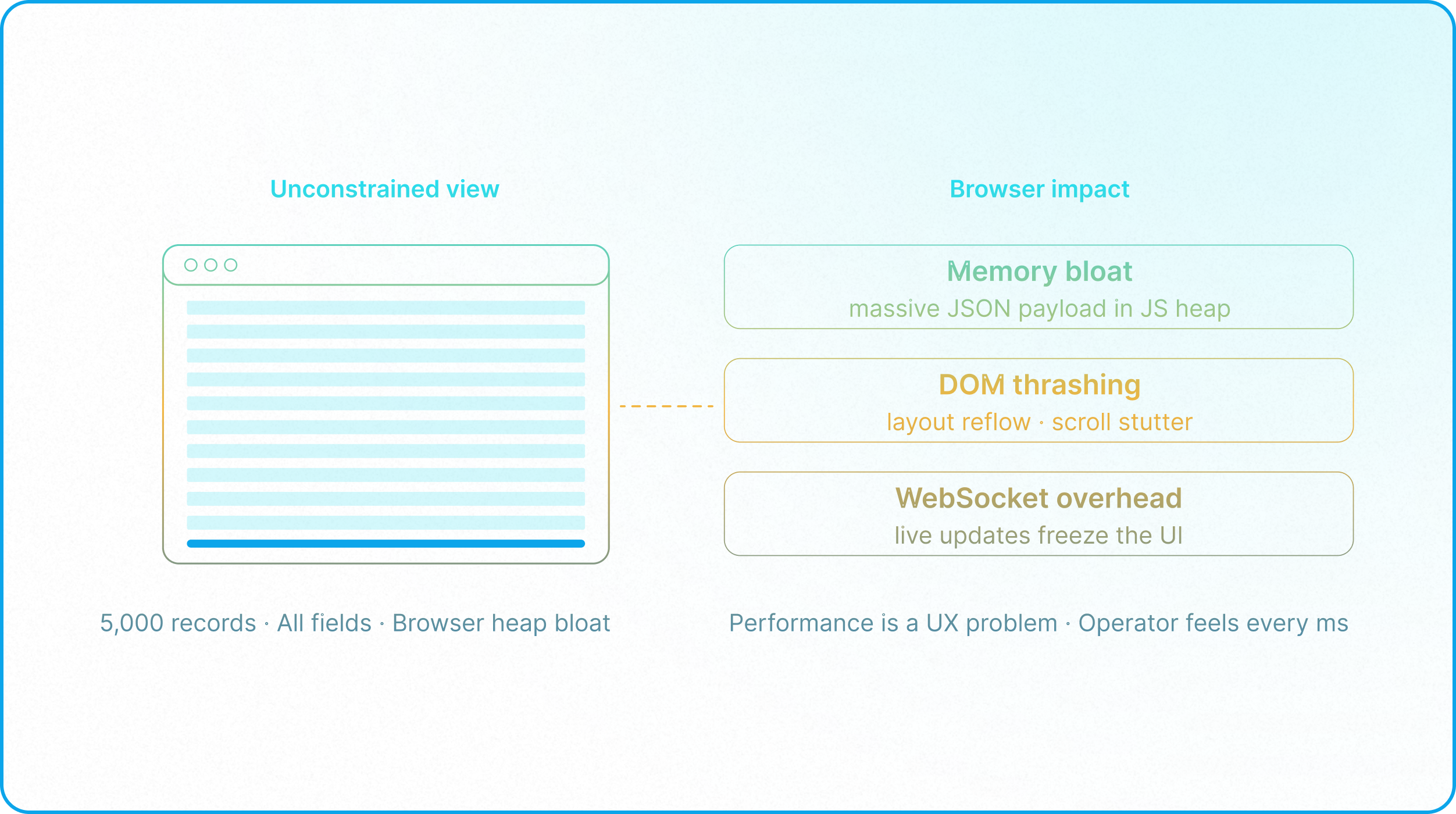
While this client-side database cache allows for real-time collaboration and instant filtering, it shifts the computational burden directly to the client browser. When a view is unconstrained, performance degrades due to three front-end factors:
- Client-Side Memory Bloat: Loading thousands of records with dozens of columns forces the browser to store a massive JSON payload in its active JavaScript heap. This high memory footprint is the primary driver of browser tab crashes and memory exhaustion.
- DOM Thrashing and Scroll Stutter: Although Airtable uses list virtualization to only render elements in or near the viewport, scrolling forces the browser's single-threaded JavaScript execution engine to constantly destroy, create, and recycle DOM nodes on the fly. When cards contain dense metadata, this rapid DOM recycling causes layout reflow bottlenecks (frame drops), experienced as stuttering scrolls. In modern web engineering, reducing DOM node count and complexity is critical to avoiding this type of layout reflow lag.
- WebSocket Sync Overhead: In a collaborative base, updates from other users are pushed to the client via WebSockets in real-time. The browser must immediately ingest these payloads, update its client-side cache, and redraw corresponding DOM elements, causing noticeable interface freezes during high-volume operations.
Because of these client-side constraints, keeping your primary database normalized (as outlined in Database Normalization is only half the battle. You must also govern the rendering surface on the front-end to protect browser performance, in line with Airtable's base performance optimization guidelines.
2. Front-End Design Anti-Patterns That Bloat the UI
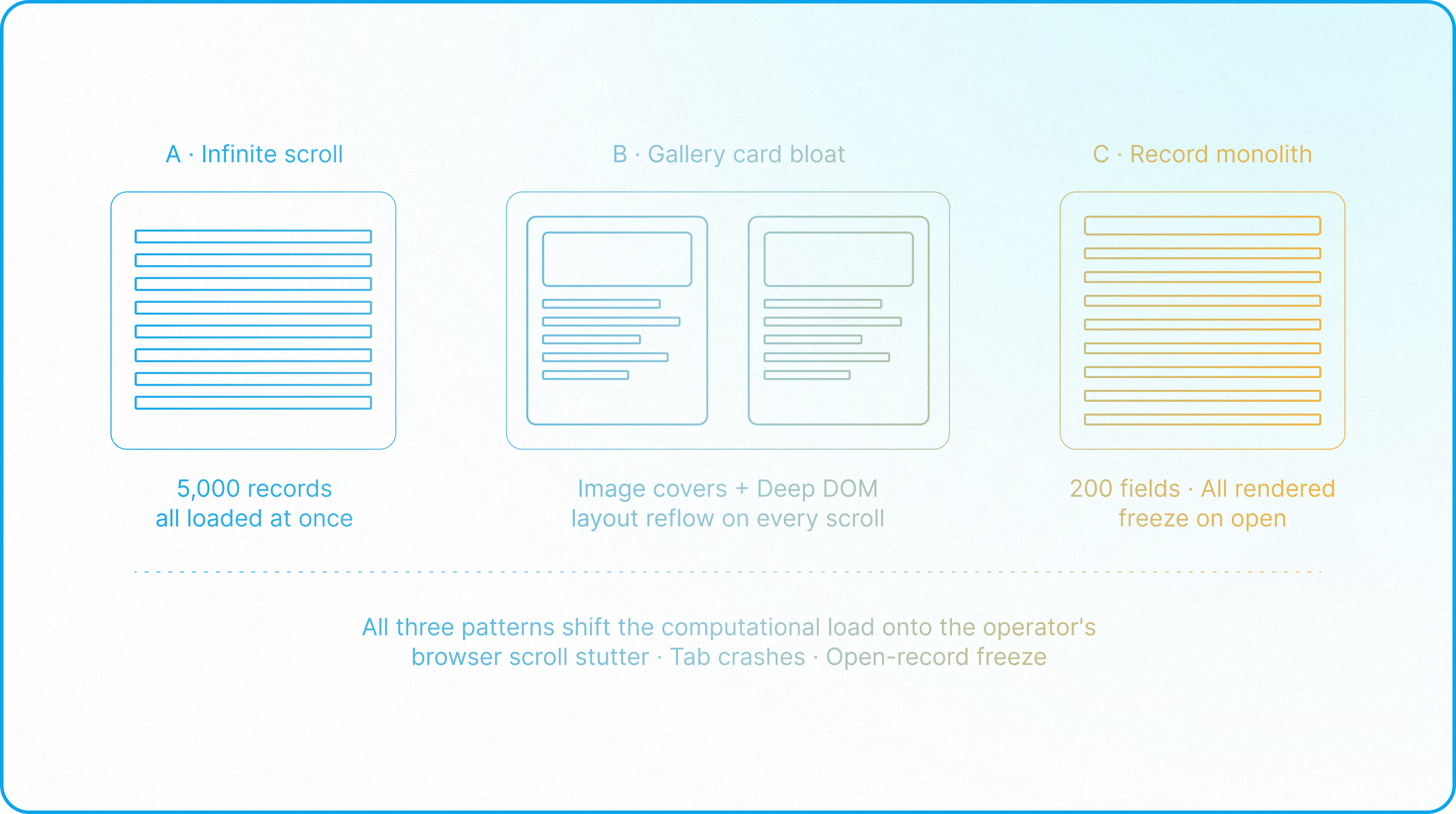
Most interface lag is not caused by platform limits, but by design decisions that treat interfaces like infinite whiteboards. Avoid these three common front-end layout traps:
A. The "Infinite Scroll" Grid View
Builders often default to database layouts that display thousands of records on a single page. This forces the browser to load all data into memory at once. It is an operational anti-pattern: human operators cannot parse 5,000 records simultaneously. Loading this volume simply drains browser resources.
B. Overloading Gallery Cards with Field and Asset Bloat
Placing too many of these fields on gallery cards still creates a massive front-end rendering bottleneck. Unlike simple flat rows in a grid or list view, each gallery card is a complex tree of nested DOM nodes (containers for tags, fields, metadata lines, and icons). As the user scrolls, list virtualization recycles these card containers; if a card is overloaded with fields, the browser must continuously layout, repaint, and thrash these deep DOM structures, causing layout reflow delays and scrolling stutters. Additionally, while Airtable generates and uses optimized, smaller thumbnail-sized images under the hood, displaying attachment fields as hero covers still adds significant image-loading, decoding, and rendering overhead during scrolling, causing noticeable GPU/CPU paint lag compared to text-based rows.
C. The Huge Record Monolith
When configuring grids, lists, or interface views, builders often place all 200 fields of a record on a single view. This forces the browser to evaluate permissions, load relationships, and render all 200 elements simultaneously, resulting in a noticeable, frustrating freeze the moment the user opens the interface page or database view.
3. Designing for High-Volume UX: The Fixes
To fix lagging user interfaces, you must limit what the browser is forced to render. Apply these three front-end optimization strategies:
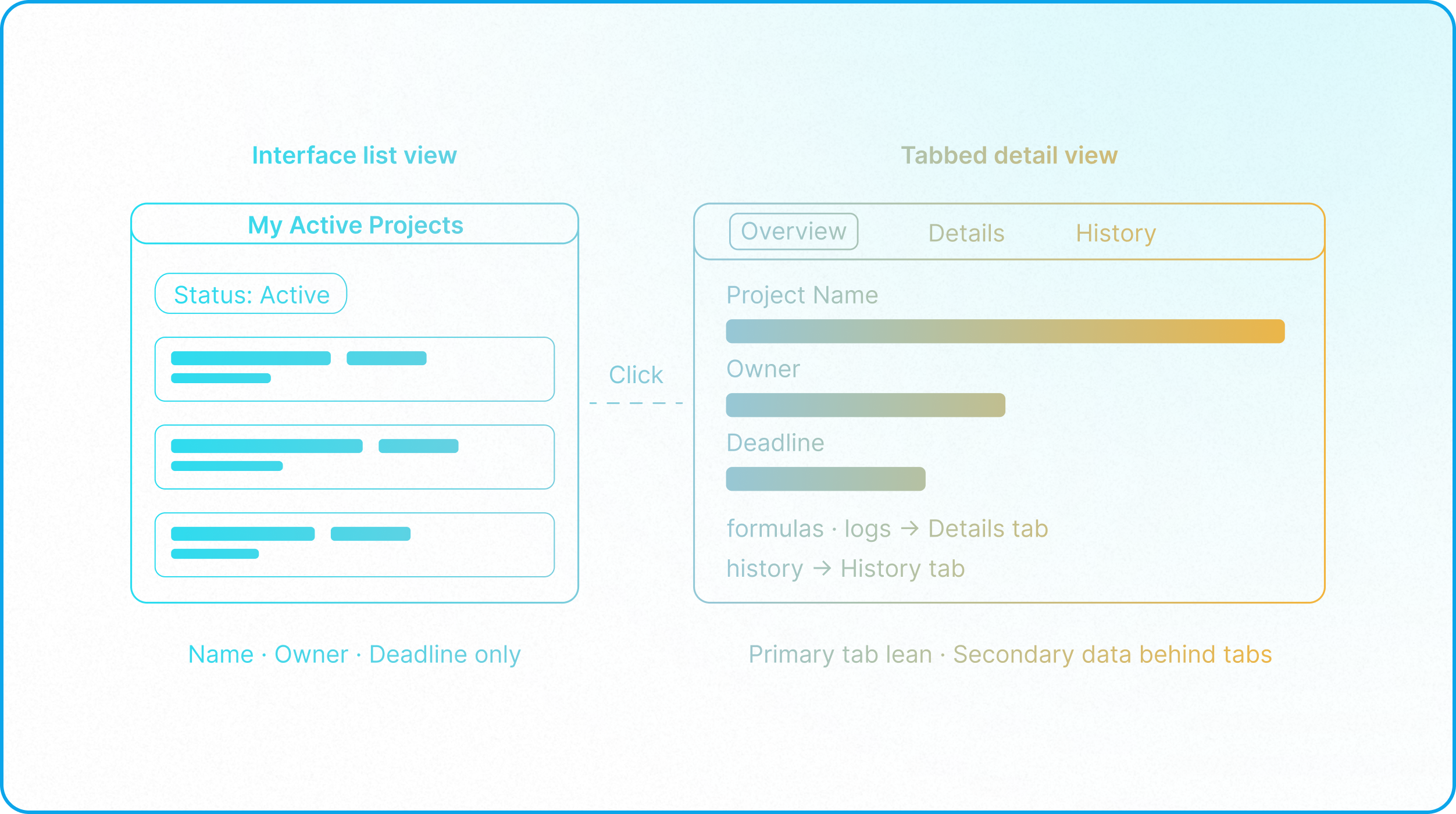
Fix 1: Implement Progressive Disclosure
Do not overwhelm the browser with all the data at once. Use progressive disclosure to reveal information only when the user explicitly requests it:
- The List View: Show only the most critical, identifier fields (e.g., Project Name, Project Owner, Deadline) on the main list rows. Add tabs or filter options to enforce scoped queries (row reduction), limiting the number of active records loaded into browser memory at once.
- The Detail View: Group secondary fields, formulas, and history logs inside tabs for a cleaner user experience. Because detail tabs act as navigational scroll anchors rather than lazy-rendering boundaries (meaning all configured fields load upfront), maintain a lean field set on the detail page (column reduction) and offload heavy metadata logs to separate interface sub-pages to prevent open-record lag.
Fix 2: Expose Interfaces as Controlled Input Surfaces
Physically strip backend database access from your operators. By directing users through targeted interfaces with constrained input elements, you keep rendering lightweight while securing data integrity.
As shown above, restricting views to workflow-specific input surfaces ensures that operators only see the fields they need at that specific stage, preventing browser rendering bloat and eliminating data input errors at the source.
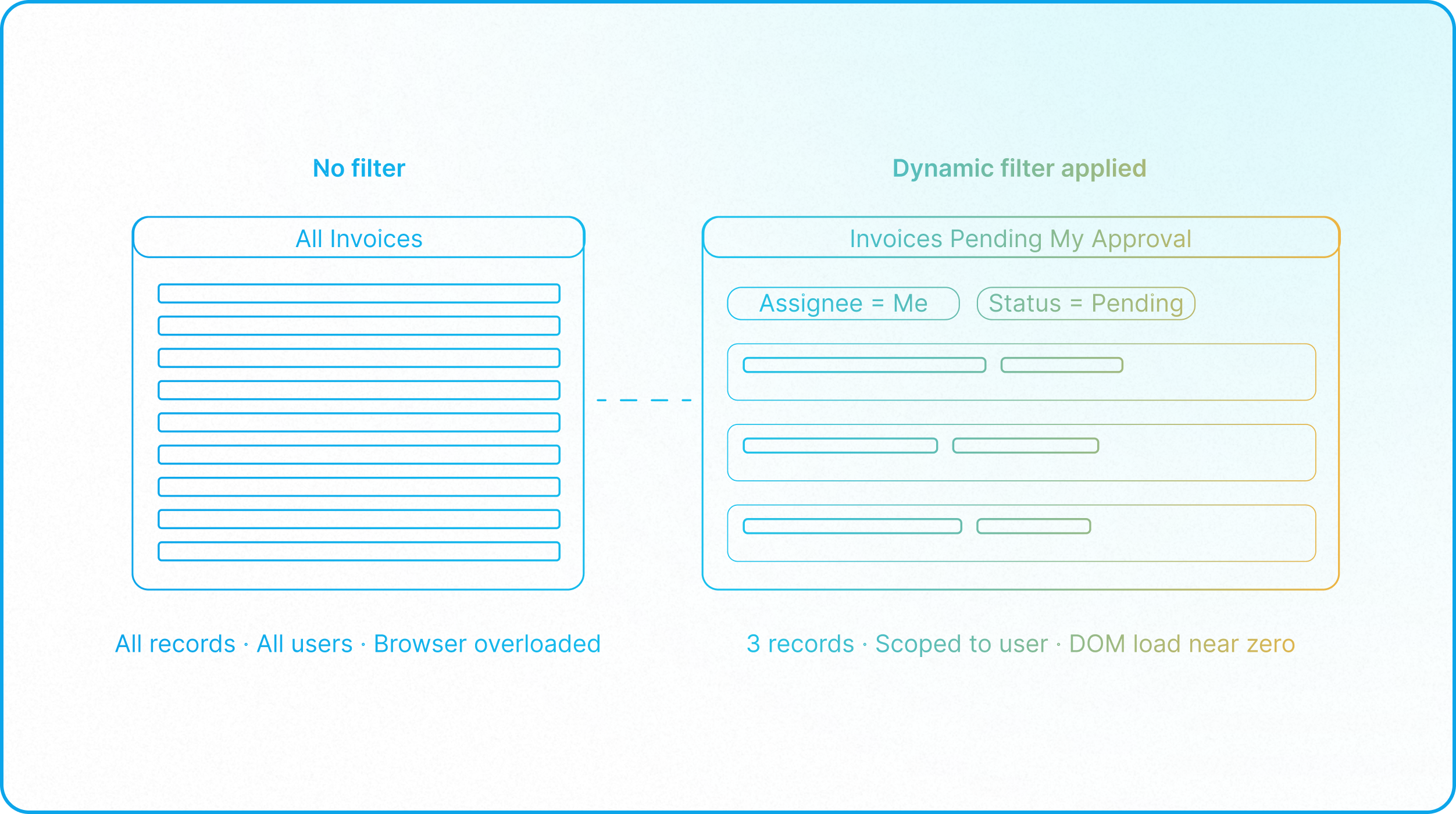
Fix 3: Use Dynamic Interface Filters
Never display a raw, unfiltered dataset. Leverage Airtable's dynamic Interface filters to display only what is relevant to the active user. By filtering views to show only "My Active Projects" or "Invoices Pending My Approval," you naturally drop record volume per page, reducing the browser's DOM load to near zero.
The Interface UX Audit Checklist
If your operators are experiencing interface lag, run their workspaces through this optimization checklist:
- Audit Card Fields & Asset Bloat: Open your main list views and gallery views. Remove any non-essential fields from these views to reduce DOM depth and layout rendering overhead per row/card. Pay close attention to attachment fields used as gallery card covers; disable unnecessary covers to eliminate image preloading and decoding bottlenecks.
- Configure Tabbed Details: Split heavy record detail screens into tabbed layouts. To reduce UX bloat and cognitive load for everyday operators, move complex formulas, technical calculation fields, and historical logs into secondary tabs, keeping the primary tab highly focused on actionable workflow data.
- Enforce Interface Filters: Add default filters to all active interface views to restrict record count. Ensure completed or archived records are filtered out, as defined in your Data Tiering Architecture and in line with Airtable's limits guide.
- Consolidate Dashboard Elements: Review dashboard pages. If a page contains more than four charts or summary widgets, split them across multiple pages or tabs to distribute the browser's recalculation load.
By optimizing your front-end rendering surface, you transform Airtable from a laggy, frustrating workspace into a responsive, enterprise-grade software application. While historical data offloading (detailed in Architectural Complexity) solves long-term capacity issues, designing a performant interface ensures a smooth daily user experience for your operators.