 ·
5 minute read
·
5 minute read
Relational database systems at scale demand strict constraints to prevent data corruption. As established in the Enterprise Airtable Architecture Foundations, separating the backend database structure from user interaction is a prerequisite for enterprise readiness. If operators can modify raw tables directly, they will inevitably enter inconsistent data, bypass compliance gates, and create structural debt.
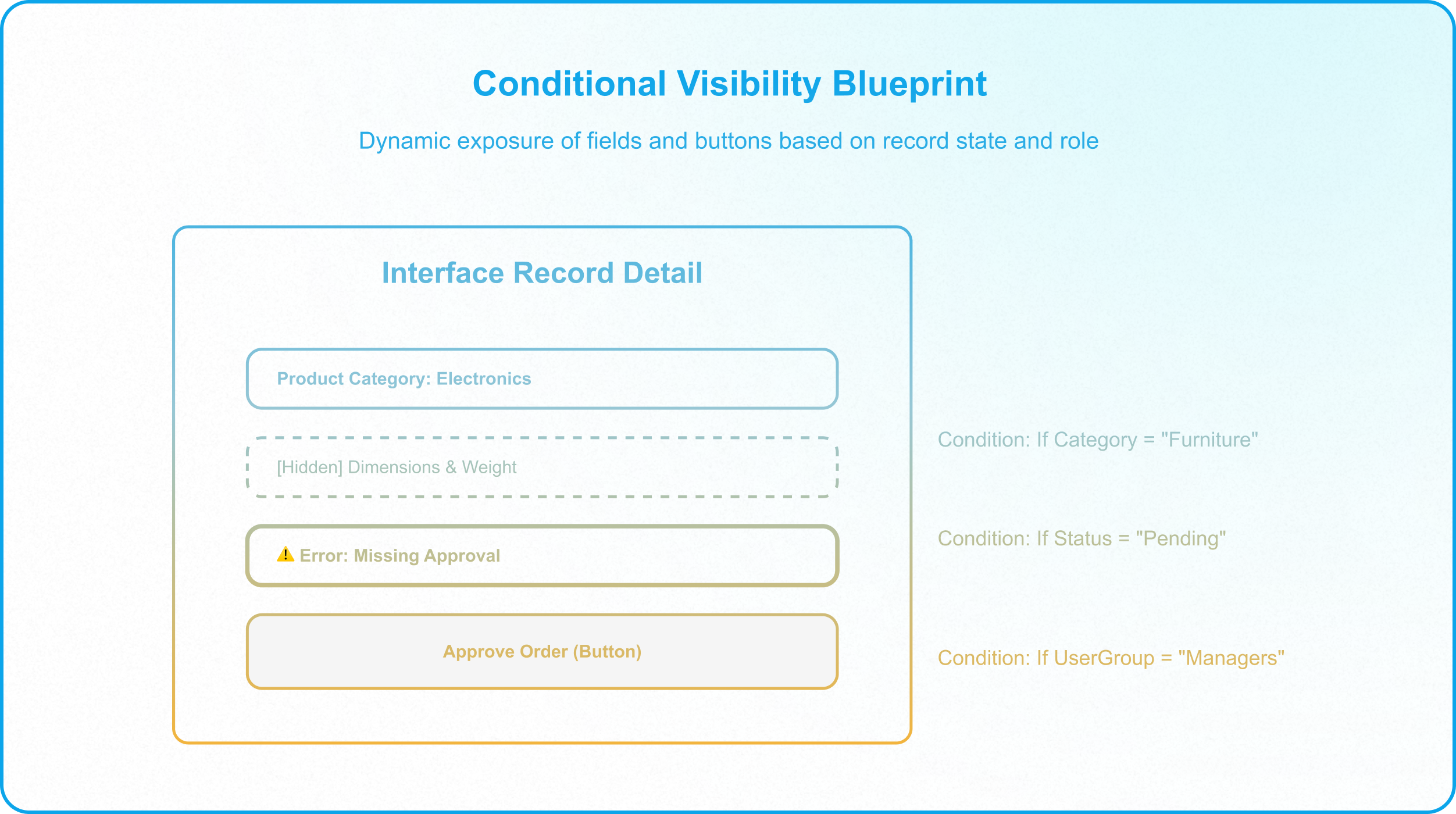
Figure 1: Architectural blueprint mapping the dynamic visibility of input fields, validation alert banners, and role-restricted buttons based on record state and user groups.
Building on the segregation of read and write paths detailed in CQRS in Airtable, conditional visibility is the primary mechanism for securing the operator write path. Within these controlled portals, architects use dynamic layouts to enforce data compliance.
This technical guide details how to build conditional visibility systems within Airtable Interfaces, physically blocking invalid data entry and routing users through governed operational pathways.
1. The Illusion of Field-Level Safety
Many builders assume that setting field-level permissions inside a base is sufficient to maintain data integrity. They configure collaborator permissions to restrict edit access to specific columns; however, this flat spreadsheet approach fails when records move through a multi-stage lifecycle.
When operators are exposed to a static grid containing every field, several failure modes emerge:
- Out-of-Order Modification: Users can edit fields out of sequence; for example, they might enter shipping logistics data before the compliance team has approved the record.
- Cognitive Drag: Exposing dozens of empty fields creates visual confusion, which slows down daily operations and increases the rate of input errors.
- Silent Validation Bypass: Flat tables cannot hide action buttons based on the completeness of other fields; consequently, operators can click buttons that trigger downstream automations even when critical fields are empty.
To protect the schema, the interface must act as an active gatekeeper. By implementing conditional visibility rules, you transform static layouts into dynamic interfaces, ensuring that fields and actions are only exposed at the precise moment they are required.
2. The Progressive Disclosure Pattern
Exposing input fields before their prerequisites are met leads to incomplete data. The most effective defense against this is Progressive Disclosure, a design pattern that reveals information and fields progressively as the user moves through a workflow.
In an Airtable Interface, you can configure progressive disclosure by binding a field's visibility to the value of preceding fields:
Step 1: Hide Secondary Inputs
Configure the interface layout so that secondary input fields remain hidden by default. For example, in a product catalog database, the Weight_g and Dimensions_cm fields should remain hidden until the operator selects a product category that requires shipping.
Step 2: Establish the Logic Trigger
Set the conditional rule for the secondary field. In the field settings, select Show field when conditions are met and define the trigger; for example, Shipping_Required = 'Yes'.
Step 3: Implement Conditional Lockouts
Combine conditional visibility with input locks to prevent operators from skipping fields. If an operator requests a pricing discount override, you can hide the final "Submit Request" button and display a required Override_Justification field. The submit button is configured to appear only when the justification field is no longer empty, preventing users from submitting requests without explaining the business case.
3. Role-Based and Lifecycle-Stage Routing
Enterprise operations require clear division of labor, where different departments own different stages of a record's lifecycle. We establish these ownership rules administratively in the Data Responsibility Map; however, to make these rules enforceable, we must implement them physically in the user interface.
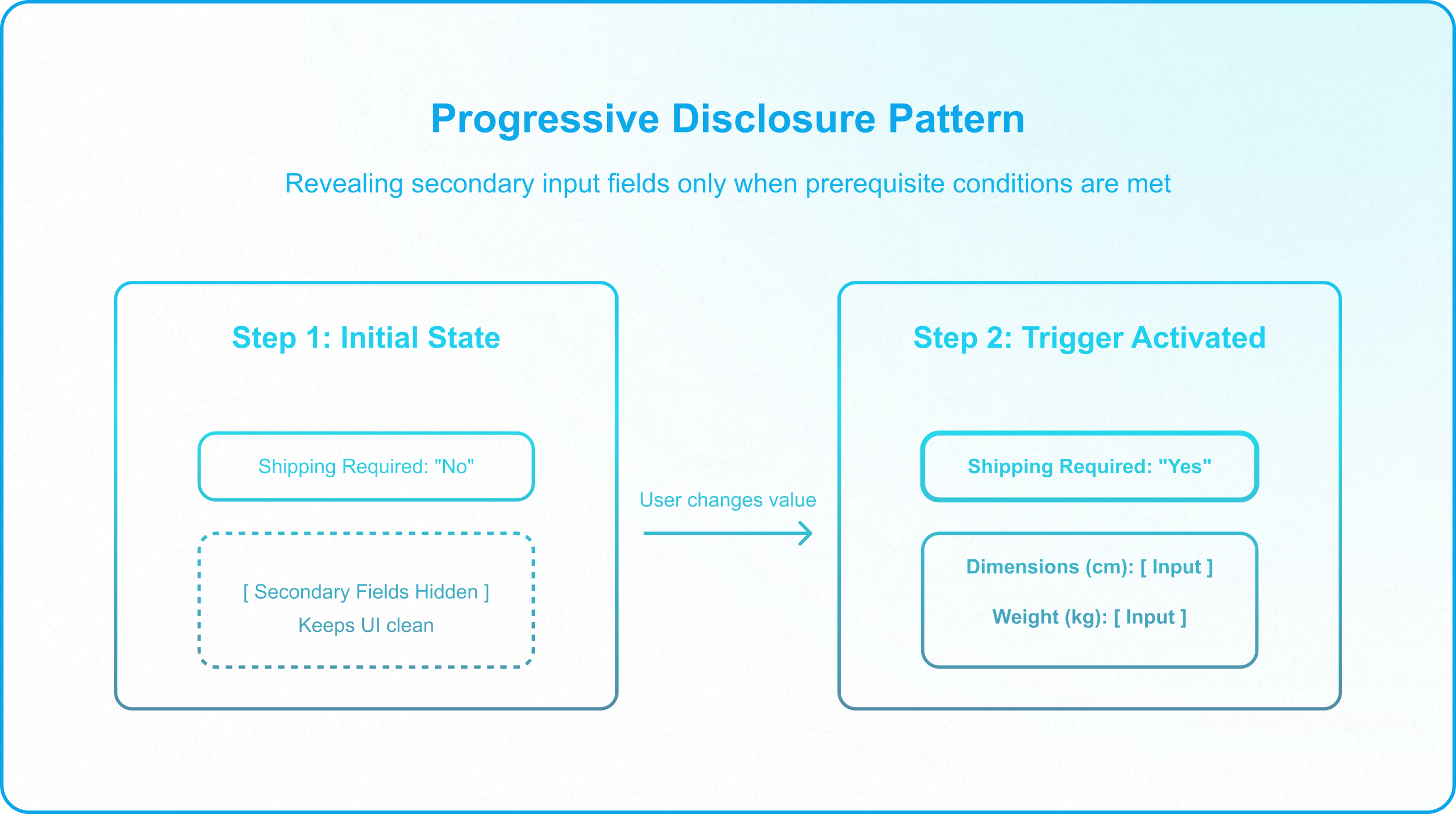
Figure 2: Sequence mapping of an interface validation feedback loop, showing how missing inputs block submission (State A) and how valid inputs unlock the submit button (State B).
Conditional visibility allows you to restrict field exposure based on both the record's current state and the logged-in user's role group:
State-Based Visibility
Filter fields based on a single-select status field. In a procurement database, when Purchase_Order_Status is set to Pending Finance Approval, the interface dynamically hides the shipping address and payment method inputs from the screen, replacing them with read-only fields to prevent unauthorized modifications during review.
Role-Based Action Gates
Because Airtable lacks native options for role-based conditional visibility of fields and buttons on a single interface page, restricting access to sensitive actions like the ERP webhook trigger requires a separate interface. The 'Approve Purchase Order' button must be hosted on an interface page restricted strictly to the user group 'Finance Managers'. On the standard operator page, a custom action button is configured with a dynamic URL formula that passes RECORD_ID() to redirect authorized users to the finance interface, while preventing unauthorized users from opening the target page, thereby eliminating the risk of accidental trigger execution.
By restricting access to specialized interfaces, you ensure that operators cannot modify sensitive fields outside their specific operational scope; this enforces clear functional boundaries and reinforces the access controls detailed in Why Base-Level Permissions Create Enterprise Vulnerability.
4. The Visual Validation Callout Pattern
When validation rules are violated, standard databases block the write operation and return a generic database error, which frustrates operators and leads to support tickets. A more resilient approach is to guide users to correct their inputs before they attempt to save the record, which can be accomplished using different techniques depending on the layout type
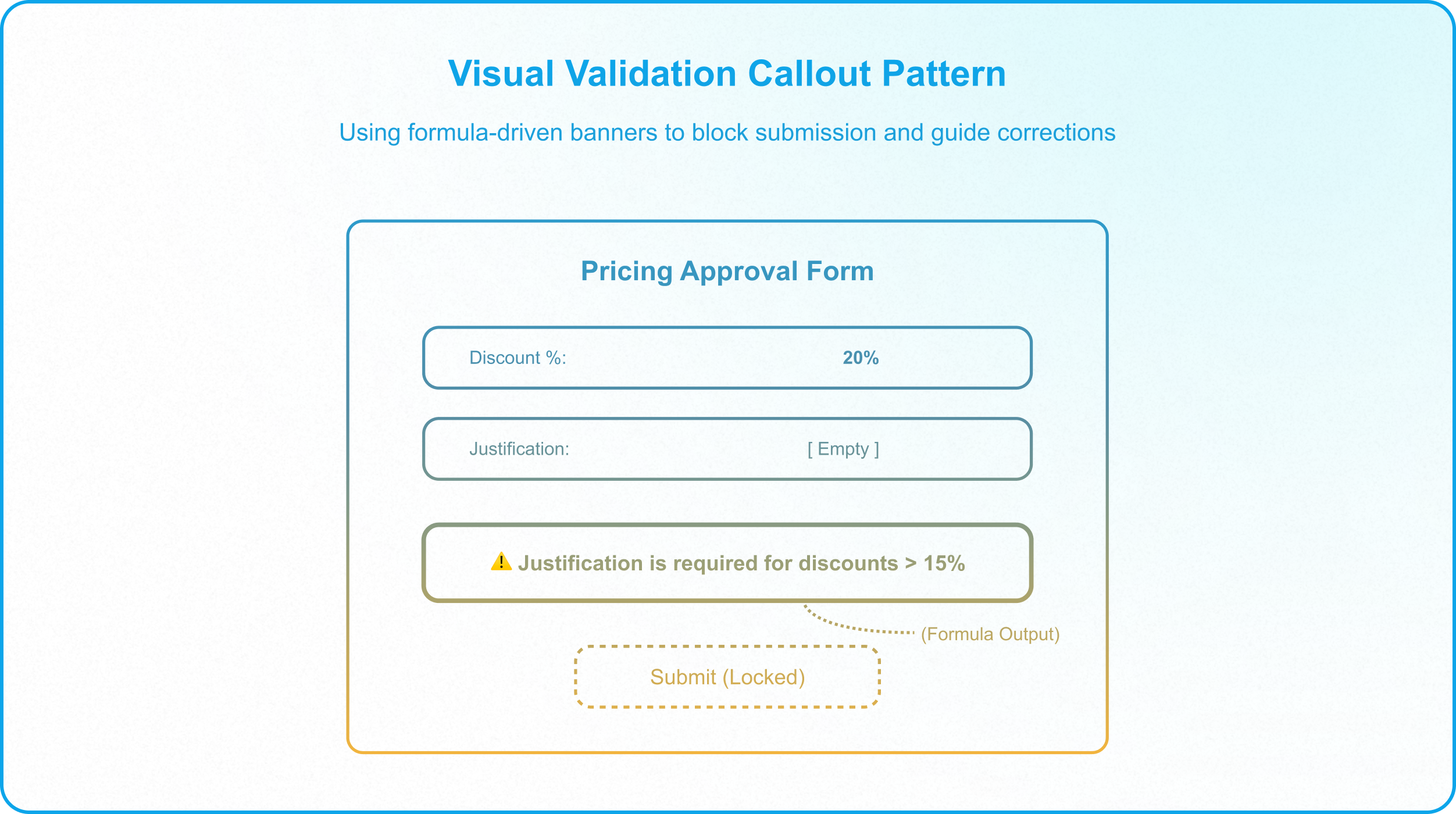
Figure 3: Layout schematic illustrating role-based tab access controls and user group verification.
When validation rules are violated, standard databases block the write operation and return a generic database error, which frustrates operators and leads to support tickets. A more resilient approach is to guide users to correct their inputs before they attempt to save the record, which can be accomplished using different techniques depending on the layout type.
Record Detail Layouts
Because static text components do not exist at all in record detail layouts, builders must configure validation alerts using a formula field workaround:
- Define the Formula Field: Create a formula field in the backend table containing an IF() statement that outputs a specific warning message when validation conditions are breached; for example, IF(AND(Discount_Percentage > 0.15, Justification = BLANK()), "⚠️ Justification is required for discounts exceeding 15%.", "").
- Expose the Alert Conditionally: Add this formula field to the interface detail layout, and set the field settings to show it conditionally only when it is not empty.
- Lock the Action Button: Configure the submit action button to hide or lock under the same conditions, ensuring the operator must fill in the missing justification before they can proceed.
Form Layouts
For standard intake forms, builders can utilize native data validation settings directly:
- Configure Field-Level Constraints: Set strict validation rules directly on the input fields, such as defining numeric ranges or character limits.
- Apply Required Settings: Make fields mandatory, or use form conditional logic to show and require specific inputs like justification only when preceding fields trigger those conditions.
This validation pattern creates a self-correcting feedback loop that improves data quality at the point of entry, reducing the need for administrative cleanup.
5. The Interface Builder Protocol
For application managers like Alex, establishing frontend input gates is a systematic engineering process. When deploying new workflows, builders should follow this structured protocol:
- Audit the Write Paths: Review your base schema and identify all fields that mutate state. Ensure these fields are non-editable from raw grid views and placed exclusively inside interface detail pages, as detailed in How to Build Controlled Interface Pathways in Airtable.
- Define User Groups: Map your collaborators to specific role-based user groups inside the Airtable admin panel, separating standard operators from managers and auditors.
- Sequence the Visibility Rules: For each detail layout, determine which fields belong to which lifecycle stage. Set visibility rules so that fields are hidden when the record is outside their active stage.
- Lock the Submit Actions: Ensure all action buttons are conditionally visible based on payload validation, verifying that required fields are populated before letting the user submit.
- Enforce the Interface-Only Mandate: Remove all standard operators from base-level access, ensuring they only interact with the database through these governed interface screens.
Enforcing the Interface-Only Mandate
Conditional visibility is a powerful tool for structuring data entry, but it is only effective if you enforce the Interface-Only mandate. If collaborators retain base-level access, they can easily bypass your interface layout rules by opening the raw database grid and editing cells directly.
To secure your systems, you must completely remove standard users from the base collaborator list and share the custom interface with them as Interface-Only collaborators. This blocks their access to the backend base, preserving your data structures and ensuring that your validation gates cannot be bypassed.
If your team is managing a scaling Airtable database and needs to implement governed interface workflows, Schedule a Discovery Call with InAir. We audit your bases and build structural pathways that protect your data integrity as your operations scale.