 ·
5 minute read
·
5 minute read
When an Airtable base begins to stall (when records take three seconds to save, or when views freeze during a scroll), operators almost immediately blame record limits. They assume the software cannot handle their scale and begin to archive data chaotically to free up space.
This is a fundamental misunderstanding of how the platform computes.
As we established in Enterprise Airtable Architecture Foundations, pure record volume is rarely the culprit. An enterprise Airtable environment can effortlessly handle 500,000 records if the schema is lean. Bases do not fail because they are too long; they fail because they are too wide.
This is the danger of Tight Coupling, a form of Architectural Complexity. When citizen builders prioritize surface-level convenience over structural discipline, they rapidly accumulate invisible computational weight. Here is how that complexity silently degrades your operations and how you identify it before your system collapses.
1. Horizontal Bloat and the "View" Illusion
The first symptom of architectural complexity is Field Creep. As departments inevitably expand their workflows, internal builders default to the path of least resistance: they simply add more columns to the primary tracking table.
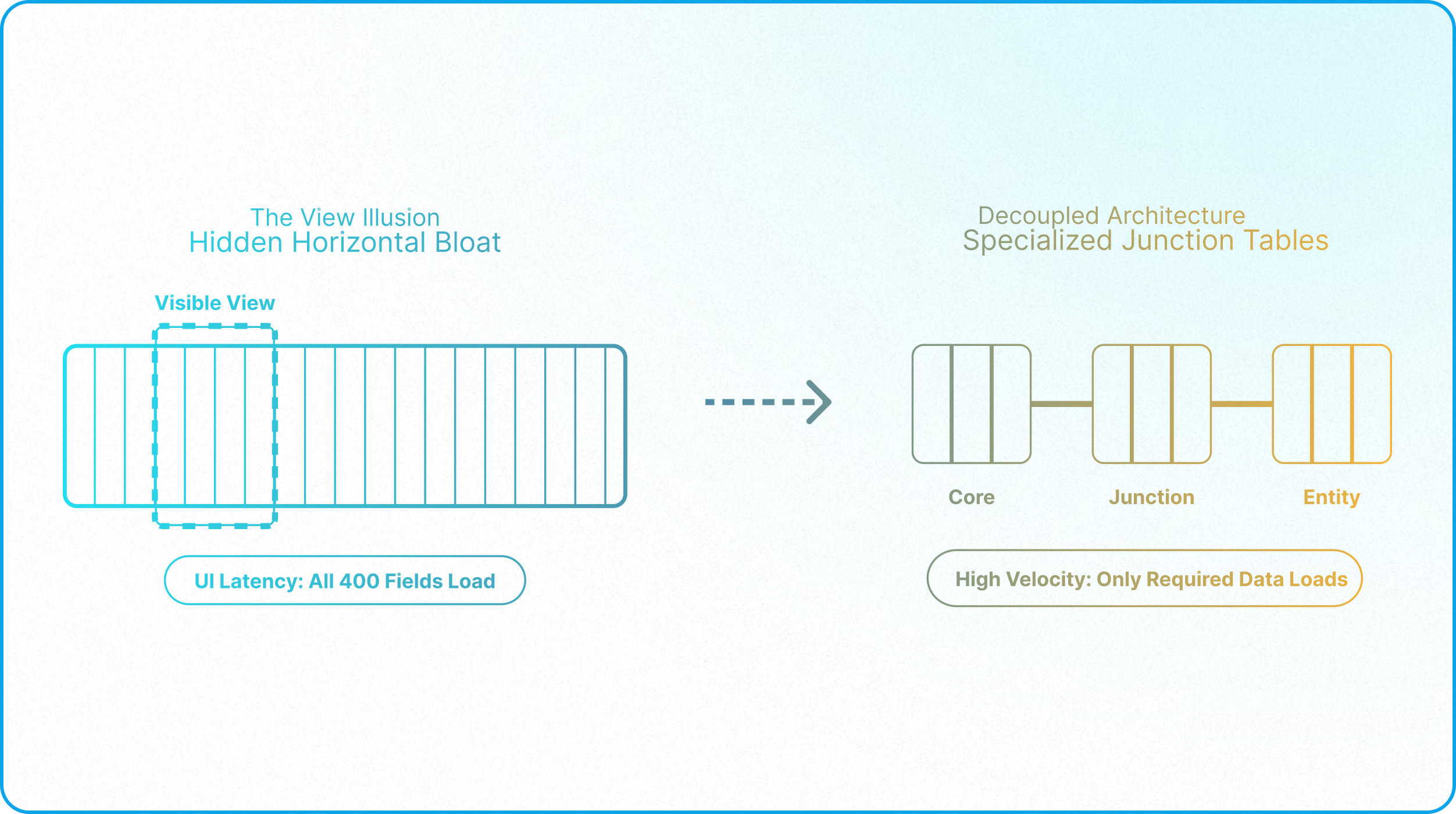
You end up with a single "Projects" table burdened by 400+ fields. To manage the visual chaos, the builder creates dozens of Filtered Views, hiding 380 fields so the Marketing team only sees the 20 columns relevant to them.
This creates a dangerous illusion of simplicity. An Airtable View is a cosmetic UI layer; it is not a structural boundary. Even if a field is hidden from the user's screen, the Airtable execution engine is still constantly loading, tracking, and holding that field in memory in the background. If 100 users are simultaneously working in different views of a 400-field table, the browser-side memory requirements skyrocket, resulting in catastrophic UI latency. You are paying the computational tax for every field, everywhere, all at once.
2. The Weight of Recursive Computation
Horizontal bloat is deadly, but it becomes fatal when combined with recursive calculation chains.
In a standard spreadsheet, formulas are relatively flat. In a relational database, builders rely on Lookups and Rollups to pull data across tables. When deployed without governance, citizen developers create massive, fragile dependency trees:
- Table A rolls up a value from Table B.
- Table B is looking up that value from a formula in Table C.
- Table C's formula is calculated based on a Synced Table from an external Base.
This is a Recursive Lookup Chain. The danger is not performance degradation, since these chains execute quickly; the danger is structural fragility: if someone on the source table deletes a record being looked up, changes the name of a select field option referenced by a downstream formula, or alters the linked relationship itself, your dependent formulas silently return empty values or incorrect results. The data structure changes propagate downstream without breaking the formula syntax, leaving your reporting layer operating on incomplete or stale data with no visibility into what shifted upstream.
3. Disentangling "Execution" from "Storage"
To survive the Complexity Threshold, enterprise architects enforce a strict separation between data storage and data computation.
If you have a core "Clients" table, it should act purely as a high-velocity storage database. It should contain raw entities and strict relationships (as defined in Architecting a Unified Core Schema).
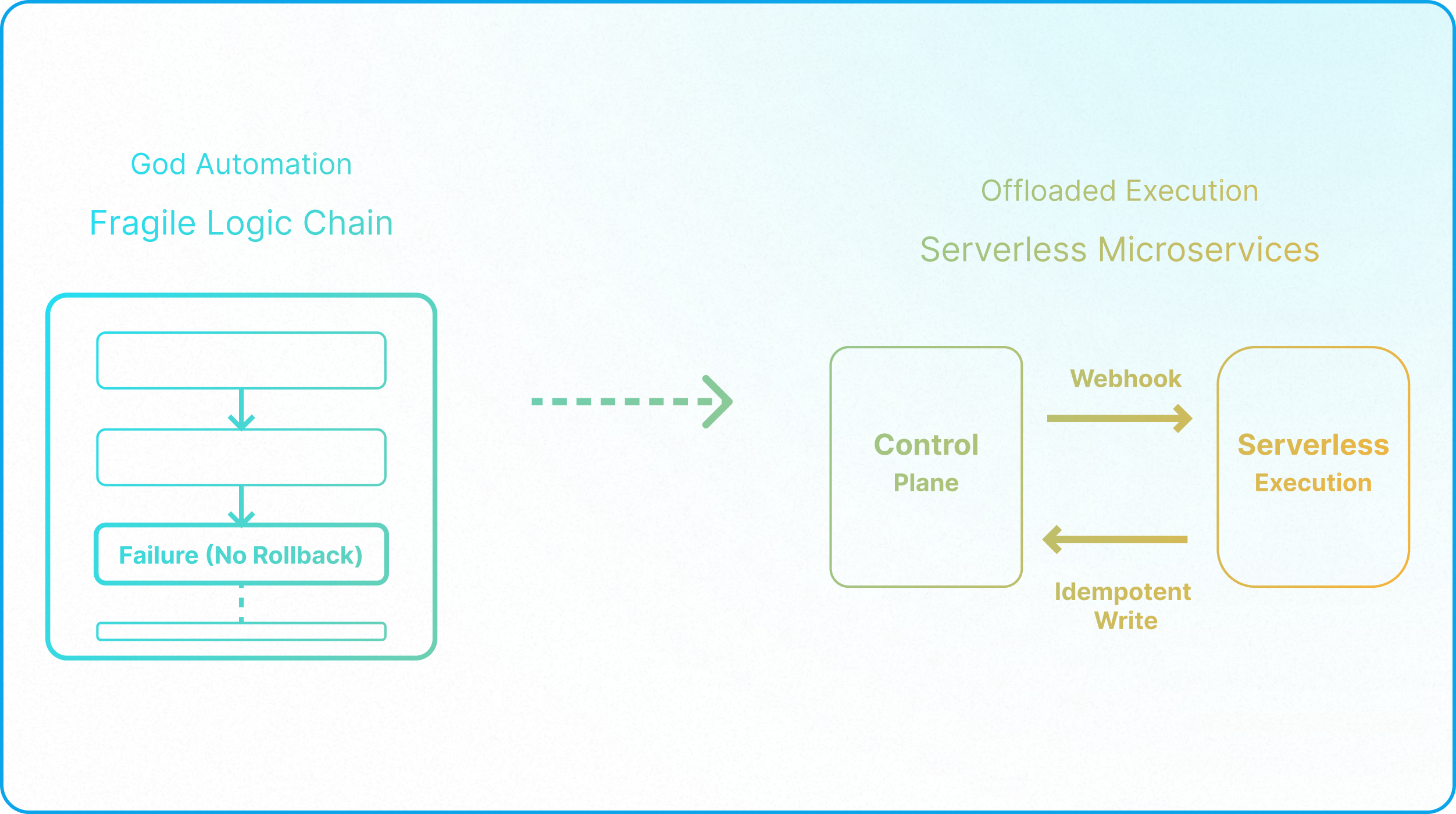
Application managers often attempt to solve computational drag by systematically stripping recursive formulas and massive lookup chains out of primary storage tables. The common instinct is to offload these heavy calculations to automation scripts and write the results back to the database as static text. While this method reduces continuous background processing, converting native formulas into scripted calculations introduces severe architectural liabilities and should never be a default strategy.
First, offloading native logic creates immediate automation bloat. Just as a native lookup field should always replace an automation designed to paste data between tables, a native rollup should always take precedence over a scripted calculation. Shifting core logic away from the database layer introduces unnecessary points of failure.
Second, Airtable operates on a fundamentally different architecture than traditional databases like Xano or Supabase: traditional systems separate their data and computation layers, forcing reliance on external scripts to calculate values. Airtable’s primary advantage is that its computation and data layers are natively unified, meaning that formulas and rollups execute instantly within the interface.
When builders attempt to treat Airtable like a legacy database by offloading core math to asynchronous automations, they introduce an artificial delay. Automations are designed to move data silently behind the scenes; they are not built to provide instant visual updates to a user interacting with the database. That structural delay creates immediate friction on the frontline.
Consider a standard financial workflow: when an operator records a client payment, they rely on the remaining balance updating immediately to confirm their entry. If that calculation is tied to an automation, the user is forced to pause and wait for a background script to finish executing before they can verify their work. Stripping native formulas in favor of these delayed scripts breaks the seamless interactivity that makes the platform so effective.
Most importantly, scripted calculations compromise your governance layer. Native formula and rollup fields are structurally immutable. The system generates the value and prevents manual edits. If an automation writes that same calculation into a standard text or number field, you have abandoned that protection. Any user with base level access can accidentally overwrite the exact figure your system just spent resources calculating.
The correct architectural approach requires selective offloading. You must only transition logic to episodic automation scripts when the resulting delay is irrelevant to the operator and when strict field-level permissions secure the destination field. For operations requiring immediate visibility and absolute data protection, native formulas must remain in place. We detail exactly how to define these operational boundaries and manage background triggers safely in Architecting a Zero-Maintenance Environment.
The Architectural Diagnostic
If you suspect your system is suffering from Architectural Complexity rather than record bloat, run your schema through this two-point audit:
- The 'Three-Second' Test: Open your most active Interface. Manually change a status dropdown on a core record. If the UI hesitates more than a second or two before revealing the next conditional field, your database is suffering from automation bloat or overly complex scripting. The system stalls while a background script executes.
- The Field-to-Entity Ratio: Open the field manager on your primary table. If you have more than 100 fields, you have likely conflated multiple business entities into a single table. You must structurally decouple your workflows into specialized junction tables to halt the horizontal bloat.
The Execution Mandate
You cannot out-scale a bloated schema. Upgrading your license tier will not fix a dependency tree that is structurally compromised.
Your immediate mandate is a Computation Audit. You must identify every recursive formula and strip out excessive lookup chains. While native formulas and rollups are always your primary tools, certain operations inevitably require a transition to automation scripts. When this happens, you must choose the correct architectural trigger for the job.
Typically, calculations should only be moved to scripts under two specific conditions:
- Scheduled Background Tasks (Episodic Scripts): Use these for advanced, non-time-sensitive calculations that native formulas simply cannot process. Because they run on a chronological timer rather than a direct operational trigger, they must be scheduled infrequently—typically once a day, or at most once an hour. This ensures the heavy calculation happens in the background without burning through your workspace's monthly automation limits.
- Instant-Triggered Automations (Event-Driven): Use these when a calculated value must also remain manually editable by an operator. A native formula field permanently locks the cell from user input. For example, an invoice total is usually rolled up from line items. However, if a sales rep occasionally needs the ability to manually overwrite that total to apply a custom discount, a native rollup won't work. Instead, you use an instant-triggered automation to calculate the baseline total whenever a line item changes, while keeping the destination field open for manual human overrides.
If your database failed the diagnostic, your next step is not a software upgrade; it is a structural overhaul. You must fundamentally transition from a collection of isolated, bloated trackers to a governed, decoupled architecture.
Read the Next Guide: Architecting a Unified Core Schema
Learn how to decouple your raw data from your workflows and build a central, high-velocity "Service Layer" that prevents horizontal bloat from ever returning.