
 ·
9 minute read
·
9 minute read
When an enterprise scales, the very flexibility that drove Airtable's initial adoption becomes its greatest threat. In the early phases of growth, any manager can spin up a base, invite collaborators, connect standard Zapier triggers, and build a localized workflow. It feels like speed. It feels like empowerment.
But without systematic boundaries, it is also where architectural sprawl quietly takes root.
Without strict boundaries, a department-level project tool silently escalates into critical operational infrastructure. The signs of this tipping point are predictable: automations fail silently, duplicate tables of client records drift out of sync, and teams build workarounds because they no longer trust the shared data.
Regaining control is not a matter of adjusting user permissions or restructuring a few views. It is a fundamental shift in discipline. IT and operations leaders must move past simple workspace configuration and establish a robust model of Airtable governance, architectural control, compliance, and auditing across the ecosystem.
This guide outlines the operational framework to audit existing sprawl, dismantle Shadow IT, and establish a Center of Excellence (COE) that treats Airtable as a governed, enterprise-grade database. It builds on the core relational principles developed in the Enterprise Airtable Architecture Foundations and the architectural foundations of Enterprise Airtable Systems_ How to Build a Resilient, Enterprise-Grade Machine.
Workspace Configuration vs. True Airtable Governance
Most organizations attempt to solve Airtable sprawl by adjusting user permission levels. They assign native roles (Creator, Editor, Commenter) based on corporate hierarchy, assuming this restricts risk.
This is a category error. Workspace configuration is not true Airtable governance, nor does it reflect best operational management practices.
- Workspace Configuration is about who has access to the tool. It relies on Airtable's native permission levels, which are coarse-grained. An operator granted "Editor" access to update tasks in a base inherits raw backend access to modify records across every table in that base, including restricted financial and customer data.
- True Airtable Governance is about how data is modified and where authority resides. It is the discipline of protecting schema integrity, enforcing data contracts, mapping explicit write-paths, and separating the presentation layer from the database engine.
To understand how this differs from traditional database systems, refer to Traditional Database Architecture in Airtable.
Restricting Access at the Enterprise Level
To establish true governance, IT teams must disable native, ad-hoc permission changes. Through the Airtable Enterprise Admin Panel, administrators must enforce three key policy restrictions:
- Block Base and Workspace Creation: Restrict base-creation privileges exclusively to enterprise administrators. This stops standard users from spinning up unmonitored bases that immediately accumulate architectural debt.
- SAML SSO Group Mapping: Automate workspace provisioning using Identity Provider (IdP) groups (e.g., Okta, Entra ID) mapped via SCIM. Users are automatically provisioned with the lowest required permission level (usually Read-Only or Commenter) based on their active directory group, eliminating manual-based sharing via email.
- Configure Sharing & Data and Workspace Restrictions:
- Restrict Collaborator Invites (Admin Panel): Under Settings > Sharing & data, restrict collaborator invitations to your organization's verified email domains, or enforce a strict email domain allowlist for approved external partners. For Enterprise Hub accounts, restrict invites exclusively to designated Org Unit Members.
- Enforce Workspace-Level Sharing Restrictions (Workspace Settings): Because organization-wide domain restrictions still allow internal Creators to invite users directly, toggle on "Restrict adding new collaborators to this workspace, its bases, and its interfaces" for every workspace in the organization. This limits invitation capabilities solely to Workspace Owners (Admins/COE members), blocking default Creator invitation rights (note that Editors and below are already restricted from inviting by platform default). All access additions must flow through an approved IT service catalog ticket.
Enforcing Interface Validation Gates
By locking backend bases, standard users cannot access the spreadsheet-like grid view. Instead, they interact with Airtable Interfaces, which act as validation shields.
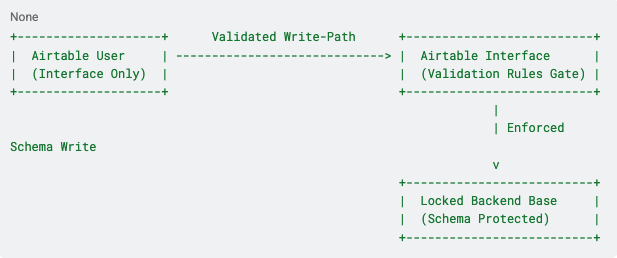
Interfaces allow you to enforce strict validation rules before a record mutation reaches the database schema:
- Field Requirements & Formats: Force users to complete mandatory fields, enforce character minimums/maximums, and apply regex validation to text blocks (e.g., matching a strict purchase order format PO-YYYY-NNNN).
- Conditional Logic Gates: Show or hide fields dynamically based on previous selections, ensuring users only input data relevant to the specific transaction.
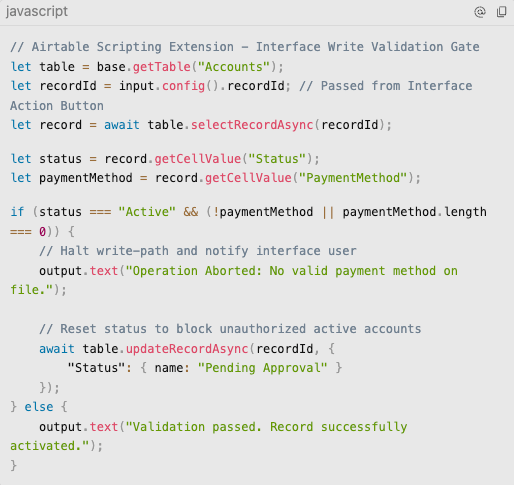
- Write Validation Scripts: For complex business logic, route updates through an Interface Action Button that triggers an automation script. For example, if a Sales Rep changes an account status to "Active," the script queries the billing table to verify a valid payment method exists. If absent, the script halts the write and returns a visible error message to the interface user: Operation Aborted: No valid payment method on file.
Dismantling Shadow IT
Shadow IT in Airtable spreads because building a new base is easier than navigating a formal IT approval queue. When a marketing team finds the corporate CRM too rigid, they clone the client base and add their own tracking fields. When operations needs a custom billing pipeline, they set up a separate base and stitch it together with Zapier.
This ad-hoc cloning creates immediate data fragmentation, semantic drift, and increases the threat of data exfiltration when unvetted integrations backup PII to personal workspaces.
Eliminating Shadow IT requires a two-part strategy: auditing the current sprawl and providing a governed, high-velocity alternative.
The Enterprise Admin API Sprawl Audit
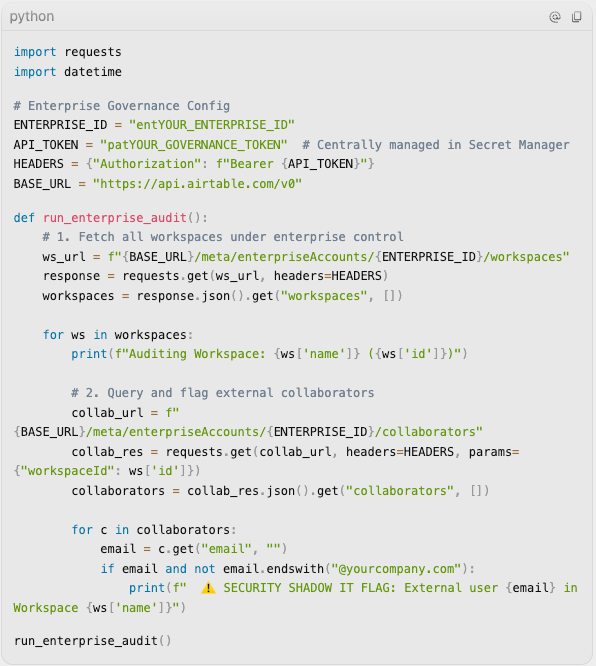
Rather than hunting for sprawl manually, IT administrators can programmatically inventory the ecosystem using the Airtable Enterprise Admin API. A daily Python script should be scheduled to perform the following checks:
- Retrieve Workspaces and Bases: Query the enterprise account metadata endpoints to inventory active workspaces, and then query the Metadata API workspace endpoints (such as GET /v0/meta/enterpriseAccounts/{enterpriseAccountId}/workspaces) to build and maintain a comprehensive inventory of all active workspaces, bases, and user groups.
- Flag External Collaborators: Query base-level collaborators or share metadata to audit access permissions. Any collaborator invited with an email domain outside the corporate domain, or any base shared with domain restrictions disabled, must be flagged for manual review or automated teardown.
- Identify Orphaned Bases (via Audit Logs): Because Airtable's metadata endpoints do not return a "last activity" timestamp for bases or workspaces, query the Airtable Audit Log Events API (GET /v0/meta/enterpriseAccounts/{enterpriseAccountId}/auditLogEvents). By searching for user-initiated events (such as logging in, opening a base, or viewing an interface page) associated with each base ID over the past 90 days, the script can infer base activity and flag bases with zero active events for archiving.
- Monitor Integrations and OAuth Activity: While Airtable does not expose user API keys or active tokens via API, administrators can monitor integration footprints by parsing OAuth grant events and API request actors in the Audit Logs. To restrict unauthorized connections, administrators must use the Enterprise Admin Panel settings to enforce global integration blocks (e.g., blocking personal access tokens and white-listing authorized enterprise OAuth clients like Make or Zapier).
The Hub-and-Spoke Replication Topology
You cannot eliminate Shadow IT by simply denying access; you must replace it with a superior architecture. Instead of allowing departments to clone bases and duplicate data, route them into a Hub-and-Spoke replication topology, aligning with the Unified Core Schema.
Core master entities (Clients, Inventory, Contracts) reside in an authoritative Source Base (the Hub). Downstream departments subscribe to this master data via synced, read-only tables in their Destination Bases (the Spokes), decoupling the systems in a microservices pattern as outlined in Building a Microservices Architecture in Airtable.
To edit master data from a spoke, direct writes are blocked. Instead, spokes use a structured Interface Action:
- The operator clicks "Request Account Update" in their local Spoke base interface.
- This writes a record to a [Pending_Updates] table in the Hub base (accessible via a restricted, write-only webhook or sync setup).
- An automation script in the Hub validates the incoming payload against the master data dictionary.
- Upon verification, the Hub applies the change to the master record. The synced tables automatically propagate the clean update back to all Spokes on the next sync cycle.
To ensure data integrity is maintained during these replication cycles, see Single Source of Truth Architecture and Parent-Child Implementation Guide.
The Center of Excellence (COE)
To maintain control after dismantling sprawl, the organization must establish a formal Center of Excellence (COE). The COE is the governing body that sits between business requirements and the database architecture; it shifts the IT department from an "order-taker" that blindly adds fields on request to a "policy-maker" that protects the platform's stability.
The Central Sync Registry Base
The COE's primary governing instrument is a master Sync Registry Base. This base contains four primary tables designed to map the entire data lineage of the enterprise:
- [Bases]: Tracks metadata for all bases (Base ID, Name, Workspace, Technical Owner, Business Owner, Compliance Tier).
- [Sync Connections]: Maps the movement of data between bases (Connection Name/ID, Source Base ID, Source View Name, Destination Base ID, Destination Table Name, and Synced Fields). Since Airtable Sync executes automatically in near real-time, no schedule or execution status is tracked; instead, this record acts as the definitive structural contract documenting the dependency.
- [Mapped Fields]: Maps critical fields back to a master data dictionary (Field API Name, Base ID, Table ID, Field Type, Validation Rules, Source Field, Synced Targets).
- [API Integrations]: Tracks external systems reading/writing to the bases (Integration Name, Client ID/Service Account, Integration Tool, Authorized Scopes, and Developer Email). Since credential parameters and request volumes are not exposed via standard APIs, this table is operationally maintained as a registration ledger whenever a new API key, OAuth connection, or webhook is deployed.
COE Change-Management Protocols
Before a parent table schema in the Hub base can be modified, the COE must conduct an impact analysis. A checklist must verify:
- Downstream Dependencies: Identify all destination Spokes subscribing to the table.
- Logic & Automation Check: Scan all active scripts, formulas, and automations in both the Hub and Spokes. If a schema change modifies a field's name, ID, or underlying data type (e.g., text to single-select), any logic referencing or processing that field must be audited to prevent runtime execution failures, type mismatch errors, or broken automation runs.
- Data Contract Validation: Verify that changing a field type (e.g., text to single-select) does not break external REST API configurations.
This change-management protocol is detailed in Why Airtable Sync is a Structural Bridge, Not a Convenience. To maintain a clean database structure free of redundant elements, the COE enforces the MVA guidelines outlined in The Principle of Minimum Viable Architecture (MVA) in Airtable and the normalization guidelines in Database Normalization.
To execute these checks and changes safely without risking live system downtime or data corruption, the COE coordinates them through a structured environment staging pipeline.
Environment Isolation: Sandbox vs. Production
Rather than permitting live modifications on active operational bases, the COE enforces a strict separation of environments. All testing of schema structures, new automation scripts, and interface configurations is conducted in a designated Sandbox Base (a copy of the production base containing obfuscated test data).
Once changes are validated in the Sandbox, a COE administrator mirrors the schema additions in the Production Base. This migration can be audited and managed using the Airtable Metadata API to ensure schema parity without interrupting daily business operations.
Airtable Compliance: Data Lineage and Audit Trails
For enterprises in regulated sectors (such as healthcare, finance, or retail supply chain), compliance is not a reporting task; it is a structural requirement. An auditor must be able to trace where a data point originated, who modified it, and where it has been synced.
Establishing compliance in Airtable requires building three structural components within the platform's architectural boundaries:
-
Data Lineage Mapping
Data lineage tracking ensures that every core field's path is documented. Using the COE's central Sync Registry base (described above), a database administrator can map out the flow of data across the workspace ecosystem. For example, if the Invoice Value field originates in the Finance base, is synced to the Enterprise Accounts base, and is subsequently referenced via lookup in the Marketing base, this sync dependency path is registered. If the Finance team plans to alter the field's data type, the lineage map tells the COE exactly which downstream databases will be impacted before any changes are committed.
-
Record & Base History
To maintain an audit trail for compliance, organizations must track user actions, schema modifications, and data mutations. Rather than building external ingestion layers, compliance teams should leverage Airtable's native auditing infrastructure:
- Enterprise Activity Log API: For admin-level compliance, enterprise administrators can query the Enterprise Activity API. This native log records administrative events (base creations, sharing link generation, collaborator additions, SSO logins, and workspace permission changes).
- Record & Field History: Airtable maintains native record revision histories, showing exactly which user made a change, what the previous value was, and when it occurred. Note: Cell-level history only captures mutations to record values; it does not track base configuration modifications, field creations/deletions, or structural schema changes. To review or revert schema-level changes, administrators must utilize Base History (Snapshots) or check enterprise-level activity/audit logs.
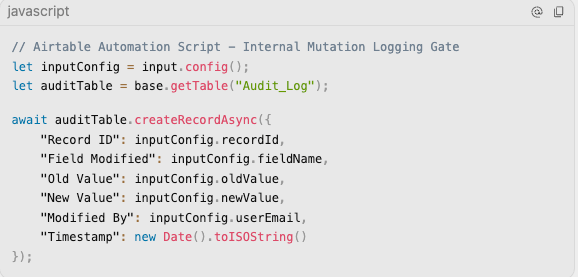
- Internal Audit Tables: For highly sensitive tables (e.g., financial ledger entries or employee records), the COE can implement an internal audit ledger using native Airtable Automations. When a critical record is modified, a trigger copies the previous values, user ID, and timestamp into a locked [Audit_Log] table within the same base.
3. Data Lifecycle Management (Active vs. Archive Bases)
Holding years of historical, closed records in your primary operational bases degrades formula performance, slows down interfaces, and violates data retention policies.
To protect system speed and security, you must enforce a Data Lifecycle Architecture that separates active production records from historical archives, as detailed in the The InAir Guide to Airtable Data Tiering Architecture.
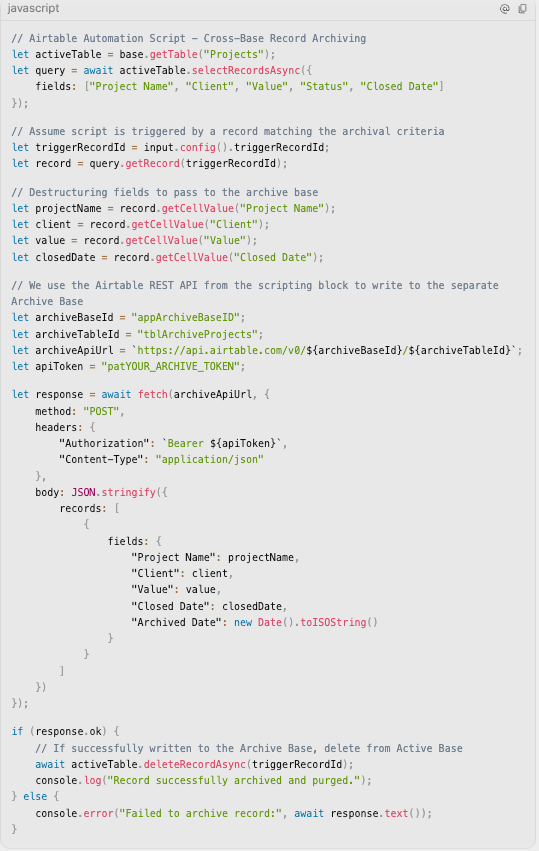
- Active Bases: Active, open records (current projects, pending invoices, active tasks) live in your daily operational bases. Archive Bases: Closed or historical records are systematically transferred to a dedicated long-term Archive Base. This archival process is fully automated using Airtable’s native automation suite:
- Archiving Trigger: A nightly scheduled automation runs in the Active Base, identifying records where Status = 'Closed' and the Closed Date is older than 90 days.
- Archive Base Replication: A native automation script or a cross-base sync action copies the closed records into a corresponding table in the dedicated Archive Base.
- Active Base Purge: Once the record is successfully written to the Archive Base, a follow-up automation action deletes the record from the active operational table, instantly freeing up record limits and restoring calculation speed.
Moving Beyond Configuration
Regaining control of a sprawling Airtable ecosystem requires moving from convenience to authority. If you allow teams to build without structural boundaries, you are simply automating the accumulation of technical debt.
The Center of Excellence, the Hub-and-Spoke sync topology, and Interface abstraction layers are the mechanisms that make scale possible. They ensure that departments retain their operational agility on the front end, while the core database remains secure and stable on the back end.
If your enterprise Airtable deployment has outgrown its current configuration and is showing signs of structural strain, schedule a Discovery Call with InAir. We audit sprawling environments, establish Centers of Excellence, and architect the secure data infrastructures that IT and operations leaders can scale with confidence.