 ·
4 minute read
·
4 minute read
When operators click an action button in an Airtable Interface, they expect immediate feedback. However, if that button triggers a complex backend process—like generating a 50-page PDF, syncing hundreds of records with Salesforce, or running a heavy pricing algorithm, the action button often locks up. The operator is forced to stare at a spinning loading wheel for ten, twenty, or sometimes thirty seconds, wondering if the system crashed.
This is the hallmark of a Synchronous API Call anti-pattern.
This article breaks down why forcing operators to wait for synchronous API calls destroys the user experience and invites human error—and how to fix it structurally with Asynchronous Task Queuing and the "202 Accepted" handshake protocol, one of the core patterns in building scalable, secure enterprise Airtable systems.
1. The UX Freezing Anti-Pattern
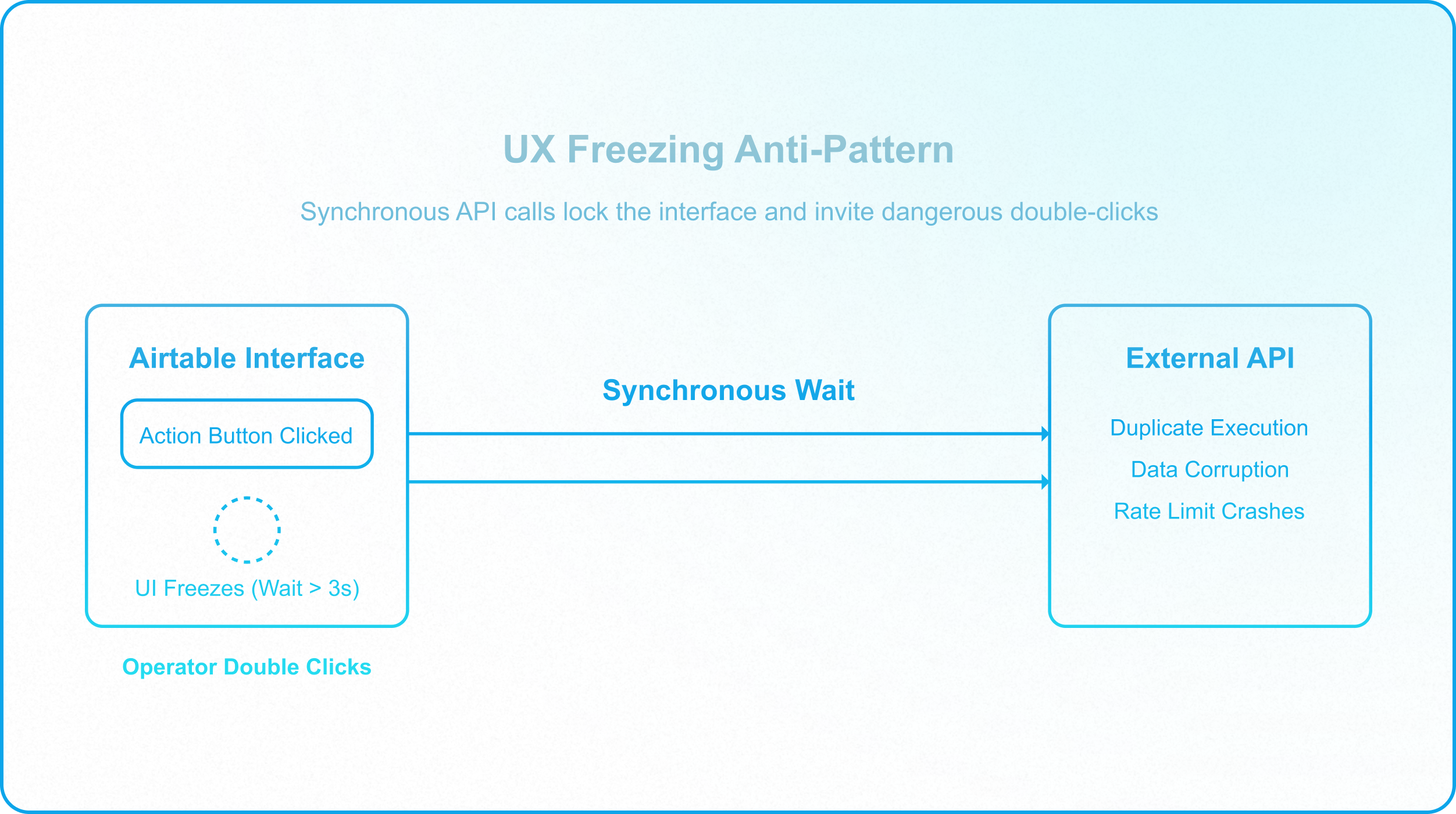
In a synchronous transaction, the action button stays locked in a spinning-wheel state, holding an open HTTP connection with the database (the Data layer) and the external API (the Integration layer) until the entire process finishes. The rest of the interface keeps working, the operator can navigate elsewhere, but that specific action is blocked. If the external API is slow, or if the automation is processing 500 linked records, the operator can be left staring at the spinner for twenty or thirty seconds. That sounds minor, but an operator who has to generate five or six contracts in a row, waiting out the spinner each time, will find it genuinely frustrating.
While Airtable's UI tries to handle this gracefully, the psychological impact on the operator is severe.
The Danger of the "Double Click"
An action button does not have this problem: while it is processing, it locks into a spinning-wheel state, so the operator physically cannot click it again. The real risk appears when the trigger is a field rather than an action button — for example, a checkbox called "Generate Contract" wired to a "when record matches conditions" (or "when record updated") automation.
Because a checkbox does not freeze or show a spinner the way an action button does, the operator gets no feedback that anything is happening. When the wait drags on, human psychology takes over: they assume the click didn't register, so they uncheck and re-check the box to try again. If your backend lacks strict idempotency controls or a "Processing" status lock (as discussed in Cluster 6.2.1), each re-check fires another webhook. This leads to:
- Duplicate Execution: Generating five identical PDF invoices instead of one.
- Corrupt Integrations: Creating duplicate client profiles in your CRM.
This is not just annoying; it is a direct, structural catalyst for database corruption and operator anxiety.
2. Decoupling UI from Compute
The solution is to physically separate the user's action from the heavy computation. Instead of forcing Airtable to wait for a 10-second external process to finish before releasing the UI, the system should instantly acknowledge the request, release the action button, and do the heavy lifting invisibly in the background.
This is achieved via Asynchronous Task Queuing, primarily utilizing a standard HTTP 202 Accepted handshake.
The 202 Accepted Handshake
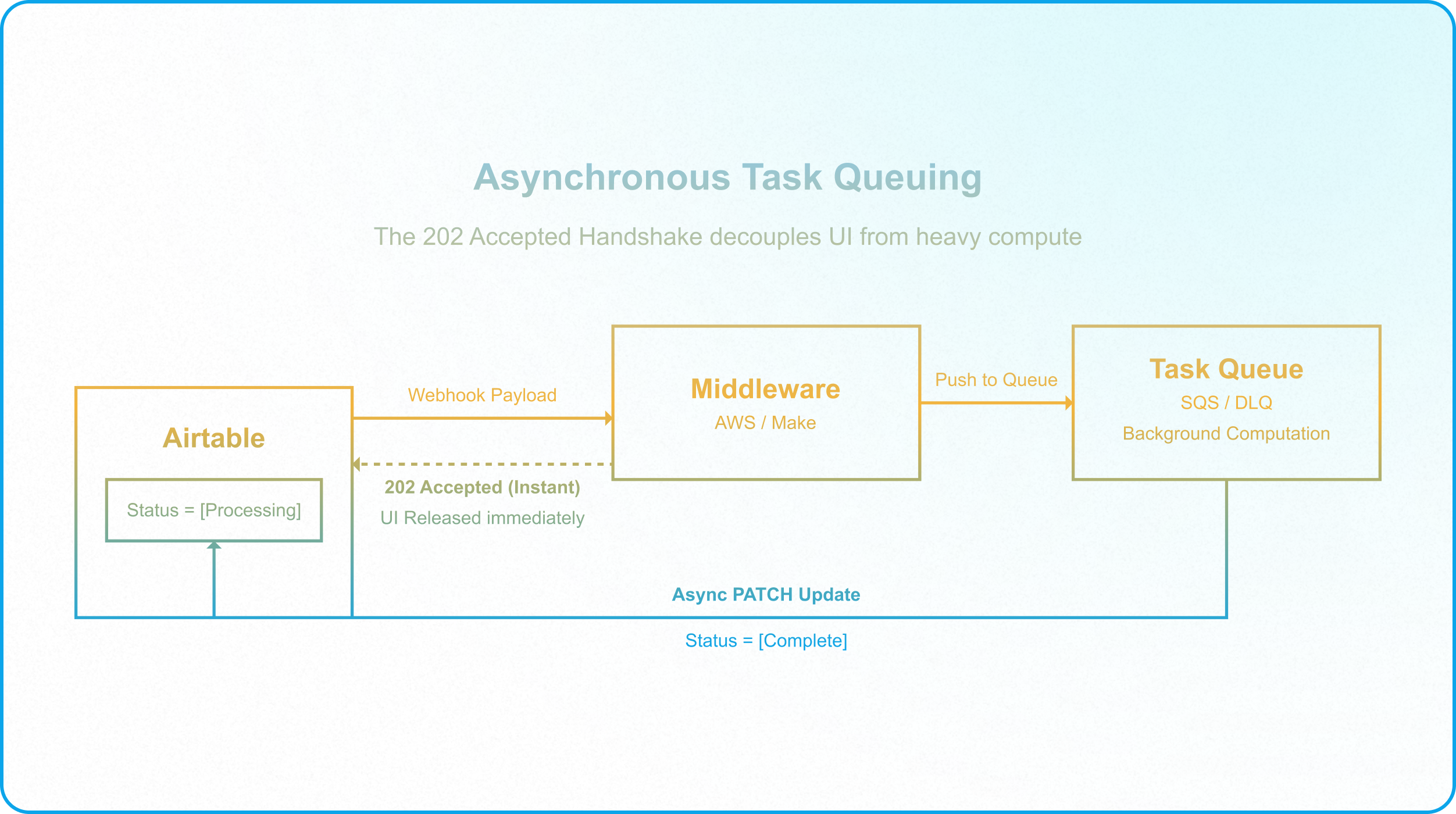
When Airtable fires a webhook to an external middleware (like AWS API Gateway or Make.com), that middleware should not process the data immediately. Instead, it should immediately return an HTTP status code 202 Accepted.
This code tells Airtable: "I received the data safely. I'm still processing it, but I'm also ready for the next task." Airtable instantly closes the connection in milliseconds, the loading spinner vanishes, and the action button is open again to trigger other tasks.
3. The Asynchronous Pipeline in Action
The precise flow of a decoupled enterprise transaction operates as follows:
- Action Initiation (Presentation Layer): An operator clicks a button in an Airtable Interface (e.g., "Generate Contract").
- State Acknowledgment (Data Layer): The system instantly updates a status field to [Processing]. Because of Status-Based Record Locking, the client's record becomes 'locked' from further actions by this action button. This physically prevents the dangerous "double click."
- Payload Offloading (Integration Layer): An Airtable automation packages a lean webhook payload and fires it to the middleware dispatcher.
- Immediate Release (The Handshake): The middleware instantly responds to Airtable with a 200 OK or 202 Accepted status. It does not wait for the PDF to be generated. Airtable closes the connection. The button becomes actionable again so the operator can continue generating contracts for other clients.
- Asynchronous Task Queuing (Compute Layer): The middleware pushes the payload into an execution queue (like AWS SQS or a Make.com serialized queue). The heavy computation happens entirely in the background, absorbing all external latency and API throttling penalties safely away from Airtable's native rate limits.
- State Resolution (Data Layer): Minutes (or even hours) later, once the computation finishes, the middleware securely writes the final computed state or the generated PDF URL back into the raw Airtable database via a targeted PATCH request. The status field updates to [Complete], instantly reflecting on the operator's UI via Airtable's real-time sync.
By intentionally forcing all heavy computation out of the Airtable ecosystem and into an asynchronous middleware layer, systems managers permanently protect the operator's experience while bulletproofing the database against timeout failures.
4. The Asynchronous Architecture Diagnostic
Is your Airtable interface dangerously coupled to your compute layer? Run this diagnostic on your environment:
- The Loading Spinner Test: When an operator triggers your heaviest automation or script, does the Airtable action button lock them out with a spinner for more than 3 seconds? If yes, your compute is dangerously synchronous.
- The "Processing" State Check: Does your database schema include a distinct [Processing], [In Transit], or [Calculating] status for records undergoing external manipulation? If no, operators have no visual feedback that work is happening in the background, leading to confusion and duplicate requests.
- The Queue Visibility Test: When your external API calls fail during a background process, do they vanish silently into the ether, or do they sit safely in a Dead Letter Queue (DLQ) in AWS/Make waiting for an administrator to click retry?
Decoupling your UI from compute is the difference between an application that feels like a sluggish, fragile spreadsheet and one that feels like native, enterprise-grade software. Operators should never have to wait for the server.